Client Portal vs Legal Practice-Management Software: Why Law Firms May Need Both
A law firm can have excellent practice-management software and still deliver a fragmented client experience.
The matter may be perfectly organised internally, but clients are still emailing documents to individual lawyers, asking repeatedly for updates, losing track of outstanding requests and searching through old messages for the latest draft. Staff then spend time chasing files, resending information and translating the firm’s internal records into updates the client can understand.
That is not necessarily a failure of the practice-management system. Matter management, billing, time recording and internal legal workflows are what that system was primarily purchased to handle.
The unresolved problem is client collaboration.
A dedicated legal client portal gives the firm a controlled, branded environment for collecting documents, sharing updates, assigning client actions and coordinating ongoing work. It does not replace practice-management software. It solves the client-facing problem that internal operational software may leave behind.
The simplest distinction is:
Legal practice-management software runs the firm internally. A client portal helps the firm work with the client.
For many law firms, the right technology decision is therefore not one system or the other. It is deciding which role each system should play.
The client-facing gap practice-management software may not solve
Practice-management software can tell the firm:
Who is responsible for the matter
Which internal deadlines are approaching
How much time has been recorded
Which invoices have been issued
What activity has taken place
Which internal tasks remain open
But it does not necessarily give the client an effective way to:
See what is expected from them
Upload requested documents
Identify the latest draft
Follow shared deadlines
Approve documents
Communicate with the correct people
Access information without contacting the firm
Collaborate with lawyers and authorised third parties
Experience the service through the law firm’s own brand
This gap often remains hidden because the firm’s internal system is working.
Lawyers and administrators can see the matter clearly, so they assume the client can too. In reality, the client may see only disconnected emails, attachments, invoices and occasional status updates.
That difference matters because clients increasingly expect convenient, transparent and responsive service. The Law Society has identified secure client portals and mobile access as technologies that can help firms create stronger, more responsive client relationships.
A firm may therefore have solved internal matter administration without solving the client’s experience of the matter.
The business cost of fragmented client collaboration
The case for a dedicated portal is not primarily about adding more software. It is about reducing the cost and risk of work that currently happens through email, calls and manual administration.
Repeated requests for updates
When clients cannot see what is happening, they contact the firm.
Typical questions include:
Have you received my documents?
What do you still need from me?
Which version should I review?
Has the other director uploaded their paperwork?
When is the next deadline?
Who is dealing with this?
Has the document been approved?
Can you resend the attachment?
Each question may take only a few minutes to answer, but the cumulative interruption can be significant.
The cost is not limited to the time spent writing a reply. Someone may first need to open the practice-management system, check the file repository, speak to another member of the team and reconstruct the status before responding.
A portal cannot remove every client question, but it can give clients self-service access to documents, actions, messages and dates that would otherwise require an employee to locate and resend information.
Manual document chasing
Document-heavy matters often involve a recurring cycle:
The firm asks for several documents.
The client sends some of them by email.
A lawyer or administrator downloads and files the attachments.
The firm identifies what is missing.
Another reminder is sent.
The client resends a document under a different name.
Someone checks whether it is a duplicate or a new version.
The process continues until the request is complete.
A structured file request changes this process. The client can see what is required, upload each item to the correct location and return later to complete outstanding requests.
The value is not merely convenience. It reduces the need to turn an unstructured inbox conversation into an organised matter record.
Version confusion
Email makes it easy to create several uncontrolled copies of the same document.
The lawyer may have one draft, the client may be reviewing another and an external adviser may have downloaded an earlier version. The resulting confusion can create:
Unnecessary review work
Comments on outdated drafts
Repeated explanations
Approval of the wrong version
Difficulty reconstructing the history of a decision
A persistent workspace with version control keeps related drafts together and makes the current document easier to identify.
Work scattered across several systems
A firm may use:
Practice-management software
Microsoft 365 or Google Workspace
Email
A cloud-storage platform
Electronic signatures
Messaging applications
Spreadsheets
One-off transfer links
Each tool may be useful, but the client-facing workflow becomes fragmented when documents, conversations, requests, approvals and deadlines are spread across them.
A dedicated portal gives the firm a place to bring the client-facing parts of that workflow together without replacing the internal systems.
Client-service inconsistency
Without a standard portal, different lawyers may deliver the service differently.
One lawyer uses email attachments. Another creates a shared drive. A third sends transfer links. Some clients receive regular written updates, while others must ask.
That inconsistency makes the experience difficult to manage, train and improve.
A common client workspace allows the firm to standardise how it:
Welcomes clients
Requests documents
Shares drafts
Communicates progress
Assigns client actions
Handles approvals
Closes access after the matter
What legal practice-management software is designed to do
Legal practice-management software is the firm’s internal operational system.
Depending on the product, it may support:
Matter and case management
Contact management
Time recording
Billing and invoicing
Trust accounting
Internal calendars
Court dates
Conflict checks
Intake
Staff assignments
Internal workflows
Reporting
Document organisation
Email and activity records
These capabilities are fundamental. A dedicated client portal does not replace them.
Practice-management software should normally remain the system of record for:
Matter details
Responsible lawyers
Internal legal work
Time entries
Billing
Accounting
Internal deadlines
Compliance records
Operational reporting
The purpose of adding a dedicated client portal is not to duplicate those functions. It is to create a better environment at the boundary between the firm and the client.
What a dedicated legal client portal is designed to do
A client portal is a secure online workspace for collaboration between the firm, its clients and other authorised participants.
Depending on the platform, it may support:
Secure document exchange
Client uploads
Structured file requests
Folder and workspace permissions
Document versions
Document approvals
Messages and discussions
Client-facing tasks
Shared calendars
Notifications
Electronic signatures
White-label branding
Custom domains
Mobile access
Controlled access for third parties
The client portal should normally serve as the client-facing environment for:
Documents the client needs to provide
Documents the client needs to review
Shared messages
Client responsibilities
Approvals
Shared dates
External participants
Ongoing collaboration
This leads to a useful distinction:Practice-management software helps the firm manage the matter. A dedicated client portal helps the firm deliver the matter to the client.A login is not the same as a collaborative workspaceMany legal practice-management products include some form of built-in client portal.These portals can be useful. They may allow clients to:
View invoices
Pay bills
Read secure messages
Access appointments
See basic matter information
Download documents
Complete intake form
For straightforward client relationships, that may be enough.However, there is an important difference between giving a client somewhere to log in and giving the firm somewhere to work with the client.
A basic portal gives the client access. A dedicated client portal provides an environment for ongoing collaboration.
A built-in portal may become limiting when the firm needs:
Structured document-collection workflows
Multiple document versions
Client approvals
Shared tasks
Shared calendars
Flexible access for several external participants
Distinct workspaces for departments or client organisations
Stronger white-label branding
A custom client-facing domain
More control over the client experience
Collaboration that continues beyond an individual invoice or matter update
This does not mean the built-in portal is poorly designed. It means it was created as a supporting feature of a broader internal legal platform rather than as the firm’s main digital client environment.
Comparison: Internal Operations vs Client Collaboration
Business requirement
Practice-management software
Dedicated client portal
Manage matters internally
Primary purpose
Not the primary purpose
Record time
Core function
Usually not included
Create invoices
Core function
Usually not included
Manage trust accounting
Available in some systems
Not the purpose
Run internal staff workflows
Primary purpose
Limited
Maintain internal legal records
Primary purpose
Limited
Share occasional documents
Often available
Available
Collect documents systematically
Varies
Core use case
Coordinate several external participants
Often limited
Core use case
Keep client files, tasks and messages together
Varies
Core use case
Manage document versions with clients
Varies
Common use case
Obtain client approvals
Varies
Common use case
Give clients self-service visibility
Varies
Primary use case
Control the client-facing brand
Usually limited
Key differentiator
Use a custom client-facing domain
Uncommon
Available on selected platforms
Support long-term client collaboration
Secondary
Primary purpose
Differentiate the firm’s digital service
Limited
Strong use case
Capabilities vary by provider and plan. Firms should assess the actual workflows supported by their existing software rather than relying only on a feature label such as “client portal.”
Five signs your firm has outgrown its current client portal
1. Clients regularly ask for information they should be able to find themselves
If clients repeatedly request updates, documents, deadlines or outstanding actions, the current experience may not provide enough visibility.
A dedicated portal can give clients one location for:
Current documents
Open requests
Shared tasks
Messages
Important dates
Approvals
This does not remove personal service. It removes unnecessary uncertainty.
2. Staff spend significant time chasing and organising client documents
Consider how often employees:
Send reminders
Download email attachments
Rename files
Move documents into folders
Check whether submissions are complete
Resend documents
Explain which version is current
A firm can estimate the cost using its own data:
Number of employees involved × average weekly time spent × internal hourly cost.
For example, if five employees each spend 20 minutes per working day chasing, refiling or resending client documents, that represents more than eight staff hours per week.
Document-collaboration providers report significant efficiency benefits from controlled workspaces. In a 2024 survey cited by Thomson Reuters, 98% of surveyed HighQ users said they experienced greater efficiency when exchanging and locating documents. This is vendor-user research rather than an independent market benchmark, but it illustrates the operational problem that legal collaboration platforms are designed to address.
3. The firm’s client experience is weaker than its internal technology
A firm may use sophisticated internal systems while presenting clients with:
Generic login pages
Vendor-branded URLs
Inconsistent emails
Unstructured attachments
Different processes for different lawyers
No clear digital workspace
This creates a mismatch between the quality of the legal work and the way the service feels to the client.
A white-label portal allows the firm to continue the client relationship through its own:
Name
Logo
Domain
Colours
Notifications
Workspace structure
The portal becomes part of the service rather than a visible add-on supplied by another software company.
4. Matters involve several external participants
Modern legal work often includes more than one lawyer and one client.
The firm may need to collaborate with:
Several client contacts
Directors
Trustees
Beneficiaries
Accountants
Experts
Consultants
Co-counsel
Insurers
Translators
Other professional advisers
These participants may need access to different documents for different periods.
A dedicated portal is valuable when the firm needs granular permissions and separate workspaces rather than sending the same folder or message to everyone.
5. Client experience affects retention and business development
For repeat, institutional or high-value clients, the digital experience can become part of the firm’s commercial proposition.
A well-designed portal can be used to demonstrate:
A clear onboarding process
Secure document exchange
Matter visibility
Standardised reporting
Controlled collaboration
Efficient service delivery
A consistent experience across matters
Legal-industry commentary increasingly connects client communication and technology adoption with satisfaction, loyalty and growth. The Law Society notes that clients expect communication, transparency and streamlined processes, while Clio’s research has highlighted significant gaps in law-firm responsiveness and client engagement.
The portal is therefore not only an administrative tool. It can become part of how the firm differentiates its service.
Why Many Law Firms Need Both Systems
The strongest technology stack does not require every function to be forced
into one platform. Instead, each system should have a clear and complementary role.
Area of responsibility
Practice-management software
Dedicated client portal
Primary role
Protects operational continuity and manages the internal running of the firm.
Improves how the firm delivers services and collaborates with clients.
Matters
Primary responsibility
May display selected client-facing information
Time recording
Primary responsibility
Not usually managed here
Billing and accounting
Primary responsibility
May display invoices or payment information when integrated
Internal deadlines
Primary responsibility
May display selected shared dates
Staff workflows
Primary responsibility
Supports shared client-facing tasks
Internal notes and legal records
Primary responsibility
Only selected information is shared externally
Operational reporting
Primary responsibility
May provide client activity and engagement visibility
Client document exchange
Often secondary or limited
Primary responsibility
File collection
Varies by platform
Primary responsibility
Client-facing communication
Often available, but secondary
Primary responsibility
Approvals
Varies
Primary responsibility
External participants
Often limited
Primary responsibility
Client visibility
Varies
Primary responsibility
Branded access
Usually limited
Primary responsibility
Ongoing collaboration
Secondary
Primary responsibility
How the two systems work together
Some information may move between the systems through integrations or workflow
automation. Other information may remain in one platform according to the firm’s
internal process.
The important point is that responsibilities are explicit:
the practice-management platform protects operational continuity, while the client portal improves the client experience.
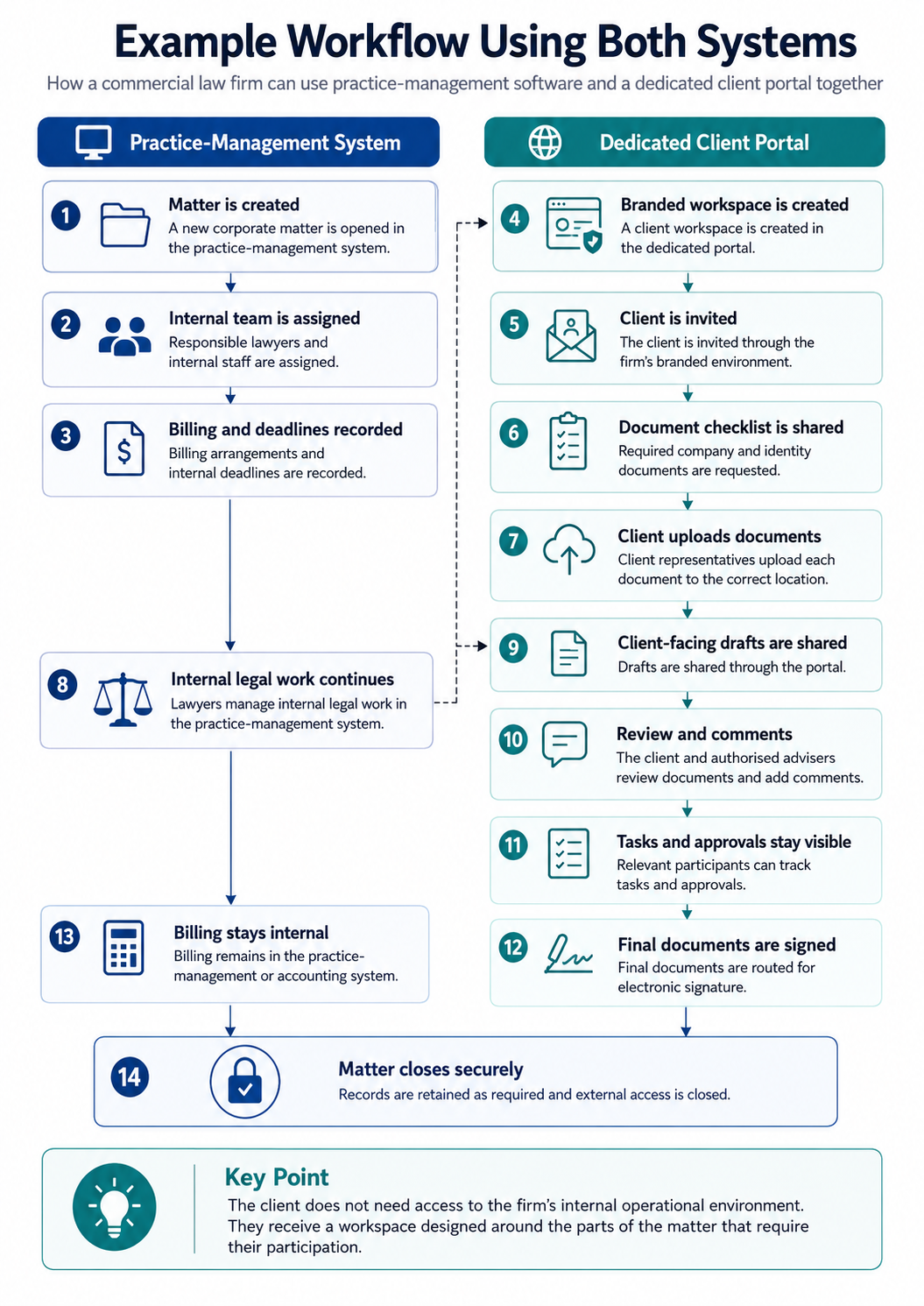
Example workflow using both systems
Consider a commercial law firm opening a new corporate matter.
How Practice-Management Software and a Client Portal Work Together.
A law firm opens the matter, assigns staff, and records billing and internal deadlines in its practice-management software.It then creates a branded client workspace in the portal, where the client uploads documents, reviews drafts, comments, completes tasks, and provides approvals.Internal legal work and billing stay in the practice-management system. Client-facing collaboration stays in the portal.This keeps the firm’s internal operations separate while giving clients a secure, organised space for the parts of the matter that require their involvement.
Example workflow showing how a law firm can keep internal legal operations in practice-management software while using a dedicated client portal for documents, communication, approvals and external access.
How to calculate whether a dedicated portal is worth it
A law firm does not need to rely entirely on generic market statistics. It can assess the likely return using its own workflows.
Administrative time
Estimate the time spent each week on:
Chasing documents
Filing email attachments
Resending information
Checking submissions
Answering routine update requests
Correcting version confusion
Managing shared links
Adding or removing external users
Multiply that time by the firm’s internal employment cost.
Lawyer interruptions
Estimate:
The number of routine client enquiries
The average time required to understand and answer each one
The internal or billable value of that time
Even when lawyers do not charge for the communication, the interruptions reduce the time available for substantive legal work.
Client retention
Consider whether better visibility and collaboration could improve:
Satisfaction
Trust
Responsiveness
Repeat work
Referrals
Institutional client relationships
Business development
Consider whether a branded client workspace could support:
Pitches
Panel reviews
Client demonstrations
Added-value services
Ongoing advisory relationships
Differentiation from competing firms
Risk and consistency
Consider whether the portal could reduce:
Documents sent to the wrong person
Uncontrolled external links
Confusion over current versions
Inconsistent client processes
Access remaining open unnecessarily
Information being stored in individual inboxes
The business case should be based on the cost of the current process, not simply the subscription price of the portal.
Business case framework
How to Calculate Whether a Dedicated Client Portal Is Worth It
A law firm should assess the value of a dedicated client portal using its
own workflows, rather than relying only on generic market statistics.
The strongest business case compares the cost of the current process with
the time, risk and client-service improvements the portal could create.
01
Administrative Time
Estimate how much time staff spend each week on routine administrative work.
Chasing documents
Filing email attachments
Resending information
Checking submissions
Answering routine update requests
Correcting version confusion
Managing shared links
Adding or removing external users
Multiply that time by the firm’s internal employment cost.
02
Lawyer Interruptions
Estimate:
The number of routine client enquiries
The average time required to understand and answer each one
The internal or billable value of that time
Even when the communication is not billed, interruptions reduce the
time available for substantive legal work.
03
Client Retention
Consider whether better visibility and collaboration could improve:
Satisfaction
Trust
Responsiveness
Repeat work
Referrals
Institutional client relationships
04
Business Development
Consider whether a branded client workspace could support:
Pitches
Panel reviews
Client demonstrations
Added-value services
Ongoing advisory relationships
Differentiation from competing firms
05
Risk and Consistency
Consider whether the portal could reduce:
Documents being sent to the wrong person
Uncontrolled external links
Confusion over current document versions
Inconsistent client processes
Access remaining open unnecessarily
Information being stored in individual inboxes
Key Takeaway
A dedicated client portal becomes easier to justify when it saves internal
time, reduces friction, improves the client experience and lowers operational risk.
Where Clinked fits in the legal technology stack
Clinked is not legal practice-management software.
It does not aim to replace the systems a law firm uses for:
Matter management
Time recording
Legal billing
Trust accounting
Conflict checking
Court calendaring
Internal legal administration
Clinked’s niche is the client-facing collaboration layer.
Clinked is best suited to law firms that already have systems for matters and billing but have outgrown email, generic file links or a limited built-in portal.
According to Clinked’s current feature directory, its client-facing capabilities include custom access permissions, audit trails, two-factor authentication and single sign-on. Its document tools include file requests, version control, document approvals, watermarking and file locking.
Clinked also offers white-label branding and custom-domain options, allowing the client workspace to appear as part of the law firm’s own service rather than as a generic third-party portal.
Its role can therefore include:
Secure client document exchange
Structured file collection
Document versions
Approvals
Permission-controlled external access
Client communication
Tasks
Shared calendars
Branded client workspaces
Ongoing collaboration
Clinked is not purchased because the practice-management system has necessarily failed.
It is purchased because:
Internal matter management and external client collaboration are different disciplines.
A firm may continue using Clio, MyCase or another legal practice-management platform for matters, billing and internal workflows while using Clinked for branded client documents, messages, actions and collaboration.
The systems solve different problems.
Clinked is a strong fit when:
The firm already has practice-management and billing software
The existing client portal is too limited
Clients exchange documents repeatedly
Staff spend time manually chasing and organising submissions
The firm wants a custom-branded client experience
Several external participants require controlled access
Matters include drafts, comments and approvals
Clients need visibility of actions and dates
The firm works with repeat or high-value clients
The portal may support retention or business development
The firm does not want to migrate its core legal system
A dedicated portal may not yet be necessary when:
Client interaction is infrequent
The firm shares only occasional documents
The existing portal already supports every required workflow
Clients do not need ongoing access
Branding is not important
There are few external participants
The administrative cost of the current process is minimal
The purpose of this distinction is not to suggest that every firm needs another platform.
It is to identify the firms for which the client-facing gap has become measurable, expensive or commercially important.
Final takeaway
The choice is usually not between a client portal and legal practice-management software.
Practice-management software runs the firm’s internal legal and administrative work. A dedicated client portal improves how clients participate in that work.
For firms whose internal systems are stronger than their client-facing experience, adding a portal can reduce administrative friction, improve visibility, standardise collaboration and give the firm greater control over its digital service.
Clinked is the dedicated client-collaboration layer for law firms that already have core systems but have outgrown email, generic file links or a limited built-in portal.
It does not replace the law firm technology stack.
It completes the client-facing side of it.
FAQs
Frequently Asked Questions
Is a client portal the same as legal practice-management software?
No.
Legal practice-management software supports the firm’s internal operations,
including matters, time, billing, internal deadlines and staff workflows.
A client portal provides a secure environment for working with clients and
other authorised external participants.
Do legal practice-management platforms include client portals?
Many do.
The capabilities vary significantly. Some portals focus on invoices,
appointments, messages and occasional document exchange. Others support
broader workflows.
A firm should assess whether its built-in portal supports the client
experience it actually wants to deliver.
Why would a law firm buy a separate client portal?
A separate client portal may provide:
Stronger branding
A custom domain
More flexible external permissions
Structured file requests
Better document collaboration
Shared client tasks
Shared calendars
Approvals
Access for several external participants
A more consistent client experience
It can add these capabilities without requiring the firm to replace its
existing practice-management system.
Is a separate client portal just another system to manage?
It can be if the firm does not define clear responsibilities.
The practice-management system should remain responsible for internal legal
operations. The client portal should be used for client-facing documents,
communication and actions.
When those roles are clear, the portal fills a gap rather than duplicating
the existing system.
Can Clinked replace Clio?
Clinked should not be positioned as a complete replacement for Clio.
Clio is legal practice-management software. Clinked is a client portal and
collaboration environment. A firm may use both for different parts of its
technology stack.
Can Clinked replace MyCase?
Clinked should not be positioned as a complete replacement for MyCase.
MyCase provides legal practice-management functionality, while Clinked
focuses on secure, branded client collaboration.
Can Clinked work alongside existing legal software?
Yes.
Clinked is designed to provide a client-facing workspace alongside the firm’s
existing practice-management, billing, document and productivity systems.
The exact workflow and integrations should be assessed according to the
firm’s requirements.
Which system should be the source of truth?
The practice-management system should usually remain the source of truth for:
Matters
Time
Billing
Internal legal records
Staff workflows
The client portal can become the primary environment for:
Client-facing documents
File requests
Messages
Tasks
Approvals
Shared dates
External collaboration
How does a client portal reduce administrative work?
It can give clients self-service access to information, replace unstructured
document chasing with file requests, keep document versions together and
provide one location for messages, tasks and dates.
The amount of time saved depends on the firm’s existing process and level of
client activity.
Is white-label branding important for a law firm portal?
It matters most when the firm sees the digital client experience as part of
its service.
A branded portal can provide continuity between the firm’s website,
onboarding process and ongoing delivery. It may be especially valuable for
firms serving repeat, institutional or high-value clients.
.png)