


Here's something you probably already know if you work in healthcare: 99% of hospitals now offer patients the ability to view their records electronically. But having an electronic health record system doesn't automatically mean you're using it well.
Think about it this way: buying a high-end camera doesn't make you a photographer. You need to understand composition, lighting, timing... The same goes for EHR systems. You can have the most sophisticated software on the market, but without solid best practices in place, you're basically using a Ferrari to drive to the grocery store.
This guide will walk you through the real-world EHR best practices that actually make a difference. We'll cover everything from pre-implementation planning to ongoing optimization, with an in-depth look at how secure patient portals like Clinked can support your EHR and EMR workflows.
Understanding electronic health records and why best practices matter
Electronic health records are the backbone of modern healthcare delivery.
But according to the Athenahealth Physician Sentiment Survey, 61% of physicians said they often feel so overloaded with information that it increases their stress levels.
When implemented correctly, EHR systems help overcome this, while also significantly reducing medical errors, improving care coordination and making patient data more easily accessible. They help healthcare providers make better decisions by giving them complete patient histories, laboratory test results, imaging data and medication records in one place.
The benefits extend beyond individual patient visits. Many EHR systems support population health management, helping practices identify trends, track disease outbreaks, and allocate resources more wisely. This kind of data-driven decision support can lead to enhanced outcomes for whole communities.
The difference between EHR and EMR systems
Let's clear up some confusion: electronic medical records (EMR) and electronic health records (EHR) aren't the same thing, though people use the terms interchangeably.
An EMR is essentially a digital version of the paper charts in your clinician's office. It contains medical and treatment histories for patients within one practice. If you've ever had a doctor print out your records to take to a specialist, that's the limitation of an EMR at work.
An EHR, on the other hand, goes beyond the data collected in your provider's office. It's designed to be shared across different healthcare organizations: hospitals, specialists, laboratories, pharmacies and emergency facilities. This interoperability advantage makes EHRs more valuable for coordinated care.

Here's why this distinction matters for best practices: if you're treating your EHR like an EMR (keeping everything siloed within your practice), you're missing the entire point. The power of electronic health records lies in their ability to create a comprehensive picture of patient health across the care continuum.
Pre-implementation best practices: Setting up for success
Getting EHR implementation right from the start saves you tons of headaches. Most healthcare organizations that struggle with their systems made mistakes during this phase, and those compound over time.
Conduct a thorough needs assessment
Before you spend a single dollar on software, you need to understand your needs and preferences.
Evaluate your current workflows and pain points. Where do things break down? Where do staff members waste time? Where do errors creep in? Document everything, even if it feels obvious. Patient volume, data complexity and specialty requirements all factor into what kind of system you need.
Your EHR system needs to connect to your existing systems, like billing software, practice management tools and imaging systems. Consider your growth trajectory, too. A system that works fine for five providers might buckle under twenty.
Establish key roles and responsibilities
EHR implementation is an organizational change. You need people who understand both clinical workflows and technical requirements.
Your implementation team should include a project manager responsible for keeping everything on track, clinical staff who understand daily workflows, IT staff who handle technical integration, trainers who can help staff adapt, and compliance officers who ensure you meet HIPAA and other regulatory requirements. Needless to say, all should be communicating smoothly with a system that allows it.
Each role has specific responsibilities. The project manager keeps the timeline moving. Clinical specialists identify workflow issues, patient interactions and diagnoses. IT staff handle data migration and tech support. Trainers make sure everyone knows how to use the new system. Compliance officers make sure you don't accidentally violate any regulations during the transition.
Set up a realistic budget and timeline
For larger healthcare facilities, annual subscription fees for leading EHR software such as Epic EHR can reach up to $500,000. Clinked costs a fraction of the price, starting at $95/month billed yearly.
But the software itself is just part of the picture. Factor in hardware upgrades, network infrastructure improvements, training time, temporary productivity losses, ongoing support and contingency funds for unexpected issues.
Timeline-wise, a small practice might complete implementation in 3-6 months. Larger organizations should plan for 12-18 months or more. Rush it, and you'll pay the price in poor adoption and workflow disruptions.
Select the right EHR vendor
Security certifications are crucial, so they should be your top priority. Consider user interface and usability. Request extended trial periods when clinical staff test the systems. Poor user interfaces lead to errors and staff frustration.
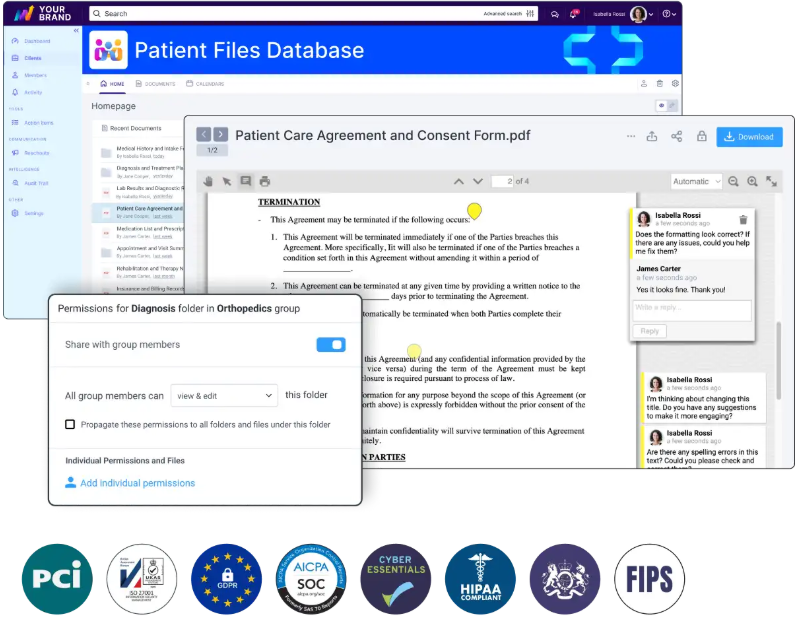
Clinked provides a secure environment for client collaboration, document sharing and project management for healthcare and medical data. With this VDR and portal software, you can build your custom-made, HIPAA-compliant patient portal, in line with SAS70, PCI and GDPR. It protects sensitive data, while ensuring easy access. Patients can book or cancel appointments in the same system. Other top features include:
- Improved patient engagement with messaging and notification features
- Intuitive and user-friendly interface
- Customizable branding and workflows (fully white-label solution)
- Audit trail ensuring transparency
- File uploading, request and approval
- Activity stream monitoring
- Mobile app accessible from anywhere
- Jotform integration for forms
Documentation best practices for electronic medical records
You can have the best EHR system in the world, but if your documentation practices are sloppy, you'll still have problems.
Implement real-time documentation
Document during patient encounters, not in the future. Delayed documentation leads to errors, omissions and those dreaded miscommunications that impact patient care quality. When you wait until the end of the day to document your patient visits, you're relying on memory instead of facts.
Real-time documentation keeps the patient's chart current and accurate, with much bigger reliability. Additionally, it reduces the cognitive load, making work easier for specialists on shift.
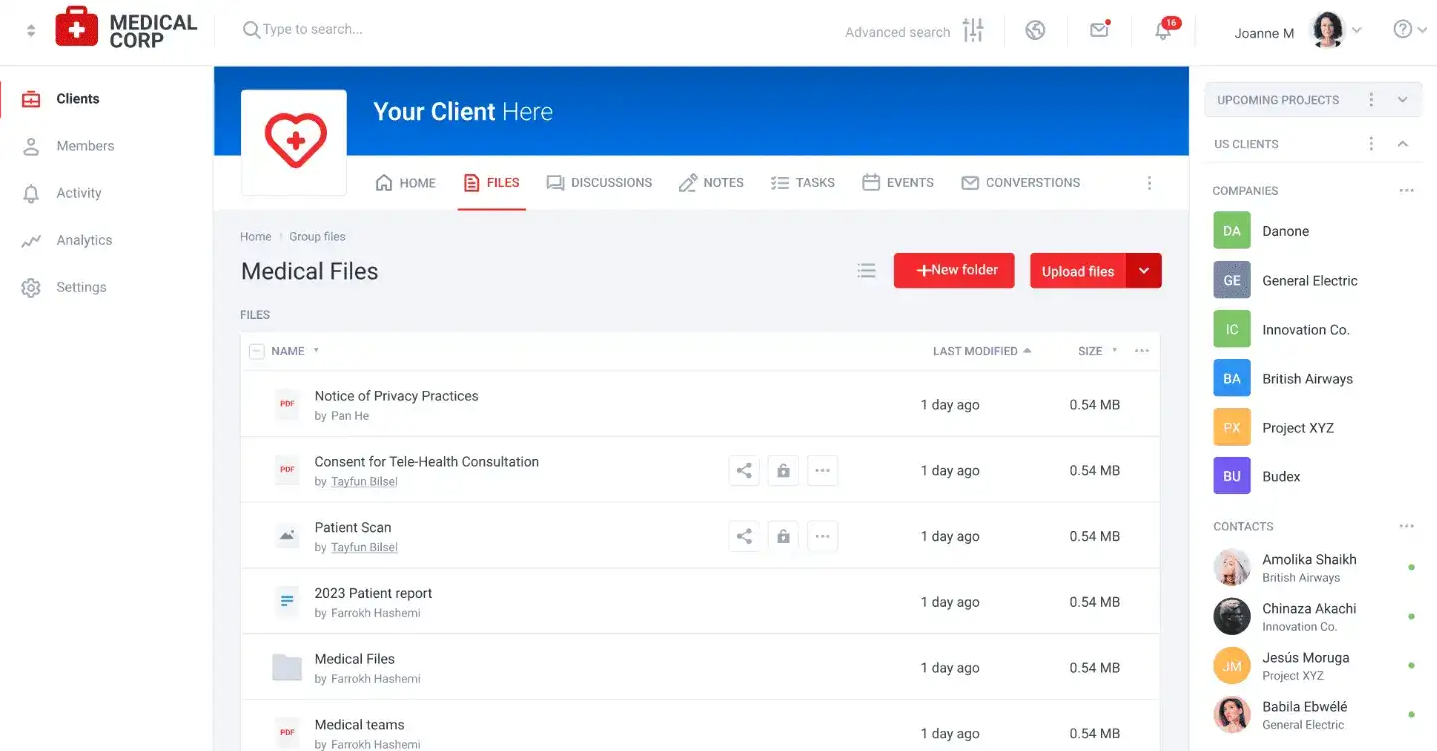
Use Clinked collaboration tools that let you document at the point of care. This approach integrates documentation naturally into the patient encounter rather than making it a separate task. You can even do it on mobile.
Avoid copy-paste and cloning pitfalls
The copy-paste function in your EHR is as convenient as it is dangerous.
The risks include inaccurate information carrying forward from previous encounters, patient safety issues from outdated medications or allergies, compliance violations that can result in audits and penalties, and loss of the clinical narrative that helps other providers understand the patient's actual condition.
Use templates wisely. They should serve as starting points, not finished products. Customize every template for each individual patient. Document unique findings that differentiate this visit from others. Maintain clear audit trails showing who changed what and when. Establish organizational policies that limit improper use of copy-paste functionality.
Maintain documentation integrity and compliance
Follow authentication and time-stamping standards. Every entry needs to be traceable to the person who made it and the time they made it.
When correcting errors, use transparent amendment procedures with full audit trails. Never just delete or overwrite incorrect information. The original entry should remain visible, with the correction clearly marked.
Avoid auto-population without review. Yes, it saves time. But it also leads to errors when pre-populated information doesn't match the current situation. Review everything before you sign off.
Complete your notes within 24-48 hours of service. The longer you wait, the less accurate your documentation becomes.
Use templates and structured data effectively
Structured data entry (dropdown menus, checkboxes, predefined fields) improves both accuracy and efficiency. It minimizes typographical errors and ensures consistent data capture.
Customize templates for your specialty workflows. A template that works for family medicine won't work for orthopedics. Balance efficiency with clinical relevance. Don't include fields just because the template has space for them.
Train users
The best EHR system means nothing if your staff won't use it properly.
Start with comprehensive initial training that covers not just how to click buttons, but why certain workflows exist. Provide role-specific training and ensure everyone knows what they're responsible for.
Offer ongoing education as the system evolves and new features roll out. Monitor system usage patterns to identify bottlenecks. Clinked lets you create a patient portal with extensive customization options, so you can adjust it to your needs as you grow.
Security and compliance best practices for EHR systems
Security in healthcare is critical, as it protects people's private health information from real threats.
Implement access controls and authentication
Implement role-based access controls and permissions. Use strong authentication methods with multi-factor authentication for accessing sensitive data.
Create audit trails that track who accessed what information and when. They help you detect unauthorized access before it becomes a breach.
The data security measures you implement should balance security with usability. If the system is too cumbersome, people will find workarounds that compromise security.
Ensure data encryption and secure transmission protocols
Encrypt data both at rest and in transit. Your EHR vendor should use bank-grade encryption standards (256-bit SSL for transmission, AES for stored data). Don't assume your vendor has this covered; verify it.
When transmitting patient data to external providers, use secure channels. Email without encryption is not acceptable for protected health information. Consider using secure file-sharing platforms that are specifically designed for healthcare communication.
Apply HIPAA compliance requirements
HIPAA compliance requires three types of safeguards: administrative, physical and technical. Administrative safeguards include your policies, procedures and training programs. Physical safeguards protect your hardware and facilities. Technical safeguards control access to electronic systems.
Conduct annual security risk assessments. "Look at the statistics of HIPAA violations and fines," notes Liam Degnan, Director of Strategic Initiatives, Compliancy Group. "You can trace an overwhelming majority of them directly to the failure to conduct or complete a security risk analysis".
Do regular security audits and vulnerability assessments
Schedule quarterly security reviews at a minimum. Technology changes quickly, and new vulnerabilities emerge constantly.
Test your incident response plan regularly. Everyone should know what to do if you suspect a breach. The worst time to figure out your response plan is during an actual incident.
Workflow optimization and system customization
Your EHR should adapt to your workflows, not the other way around. Too many practices try to force their staff to work around poorly configured systems.
Map and redesign clinical workflows
Before you customize anything, map out your current workflows in detail. Where does information flow? Where do handoffs occur? Where do bottlenecks happen?
Identify inefficiencies and redundancies. Many practices discover they're doing the same data entry multiple times because systems don't connect well enough. Don't just recreate bad paper-based habits in digital form. This is your chance to improve.
Platforms like Clinked can help with workflow optimization by providing a central hub for team collaboration, document management and task tracking.
Identify and eliminate redundant data entry
Look for opportunities to automate data flow between systems. When a patient checks in at the front desk, that information should automatically update the clinical system. When a lab result comes back, it should flow directly into the patient's chart without manual re-entry.
Use integration capabilities to connect your systems. Most modern software offers APIs or integration points.
Use automations for data migration and system integration
Moving years of patient records from one system to another is complex and error-prone, so plan this carefully. Decide what data actually needs to migrate. Clean your database before migration.
Test thoroughly before going live. Run parallel systems for a period if possible. Verify that critical information migrated correctly. Check that the interfaces between systems work as expected.
Clinked lets you upload multiple large files of any format at once, making documentation migration easy, all drag-and-drop. It acts as a virtual data room for sensitive files, providing an additional layer of organization and security.
Post-implementation optimization
Implementation doesn't mean the end of EMR best practices.
Establish feedback mechanisms
Create formal channels for staff to report issues and suggest improvements. Many problems only show up after you start using the system in real-world conditions.
Hold regular feedback sessions with different user groups. Front desk staff face different issues than nurses or physicians, and each perspective matters. Don't just collect feedback—act on it. When staff see their suggestions implemented, they remain engaged in the optimization process.
Collaboration platforms like Clinked facilitate ongoing feedback loops by providing structured spaces for different teams to share observations and suggestions.
Set up quarterly optimization sprints
Schedule dedicated time to review and refine workflows. Quarterly sprints give you regular opportunities to address issues before they become entrenched habits.
During each sprint, focus on specific areas. One quarter might address documentation efficiency. Another might focus on reporting capabilities. Breaking optimization into manageable chunks prevents overwhelm.
Measure success, ROI and patient engagement
Define clear success metrics before implementation. How will you know if the system is working? Some KPIs to track include:
- Patient satisfaction scores
- Documentation completion rates
- Documentation time per patient
- Laboratory test results retrieval speed
- Medication error rates
- Revenue cycle metrics
- Time spent on administrative tasks
- Number of times technical support was contacted
Monitor these metrics consistently. Look for trends rather than day-to-day fluctuations. Use this as your reference for improving the performance of your practice.
Your roadmap to EHR success starts here
The path to EHR excellence isn't complicated, but it does require commitment. Start with thorough planning and assessment. Establish clear documentation standards and security protocols. Optimize workflows based on real-world usage. Measure your progress against defined metrics.
Also, remember that your EHR doesn't exist in isolation. It's part of a broader ecosystem of tools that support patient care. Secure collaboration platforms like Clinked handle the communication, document sharing and project management aspects of your team.
With ISO 27001 certification, HIPAA-capable security, and integration options with over 7,000 applications, Clinked provides the customer portal and client communication tools that healthcare organizations need to work efficiently while maintaining compliance.
✅ Book a Clinked demo or start your free trial today
FAQs
How long does it typically take to implement an EHR system following best practices?
Small practices can typically complete implementation in 3-6 months, while larger healthcare organizations should plan for 12-18 months. This timeline includes planning, data migration, training, go-live and initial optimization. Rushing implementation to meet artificial deadlines usually backfires.
What are the biggest mistakes to avoid during EHR implementation?
The most common mistakes include insufficient training (both initial and ongoing), inadequate planning for data migration, failing to customize the system for your specific workflows, underestimating the impact on productivity during the transition period and neglecting to establish clear documentation standards.
How much does it cost to implement an EHR system properly?
Small practices might spend $15,000-$70,000 for initial setup plus monthly fees of $300-$800 per provider. Larger organizations can spend millions on implementation. Budget for software licensing, hardware upgrades, network infrastructure, training time (including lost productivity), ongoing support and a 10-20% contingency fund for unexpected costs. Clinked pricing starts from $95/month billed yearly, and reaches $479, depending on the scope of features you need, with custom plans available.
What security measures are required for protecting patient data in EHR systems?
HIPAA requires three types of safeguards: administrative (policies, training, security officers), physical (facility access controls, workstation security) and technical (encryption, access controls, audit logs). Specific measures include role-based access controls, strong authentication (ideally multi-factor), data encryption both in transit and at rest, regular security audits and risk assessments, incident response plans and staff training on security protocols.
Photo by Vitaly Gariev on Unsplash


