Virtual Data Room Comparison

Best Virtual Data Room Providers Reviewed

From enterprise M&A platforms to flexible,
tailored data room solutions, this comparison helps you quickly identify which provider is right for your needs.

Best Virtual Data
Room Providers 

at a Glance

If you don’t have time to compare every
virtual data room provider in detail, we’ve got
you. These top picks highlight the best virtual
data room providers based on specific use
cases: from structured M&A workflows to
secure collaboration and due diligence.

The Most Versatile Virtual Data
Room for Teams Beyond
Traditional M&A

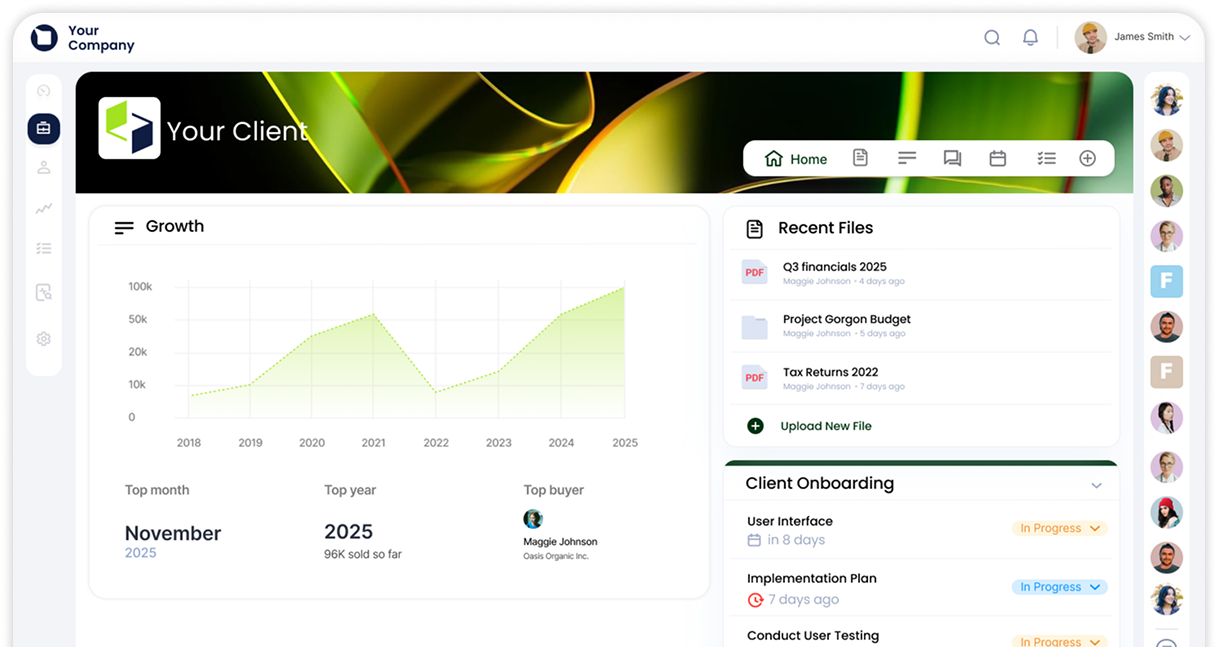
A modern virtual data room that goes beyond
traditional deal rooms by combining secure
document sharing, collaboration tools, and fully
branded client portals in a single platform.
While most VDR providers are built for one-time
transactions, Clinked is designed for ongoing use
across clients, deals, and internal workflows;
reducing tool sprawl and improving operational
efficiency.

Best for:
Teams that need
one platform for deals,
clients, and collaboration
Strength:
Combines VDR + client
portal + collaboration
tools

DealRoom

Structured M&A
Workflows

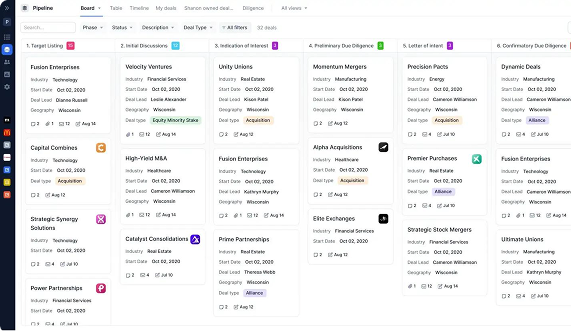
A virtual data room designed specifically
for managing structured M&A processes,
combining document storage with deal
tracking and workflow tools.

Best for:
Teams managing
complex or multiple M&A
transactions
Strength:
Built-in deal lifecycle
management
Structured M&A
Workflows

Datasite

Enterprise-Scale
Transactions

An enterprise-grade virtual data room
built for large-scale transactions, offering
advanced analytics and AI-driven
document management capabilities.

Best for:
Large, complex
transactions and
investment banking
workflows
Strength:
Advanced analytics
and automation
Enterprise-Scale
Transactions

iDeals

Due Diligence
Workflows

A secure and easy-to-use virtual data
room commonly used for due diligence
processes involving multiple stakeholders
and structured document sharing.

Best for:
Due diligence and multi-
party document sharing
Strength:
Usability and structured
workflows
Due Diligence
Workflows

Virtual Data Room Comparison

Features, Pricing
& Providers

Use this virtual data room comparison
table to evaluate the top virtual data room
providers based on pricing, features, and
best use cases. Whether you're comparing VDR providers for M&A transactions, due diligence, or secure document sharing, this table gives you
a clear side-by-side overview to
shortlist the right solution.

Provider
Best For
Starting Price
Free Trial
Key Features
G2 Rating
Clinked
SMBs, advisors, 
flexible deal rooms
From
$599/mo (VDR)
Yes
Fully white-label, bank-grade security, deal tracking, watermarking and redaction
4.8
DealRoom
M&A lifecycle &
deal workflows
From 

$1,000–$1,250/mo
Yes
Deal tracking,
diligence workflows, pipeline management
4.4
IDeals
Due diligence &
ease of use
Custom
Yes
Dynamic watermarking, fence view, Q&A
workflows, strong
security
4.7
Datasite
Enterprise M&A & large transactions
Custom
(high enterprise pricing)
No
AI redaction,
document
classification,
buyer analytics
4.6
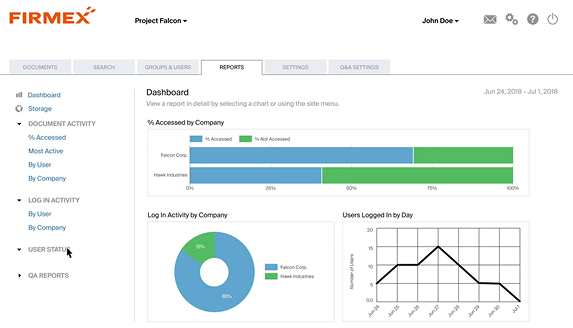
Firmex
Legal & regulated industries
Custom
No
(demo only)
Audit trails,
permissions, secure
document control,
24/7 support
4.6
Intralinks
Large enterprise & global deals
Custom
No
Enterprise security,
global infrastructure,
deal analytics
4.5
SecureDocs
Simple VDR &
fast setup
From 

$250/mo
Yes
(14 days)
Flat pricing,
unlimited storage,
quick deployment
4.6
ShareFile
Internal workflows
& file sharing
From
$16/user/mo
Yes
Integrations,
eSignatures,
document
management
4.4
CapLinked
Fundraising &
investor data
rooms
From
$149/mo
Yes
(14 days)
Audit logs, Q&A, integrations, secure sharing
4.5
Ansarada
AI-driven deal readiness
From
$399/mo
(variable)
Yes
(limited)
AI insights, deal
scoring, analytics,
due diligence tools
4.6
Drooms
EU transactions & GDPR compliance
From
€17.90/user or €129/mo
Yes
(30 days)
AI redaction, GDPR hosting, multilingual
tools
4.5
EthosData
Boutique M&A & guided support
From
$299/mo
Demo
(no full trial)
AI indexing,
smart redaction, concierge support
4.6


Virtual Data Room
Feature Comparison

Not all virtual data room providers offer
the same level of functionality. The tables
below compare key features across leading VDR providers, helping you evaluate the best option
based on your specific use case: whether that’s
M&A, due diligence, or secure
document sharing.

One

Of

the best

Virtual Data Room
Providers for Flexible,
Branded Collaboration

Overview

Clinked is a modern virtual data room and client
portal platform designed for secure document
sharing, collaboration, and controlled stakeholder
access. Unlike traditional virtual data room providers
that focus primarily on M&A transactions, Clinked is
built to support a broader range of use cases
including client portals, investor communications and ongoing business workflows.

What differentiates Clinked from other data room
providers is its combination of secure document management and built-in collaboration tools. In
addition to standard VDR functionality, it includes messaging, task management, and real-time communication features  reducing the need for
multiple tools during a project or transaction.

Clinked also stands out for its white-label
capabilities
, allowing businesses to fully customise
their data room with branded domains, email
domains, and workspaces. This makes it particularly valuable for advisors and firms that want to present a professional, client-facing experience.
For teams that need a flexible, branded virtual data
room without enterprise complexity
, Clinked is one of
the strongest options available.

SMBs
advisors
secure client
deal rooms

Key Features

  • Granular permission controls, including role-based permissions and download restrictions.
  • Full audit trail and activity tracking.
  • Dynamic watermarking and document
    protection features.
  • Bulk upload, document version control, and
    full-text search.
  • Built-in collaboration tools.
    (chat, tasks, comments, @mentions)
  • Powerful Q&A functionality.
  • Mobile apps (iOS and Android)
  • Two-factor Authentication and SSO.
  • White-label branding, custom domains and custom
    email domains.
  • Security and compliance features including ISO
    27001 and GDPR.  (SOC 2 Type II available as add-
    on)

Client 
Portals

Custom plans available for larger teams.

Free trial available.

starts from
$194
/month
See Pricing

VDR

starts from
$599
/month
Get Started

Pros

  • Combines collaboration, communication, and VDR functionality in one platform
  • Strong white-label and branding capabilities
  • Secure document management with advanced permission controls
  • Flexible across multiple use cases beyond M&A
  • Easy to use, based on user reviews

Cons

  • Smaller brand presence compared to legacy enterprise VDR providers
  • May be less suited to highly complex, enterprise-scale M&A transactions

Best Use Cases

  • Startups and SMBs
  • Advisors managing multiple clients
  • Investor relations and stakeholder reporting
  • Secure client portals and ongoing collaboration

Verdict

  • Clinked is one of the best virtual data room providers for teams that priorities flexibility,
  • branding, and collaboration alongside security. Its hybrid approach combining VDR functionality with a client portal and collaboration tools makes it particularly well suited to modern teams that need more than just a static data room.
  • While enterprise-focused platforms may offer deeper workflow automation for large-scale M&A, Clinked delivers a more versatile and accessible solution for the majority of business use cases.
DealRoom
Datasite
iDeals
Firmex
SecureDocs
ShareFile
Caplinked
drooms

Best for Structured
M&A Workflows

Overview

DealRoom is a virtual data room platform designed specifically for managing the full M&A lifecycle: from deal sourcing to due diligence and integration. Unlike traditional VDRs, it combines document sharing with workflow management and pipeline tracking. This makes it particularly effective for teams handling multiple transactions or complex deal processes.

Key Features

  • Deal pipeline tracking and lifecycle management
  • Diligence request tracking and structured Q&A workflows
  • Buyer activity tracking and reporting
  • Post-merger integration planning tools
  • Integrations with tools like Slack and Salesforce

Pricing

  • Starts from ~$1,000/month (billed annually)
  • Flat-rate pricing with unlimited users
  • Free trial available

Pros

  • Built specifically for M&A workflows
  • Strong diligence tracking and Q&A features
  • Reduces reliance on spreadsheets and manual processes

Cons

  • Higher cost than most VDR providers
  • More complex setup than simpler tools
  • Less flexible outside M&A use cases

Verdict

  • DealRoom is a strong choice for teams managing structured M&A processes and multiple deals. Its workflow-driven approach adds significant value in complex transactions.
  • However, for teams that need a simpler, more
    flexible virtual data room for broader use cases,
    lighter platforms may be a better fit.

Best for Enterprise M&A
and Large Transactions

Overview

Datasite is an enterprise virtual data room widely used by investment banks and large corporations for high-value M&A transactions. It is designed to handle complex deal environments with large volumes of sensitive data.

The platform stands out for its AI-powered tools and advanced analytics, which help deal teams manage documents, track buyer engagement, and streamline due diligence processes.

Key Features

  • AI-powered document classification and redaction
  • Buyer engagement analytics and activity tracking
  • Advanced Q&A workflows
  • Bulk upload with automated organisation
  • Full audit trails and granular permissions

Pricing

  • Custom enterprise pricing
  • Typically high-cost, depending on deal size
  • No free trial (demo available)

Pros

  • Strong reputation in enterprise M&A
  • Advanced AI and analytics capabilities
  • High-level security and compliance

Cons

  • Expensive compared to most VDR providers
  • Steeper learning curve
  • Over-engineered for SMB and mid-market use

Verdict

Datasite is a leading choice for enterprise-scale transactions where advanced analytics and process control are required.

However, for most teams, its cost and complexity can outweigh the benefits, making simpler and more flexible virtual data room solutions a more practical option.

Best for Due Diligence
and Ease of Use

Overview

iDeals is a widely used virtual data room provider designed for secure document sharing and due diligence. It is known for its intuitive interface, making it easy for teams and external stakeholders to navigate complex data rooms without training.The platform is particularly strong in structured due diligence workflows, offering reliable security and document control for mid-market transactions.

Key Features

  • Drag-and-drop upload with automatic indexing
  • Granular permissions and dynamic watermarking
  • Built-in Q&A workflows
  • Full audit trails and activity tracking
  • Mobile and desktop access

Pricing

  • Custom pricing (quote-based)
  • Free trial available

Pros

  • Easy to use with minimal learning curve
  • Strong security and compliance standards
  • Reliable for due diligence workflows

Cons

  • Pricing is not transparent
  • Limited workflow tools beyond document management

Verdict

iDeals is a strong choice for due diligence and secure document sharing, particularly for mid-market transactions. Its ease of use and structured workflows make it a dependable option for teams managing external stakeholders.

Best for Legal and
Regulated Transactions

Overview

Datasite is an enterprise virtual data room widely used by investment banks and large corporations for high-value M&A transactions. It is designed to handle complex deal environments with large volumes of sensitive data.

The platform stands out for its AI-powered tools and advanced analytics, which help deal teams manage documents, track buyer engagement, and streamline due diligence processes.

Key Features

  • Granular permissions and dynamic watermarking
  • Full audit trails and activity tracking
  • Built-in Q&A workflows
  • Bulk upload and document organisation
  • 24/7/365 customer support

Pricing

  • Custom pricing (quote required)
  • Demo available

Pros

  • Strong reputation in legal and financial sectors
  • High security and compliance standards
  • Reliable and stable platform

Cons

  • Pricing is not transparent
  • Limited focus on automation and modern workflows
  • Less flexible for non-transaction use cases

Verdict

Firmex is a dependable choice for regulated industries and compliance-driven transactions where security and control are essential.

However, for teams that require more flexibility, collaboration, or ongoing use beyond transactions, other virtual data room solutions may be a better fit.

Startups and small to
mid-sized transactions

Overview

Datasite is an enterprise virtual data room widely used by investment banks and large corporations for high-value M&A transactions. It is designed to handle complex deal environments with large volumes of sensitive data.

The platform stands out for its AI-powered tools and advanced analytics, which help deal teams manage documents, track buyer engagement, and streamline due diligence processes.

Key Features

  • AI-powered document classification and redaction
  • Buyer engagement analytics and activity tracking
  • Advanced Q&A workflows
  • Bulk upload with automated organisation
  • Full audit trails and granular permissions

Pricing

  • Custom enterprise pricing
  • Typically high-cost, depending on deal size
  • No free trial (demo available)

Pros

  • Strong reputation in enterprise M&A
  • Advanced AI and analytics capabilities
  • High-level security and compliance

Cons

  • Expensive compared to most VDR providers
  • Steeper learning curve
  • Over-engineered for SMB and mid-market use

Verdict

Datasite is a leading choice for enterprise-scale transactions where advanced analytics and process control are required.

However, for most teams, its cost and complexity can outweigh the benefits, making simpler and more flexible virtual data room solutions a more practical option.

Best for Internal
Document Workflows

Overview

Datasite is an enterprise virtual data room widely used by investment banks and large corporations for high-value M&A transactions. It is designed to handle complex deal environments with large volumes of sensitive data.

The platform stands out for its AI-powered tools and advanced analytics, which help deal teams manage documents, track buyer engagement, and streamline due diligence processes.

Key Features

  • Secure file sharing and document tracking
  • Integration with Microsoft 365, Salesforce, 
and other tools
  • Permission-based access controls
  • Custom branding optionse
  • Signature functionality

Pricing

  • Starts from ~$16–$18 per user/month
  • VDR-specific plans from ~$65+ per user/month
  • Free trial available

Pros

  • Affordable entry pricing for small teams
  • Strong integrations with existing tools
  • Easy to use with familiar interface

Cons

  • Not a dedicated virtual data room
  • Limited Q&A and due diligence workflows
  • Per-user pricing can scale quickly
  • Less suited for high-stakes transactions

Verdict

ShareFile is a practical solution for internal document management and secure file sharing, particularly for teams already using integrated business tools.

However, for M&A, due diligence, or investor workflows, dedicated virtual data room providers like clinked offer more advanced control, security, and collaboration features.

Best for Fundraising and
Investor Data Rooms

Overview

CapLinked is a virtual data room platform designed for managing fundraising, due diligence, and asset sales. It provides a secure workspace for sharing documents with investors, advisors, and external stakeholders.

The platform is particularly well suited for capital markets workflows, where teams need a simple and structured way to manage investor access and communication.

Key Features

  • Granular permissions and dynamic watermarking
  • Real-time activity tracking and audit logs
  • Built-in Q&A module for investor communication
  • Integrations with cloud storage tools (Google Drive, Dropbox, etc.)
  • Customisable workspaces and branding

Pricing

  • Starts from ~$149/month (Team plan)
  • Enterprise plans with custom pricing
  • Free trial available

Pros

  • Fast setup and easy to use
  • Strong audit tracking and document security
  • Transparent entry-level pricing

Cons

  • Performance may slow with large document volumes
  • Q&A functionality less advanced than some competitors
  • Limited workflow automation for complex transactions

Verdict

CapLinked is a strong option for fundraising and investor data rooms, offering a simple and secure way to manage external stakeholders.

However, for teams that need more advanced collaboration, flexibility, or support for ongoing workflows beyond fundraising, more comprehensive virtual data room solutions may be a better fit.

Best for European
Transactions and GDPR
Compliance

Overview

Drooms is a European virtual data room provider designed for GDPR-compliant transactions and secure document handling within the EU. It is widely used in European M&A, real estate, and cross-border deals where data residency and regulatory compliance are critical.

The platform also includes AI-driven tools that help automate due diligence and document processing.

Key Features

  • GDPR-compliant infrastructure with EU-based data hosting
  • AI-powered redaction and document processing
  • Structured Q&A workflows
  • Full audit trails and activity tracking
  • Multilingual platform for cross-border transactions

Pricing

  • Starts from ~€17.90 per user/month (FLEX plan)
  • Entry plans from ~€129/month
  • Free trial available

Pros

  • Strong GDPR compliance and European data hosting
  • Transparent pricing with self-service plans
  • Useful AI tools for due diligence

Cons

  • Less recognised outside Europe
  • AI features may be unnecessary for simpler use cases
  • Primarily suited for EU-focused transactions

Verdict

Drooms is a strong choice for European transactions and GDPR-sensitive workflows, particularly in 
regulated industries.

However, for teams that require more flexibility across regions or broader use cases beyond compliance-driven deals, other virtual data room solutions 
may be a better fit.

Virtual Data Room Pricing:

What to Expect
in 2026

Virtual data room pricing varies significantly across providers, depending on factors such as deal size, number of users, storage requirements,
and feature access. Understanding how different virtual data room providers structure their pricing is essential when comparing options and avoiding unexpected costs.

Whether you're evaluating VDR providers

for M&A, due diligence, or ongoing document management, pricing models can have a major impact on your total cost of ownership

Pricing Models

01.

Per-Page Pricing

This is one of the oldest pricing models used by traditional data room providers. You are
charged based on the number of documents or pages uploaded to the data room.

Best for:
Small document sets
Short-term projects

Risks:
Costs can increase rapidly with large due diligence datasets
Difficult to predict total cost

02.

Per-User Pricing

Some virtual data room providers charge based
on the number of users accessing the platform.

Best for:
Small internal teams
Controlled access environments

Risks:
Costs increase quickly with external stakeholders
Not ideal for large M&A transactions

03.

Flat-Rate Pricing (Most Preferred)

Modern virtual data room providers increasingly offer flat-rate pricing, either monthly or per
project, regardless of document volume or user count.

Best for:
Growing teams
Predictable budgeting
Multiple ongoing projects

Examples:
Clinked, CapLinked

04.

Custom Enterprise Pricing

Enterprise VDR providers typically offer custom pricing based on deal complexity, user volume, and required features.

Best for:
Large-scale transactions
Enterprise organisations

Examples:
Datasite, Intralinks, Firmex, iDeals

When off-the-shelf isn’t enough.

Book a free 30-minute consultation to explore a custom
solution designed around your needs.
Your Client

Virtual Data Room Pricing
Comparison (2026)

Tier
Monthly Cost
Suitable For
Example Providers
SMB / Startup
$80 – $300
Small teams,
fundraising
CapLinked
Mid-Market
$300 – $1,500
Due diligence, mid-
size deals
Clinked,

iDeals, Firmex
Enterprise
$2,000+
Large M&A
transactions
Datasite,
Intralinks

How to Choose the
Right Pricing Model

For most businesses, choosing a virtual data room provider with transparent, flat-rate pricing helps avoid unexpected costs and simplifies budgeting, especially when managing multiple projects or ongoing document workflows.

For M&A transactions
consider project-based or enterprise pricing
For ongoing use
(investor relations, client portals)
 flat-rate pricing is more cost-effective
For small teams
or short-term use
entry-level plans may be sufficient

Best virtual

Choosing the right virtual data room depends on your use case, deal size,
and workflow complexity. While some platforms are designed for large-scale
M&A transactions, others are better
suited for due diligence, fundraising,
or ongoing collaboration.

Data Rooms
by use case

Enterprise M&A

Advanced analytics,
compliance, and scalability
for large transactions

Mid-market M&A

Due diligence, mid sized
deals, easy to scale

SMB & boutique deals

 Flexible, cost-effective,
and faster to deploy

Other Common
Use Cases

Use Case
Commonly Used Providers
Due Diligence
Clinked logo
Fundraising / Investor Data Rooms
Clinked logo
Legal & Regulated Workflows
Internal Document Workflows
EU / GDPR-Sensitive Deals

Not every workflow fits a template.


Book a free 30-minute
consultation with our experts to
explore a solution tailored to you.

Table of contents

Heading 1

Heading 2

Heading 3

Heading 4

Heading 5
Heading 6

Lorem ipsum dolor sit amet, consectetur adipiscing elit, sed do eiusmod tempor incididunt ut labore et dolore magna aliqua. Ut enim ad minim veniam, quis nostrud exercitation ullamco laboris nisi ut aliquip ex ea commodo consequat. Duis aute irure dolor in reprehenderit in voluptate velit esse cillum dolore eu fugiat nulla pariatur.

Block quote

Ordered list

  1. Item 1
  2. Item 2
  3. Item 3

Unordered list

  • Item A
  • Item B
  • Item C

Text link

Bold text

Emphasis

Superscript

Subscript

FAQs

Here’s a quick overview of the questions asked most when choosing a client portal.

Can’t find what you’re looking for?
Reach out to our lovely sales team: they’re real humans, exceptionally helpful, and ready to guide you.

What is a client portal?

A client portal is a secure, online platform that enables businesses to communicate, collaborate, and share documents with their clients. It provides a central hub for clients to access important information, view project updates, and stay connected with the service provider throughout the engagement.

What does a client portal do?

A client portal allows businesses to share files, exchange messages, track projects, and manage tasks—all within a secure environment. It acts as a collaborative space where both clients and teams can stay updated on the latest progress, make requests, and keep track of important deliverables.

What is customer portal software?

Customer portal software is a platform that lets businesses provide customers with secure, self-service access to account details, support, documents, and communication tools. It streamlines interactions, improves customer experience, and reduces the need for direct support.

What is the difference between client portal and customer portal?

While both terms are often used interchangeably, a client portal is typically used by businesses that provide services, such as consulting, legal, or accounting firms, to manage ongoing client relationships. A customer portal, on the other hand, is more common in product-based businesses, providing a space for customers to manage orders, track shipments, or access product support. The functionality is similar, but the focus and industry of use can differ.

How much does a client portal cost?

The cost of a client portal depends on the features you need, the number of users, and the level of customization. Clinked offers flexible pricing plans based on the size of your business and your specific requirements. Whether you’re a small business or an enterprise, there’s a plan that can fit your budget and needs. Visit Clinked Pricing for more details on available plans. Pricing is typically structured as a monthly or annual subscription.

Is Clinked suitable for businesses of all sizes?

Yes, Clinked is designed for businesses of all sizes, from small agencies to large enterprises. Its scalability, white-label customization, and secure collaboration features make it ideal for growing businesses that require a professional client portal.

What should a client portal include?

At minimum: secure file sharing, messaging, project & task management, document approvals, branding options, integrations, audit trails and mobile access, so work stays organised and clients stay engaged.