

Let's be honest. If you're still emailing tax returns and sensitive financial data to clients, you're taking a risk you don't need to take.Today, many accounting firms are moving toward secure client portals to safely share documents, manage client communication, and meet compliance requirements without relying on email attachments.
According to IBM's 2024 Cost of Data Breach Report, financial services firms face an average breach cost of $4.88 million. That's not a typo. And email is still the most common way breaches happen.
The good news? The right client portal software for accountants can solve this problem while making your firm more efficient.
Accounting firms handling sensitive financial data increasingly rely on secure client portal software to safely exchange documents, control access, and meet compliance requirements without relying on email attachments.
I've spent months testing client portal solutions built for accounting professionals. I signed up for free trials, clicked through every feature, and read way too many Reddit threads to separate the hype from reality.
Here's what I found, and which portal software for accountants is actually worth your time.
Tools covered: Clinked, TaxDome, SmartVault, Canopy, Karbon, Client Hub, and Liscio.
Best client portal software for accountants (2026 shortlist)
- Best for security & branding: Clinked
- Best all-in-one solution: TaxDome
- Best for accounting integrations: SmartVault
- Best for client communication: Liscio
If you're looking for a secure client portal built specifically for accounting firms, explore how Clinked helps manage client documents, communication, and workflows in one place.
What is secure client portal software for accountants?
Secure client portal software for accountants is a platform that allows firms to securely share documents, communicate with clients, and manage workflows in one place. Unlike email or shared drives, it provides audit trails, permission controls, and a structured environment for handling sensitive financial data.
Why accountants need client portal software
The email problem
You already know this, but let's say it anyway: email wasn't built for secure document exchange.
Beyond the compliance risks and data breach threats, email creates everyday headaches for accounting firms. Which version of that engagement letter did the client sign? Where's that W-2 they sent three weeks ago? Why is your inbox 90% follow-up messages asking, "Did you get my last email?"
Scattered client communication wastes time. Version control becomes a nightmare. And when auditors ask who accessed client data and when, "let me search my inbox" won't fly.
Modern document management with proper audit logs solves these issues. You get secure access to client documents, complete audit trails, and a collaborative environment where nothing gets lost. The developments in the accounting industry are pushing firms toward paperless document management and client portals are central to that shift.
For firms scaling their operations, moving to a structured client portal software is often the next step to improve both security and client experience.
What clients expect now
Your clients bank on their phones. They pay bills online. They expect 24/7 secure access to their financial documents, not just during business hours.
A professional accounting client portal signals that your firm is modern and trustworthy. Email attachments and physical drop-offs? That signals the opposite.
Effective client collaboration means meeting client needs where they are. The best client portal software delivers a seamless client experience that makes working with your firm effortless.
Many accounting firms are now adopting dedicated client portals tailored for their workflows, especially those handling ongoing client collaboration and document exchange.Explore how a secure client portal for accountants can improve document management, client communication, and overall efficiency.
Not all client portals are designed specifically for accounting firms. Below is a comparison of tools that support secure document sharing, client communication, and workflow management.
Client portal software vs email and shared drives
Email is familiar, but it creates security risks, version control issues, and scattered communication. Shared drives improve file storage, but they still lack structure, permissions, and a proper client-facing experience.
A dedicated client portal gives accounting firms a secure, centralised space to share documents, manage client requests, and keep communication organised without relying on back-and-forth emails.
Quick comparison: secure client portal software for accountants
How to choose the right client portal software for your accounting firm
When comparing client portal tools, accounting firms should focus on a few key factors:
- Security and compliance (SOC 2, GDPR, encryption standards)
- Ease of use for both your team and your clients
- Document management and approval workflows
- Integration with accounting and business tools
- Communication and collaboration features
The right choice depends on whether your priority is security, workflow automation, or delivering a better client experience.
The best client portal software for accountants
Not all client portals are created equal. Some focus on document sharing. Others offer complete practice management software. Here's how each option stacks up.
Clinked
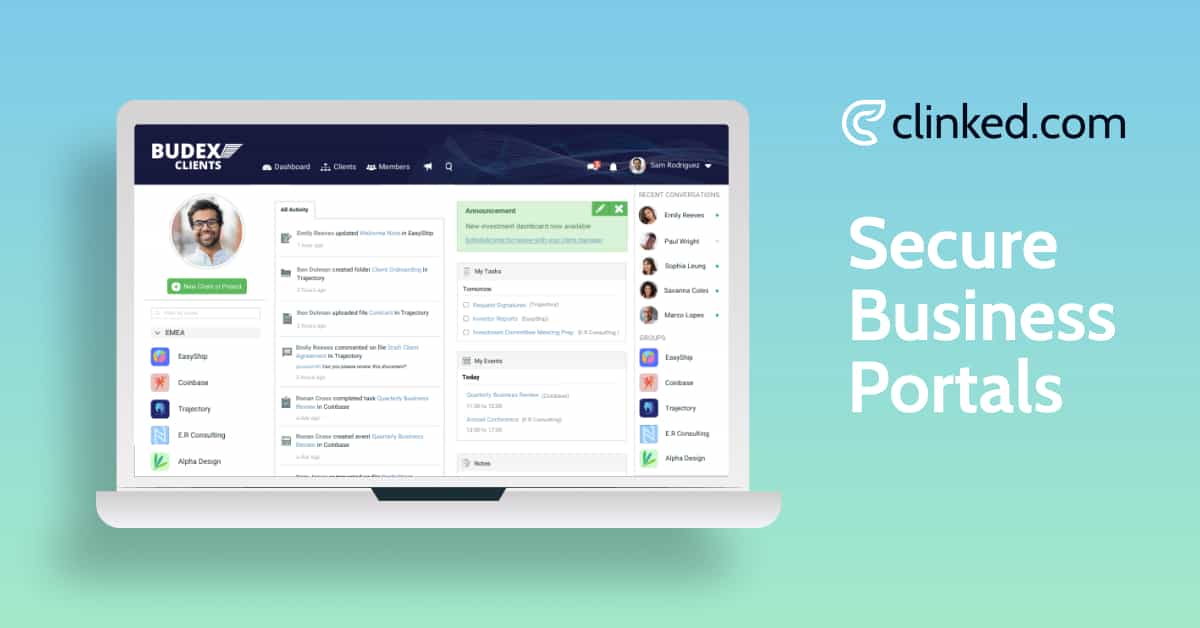
Clinked is a secure client portal built for firm owners who care about two things: bank-level security and professional brand presentation.Clinked is also one of the best secure client portal software options for accounting firms, combining document management, client collaboration, and white-label branding in one platform.
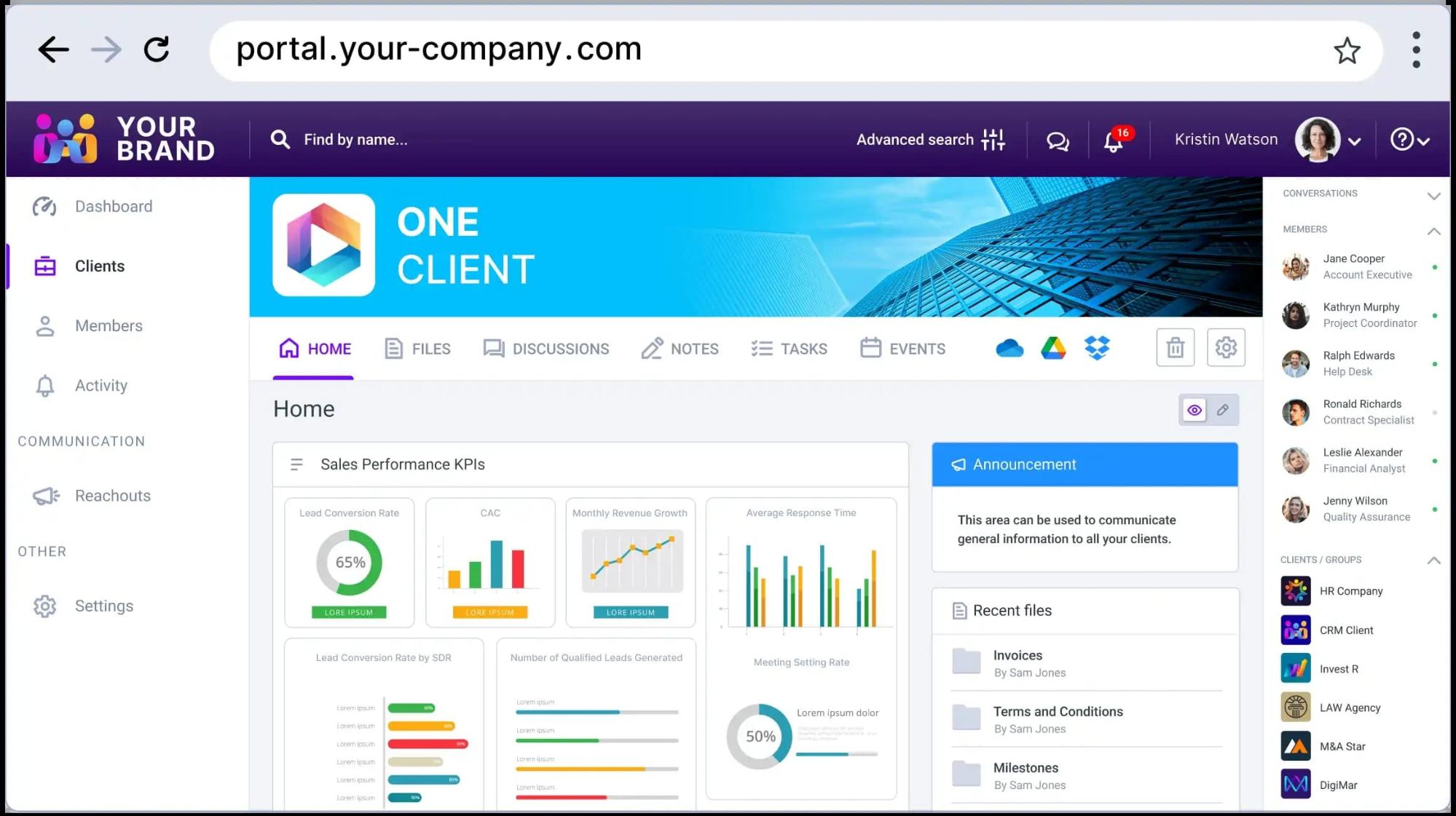
When clients log in, they see your logo, your colors, and your domain. It feels like your portal, not some third-party tool you're renting. That custom branding matters more than most accounting firms realize for client engagement.
Security-wise, Clinked checks every box. ISO 27001 certified. GDPR compliant. HIPAA-capable. SOC 2 compliant. End to end encryption with 256-bit SSL. If you need to protect client data and sensitive data, this is the standard you want.
What impressed me most during testing was how everything works together in one secure space. Document management, secure messaging, task management, approval workflows, it's all in one place. No jumping between disconnected tools.Unlike tools focused purely on tax workflows or document storage, Clinked is designed as a secure client portal that supports both internal collaboration and client-facing communication for accounting firms.
Best for: Growing accounting firms seeking a brandable, security-first portal that works alongside current accounting software without forcing a complete tech stack overhaul.
Our rating: 4.9/5
Want to see it in action? Book a free demo or start your free trial.
Pros and cons
Pros:
- ISO 27001, SOC 2, HIPAA-capable: gold standard security features
- Full white-label customization (domain, logo, colors, mobile app)
- Comprehensive audit logs for compliance
- Real-time client collaboration with chat, @mentions, and discussions
- Secure file sharing with version control
- Connects to 7,000+ apps through Zapier
Cons:
- Premium pricing may be too much for very small practices
- Advanced client portal features take time to learn
- Some features only available on higher tiers
Key features
Clinked's feature set goes beyond basic portal software, offering cloud accounting solutions that support modern workflows:
- Documents: Version control, approval workflows, virtual data rooms, document sharing
- Communication: Group chat, secure messaging, @mentions, discussion forums
- Projects: Kanban boards, task tracking, shared calendars, workflow tracking
- Branding: Custom domains, branded portals, white-label mobile apps
- Security: Two-factor authentication, audit logs, role-based secure access
- Integrations: Google Workspace, MS 365, DocuSign, Adobe Sign, Zapier
Pricing
Getting started
Most accounting practices are up and running within days. Clinked provides workflow templates during client intake and onboarding to help you identify what to automate first. Enterprise customers get a dedicated Customer Success Manager.
What users say
"When clients log in and see our logo and our colours, it feels like they are stepping into our portal rather than a third-party tool." G2 Review
"Clinked's customer support is exceptional... prompt, knowledgeable, and quick to solve any issues." Capterra Review
TaxDome
TaxDome tries to be everything for everyone; and honestly, it comes pretty close.
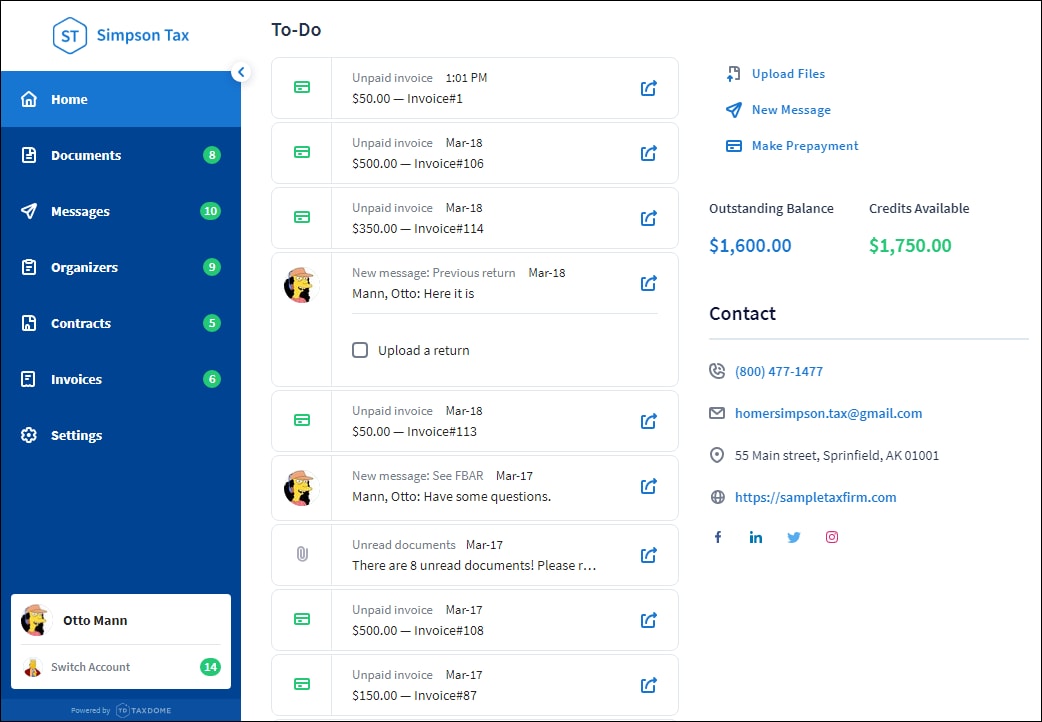
It's an all-in-one practice management software: CRM, workflow automation, document management, client portal, e-signatures, and billing. Over 10,000 accounting firms use it. It won the 2024 CPA Practice Advisor Readers' Choice Award.
The IRS transcript integration is very handy. Pull transcripts directly into client accounts with a few clicks. During tax season, these tax preparation tools save time, hours of it.
But here's the trade-off: TaxDome is packed with client portal features, and that means a real learning curve. Multiple users mention feeling "overwhelmed" during setup. If you're willing to invest time upfront, the payoff is significant. If you want something simple, look elsewhere.However, its complexity and learning curve can be a challenge for smaller firms or teams looking for a simpler client-facing solution.
Best for: Tax-focused sole practitioners and small accounting firms who want one platform for everything.
Our rating: 4.7/5
Pros and cons
Pros:
- Replaces multiple software subscriptions and disconnected tools
- Unlimited portals, e-signatures, and storage included
- Workflow automation saves up to 40 hours per employee monthly
- IRS transcript integration
- Excellent mobile app with intuitive interface (4.7/5 rating)
- Automated reminders reduce client follow-up
Cons:
- Steep learning curve
- Annual payment required upfront
- Can't store credit cards for recurring billing
- Desktop app is clunky; browser version works better
Key features
- Clients: Unlimited portals, custom branding, client management for multiple contacts
- Documents: Unlimited storage, AI tagging, request files directly from clients
- Workflow: Kanban pipelines, 250+ templates, workflow automation with conditional logic
- Communication: Secure messaging, two-way SMS, email sync, automated reminders
- Billing: Proposals, e-signatures, Stripe and CPACharge integration
Pricing
All plans include unlimited clients, portals, e-signatures, and storage.
What users say
"We were able to accept new clients this year because of how much extra time TaxDome freed up." Verified User
"Payments come in same day now, mailing less paper - that alone paid for the software." Capterra Review
SmartVault
SmartVault keeps things focused. It's a document management and secure client portal solution, nothing more, nothing less.
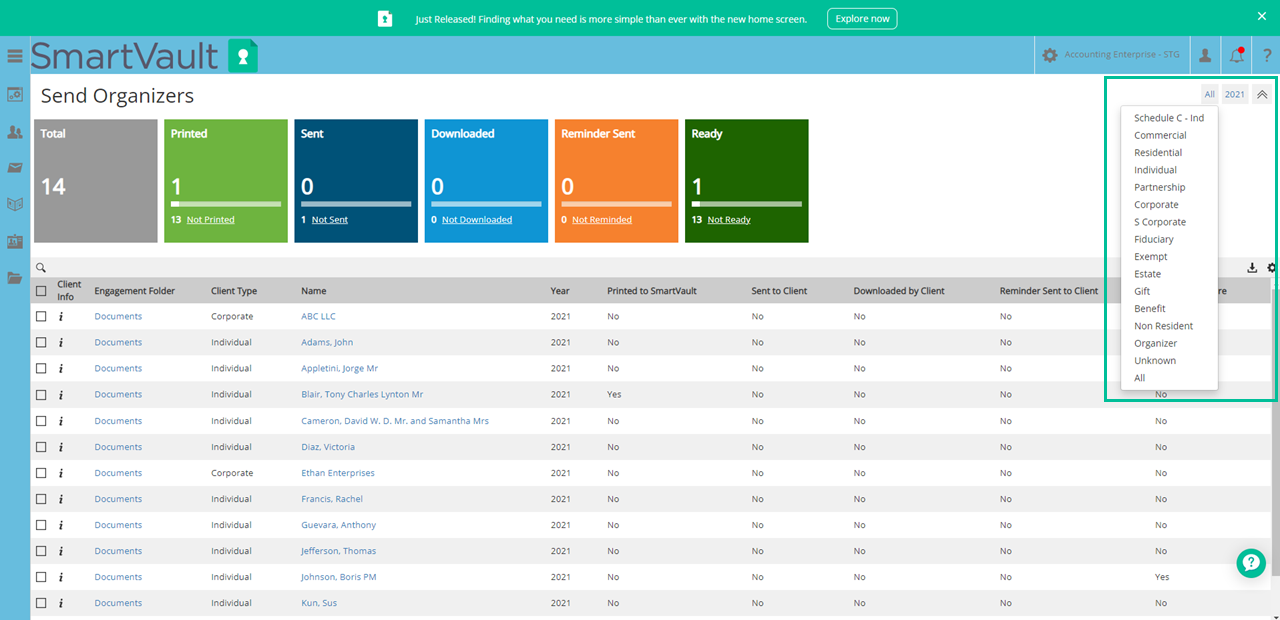
If you use Intuit accounting software (Lacerte, ProSeries, ProConnect) or UltraTax CS, SmartVault integrates beautifully. Tax returns auto-route to the correct client folders. DocuSign integration handles e-signatures with IRS-compliant Knowledge-Based Authentication.
The downside? The interface feels dated. Upload speeds can be slow. And since it's document-focused only, you'll need other tools for workflow management, CRM, and billing.
Think of SmartVault as a digital filing cabinet - a secure portal that's organized and reliable. Just don't expect it to handle all your administrative tasks.While strong for document storage, it lacks built-in workflow and collaboration features compared to more comprehensive client portal platforms.
Best for: Accounting firms using Intuit products or UltraTax CS who want solid data management without the complexity of all-in-one platforms.
Our rating: 4.3/5
Pros and cons
Pros:
- Deep integration with major accounting software
- SOC 2 Type 2 compliant, IRS 4557 ready
- Unlimited storage and clients
- DocuSign with KBA for 8879 compliance
- U.S.-based support with tax season hours
Cons:
- Interface looks outdated
- Slow upload speeds, especially for large files
- No workflow tracking, CRM, or billing features
- Can't edit documents in the app
Key features
- Documents: Unlimited cloud storage, auto-filing, version control, professional PDF format support
- Portal: Custom branding, secure file sharing, document requests, secure link sharing
- Security: SOC 2 Type 2, two-factor authentication, comprehensive audit logs
- E-signatures: DocuSign with KBA compliance
- Integrations: Lacerte, ProSeries, ProConnect, UltraTax CS, Drake, QuickBooks, Xero
Pricing
Accounting Unlimited includes unlimited e-signatures, KBAs, and Compliance Vault.
What users say
"SmartVault's integration with DocuSign makes requesting and managing signatures very efficient." Capterra Review
"I switched from SmartVault to TaxDome because SmartVault is only a portal software and costs the same with less features." User comparison
Canopy
Canopy started as a tax resolution tool and grew into a full practice management suite. The IRS transcript integration remains its killer feature: direct, secure access to the Transcript Delivery System helps accounting professionals save time during the busy season.
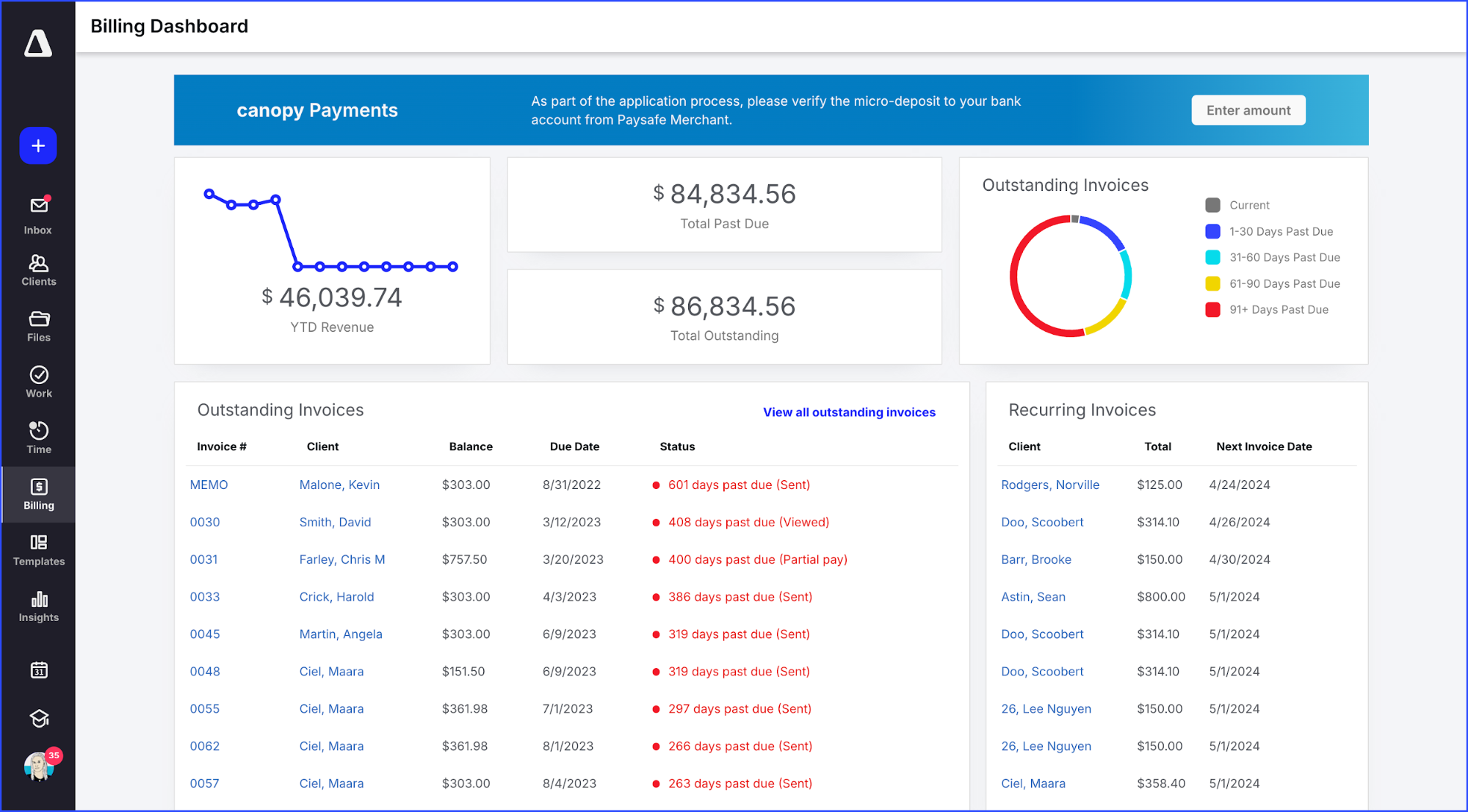
The accounting client portal impressed me. Clean, modern, intuitive interface. One CPA said even "non-tech" clients had it set up "in no time." The mobile app has a 4.8-star rating: proof that great client experience drives adoption.
The catch? Canopy uses modular pricing. Client management, document management, workflow management, time and billing: each is a separate module. Add them all up and costs climb fast.
Best for: Tax resolution specialists and mid-sized accounting firms wanting best-in-class IRS integration.
Our rating: 4.5/5
Pros and cons
Pros:
- Best-in-class IRS transcript integration
- Beautiful client portal with great mobile app
- Award-winning customer support
- Modern interface improves client experience
- Pay only for modules you need
Cons:
- Modular pricing adds up quickly
- No Kanban workflow views
- Base plan limited to 250 contacts
- Weak QuickBooks Desktop integration
Key features
- Portal: Secure document exchange, mobile app, custom branding
- IRS: Direct transcript retrieval and monitoring
- Documents: Unlimited storage, e-signatures, PDF annotations
- Workflow: Task management, workflow automation, deadline tracking, automated reminders
- AI: Auto-generate checklists, summarize emails, auto-fill forms
Pricing
Additional modules cost $22-36/user/month each.
What users say
"The fact that I could request an IRS transcript through Canopy for clients was amazing." Verified User
"Home run by Canopy. I sent the invite to a non-tech person and the portal was up in no time." CPA Review
Karbon
Karbon is the most sophisticated portal software on this list. It's built for accounting firms with complex workflows and multiple team members who need visibility into client interactions.
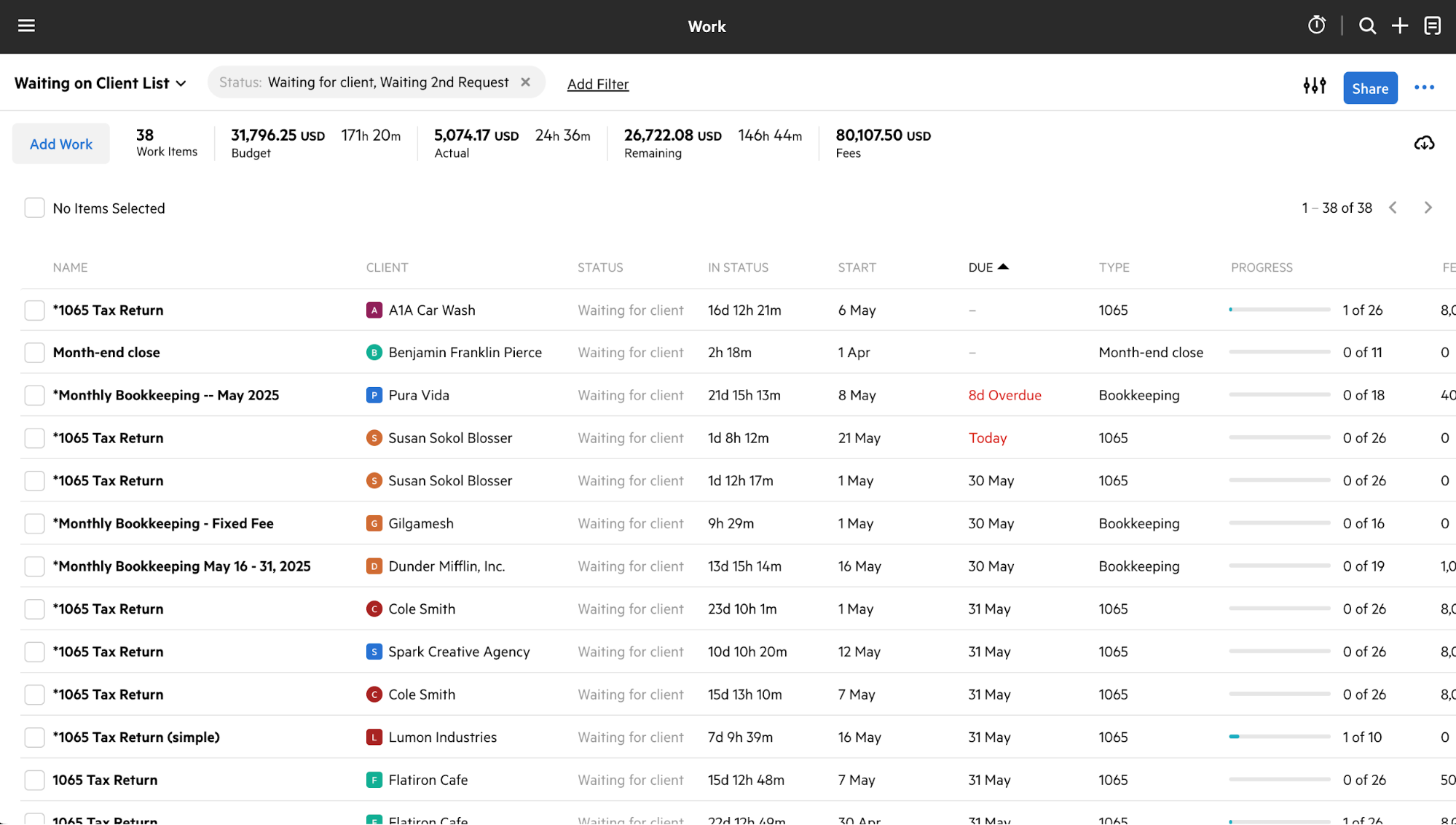
The email triage feature is genuinely unique. All client communication flows into a central inbox where you can @mention colleagues, turn messages into tasks, and track everything. No more emails getting lost in individual inboxes.
Users report saving 18+ hours per employee weekly. That's a big claim, but the workflow automation backs it up. For top accounting firms managing high volumes, the operational efficiency gains are real.
The downside? This is enterprise-grade software for accountants with an enterprise-grade learning curve. Setup takes time. Pricing isn't cheap. And there's no IRS transcript integration like Canopy or TaxDome offer.Its advanced features and setup requirements may make it better suited for larger firms with more complex workflows.
Best for: Mid-sized to large accounting firms with complex workflows who can invest in proper setup and training.
Our rating: 4.4/5
Pros and cons
Pros:
- Powerful workflow automation with branching logic
- 250+ pre-built templates
- Email triage eliminates communication silos
- AI features for email and task tracking
- Users save time: 18+ hours per employee weekly
Cons:
- Expensive, with additional implementation costs
- Steep learning curve
- No built-in proposal software
- No IRS transcript integration
- Mobile app is limited
Key features
- Workflow: Visual builders, 250+ templates, workflow automation
- Email: Gmail and Outlook triage, @mentions, email-to-task conversion
- Clients: CRM for client management, activity timelines, client groups
- Collaboration: Real-time visibility, workload tracking
- AI: Email summarization, composition, automated task creation
Pricing
What users say
"Karbon is so well-thought-out and robust, but still simple to use. It would take at least three different systems to replace what Karbon gives us today." Jason Ackerman, BNA
"Jobs are done earlier than ever." Clare, Trustpilot
Client Hub
Client Hub was built by accountants for accountants: specifically, bookkeeping and cloud accounting firms.
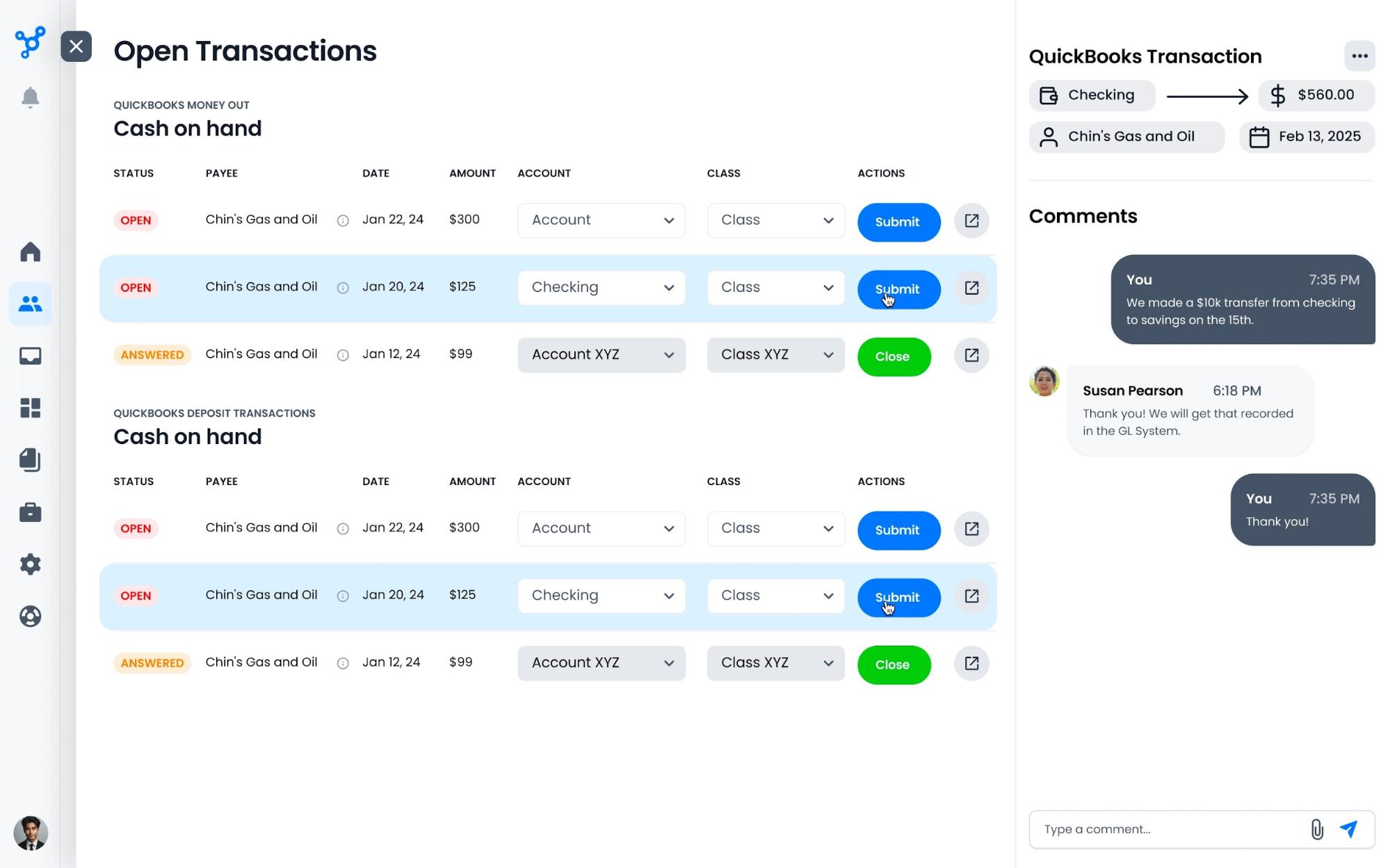
The QuickBooks Online integration is the standout. It can resolve uncategorized transactions automatically, syncing them to client workspaces where clients can categorize directly in the portal. The AI-powered Books Review flags issues during the month-end close.
Setup is fast. Multiple firm owners call it a "game changer." Most accounting practices are operational within hours. The magic link feature lets clients access specific client requests without remembering another password.
The trade-off? It's built for bookkeeping workflows. Tax-focused practices will find it limiting. There's no built-in invoicing and no e-signature capability.
Best for: Bookkeeping-focused accounting practices using QuickBooks Online or Xero that want tailored solutions without complexity.
Our rating: 4.3/5
Pros and cons
Pros:
- Super easy to set up
- Deep QuickBooks Online integration (free)
- AI features included on all plans
- Unlimited clients and storage
- Cuts software costs by 40% on average
- Magic link access for easy client interactions
Cons:
- Mobile app has limited functionality
- No invoicing: need third-party integration
- No e-signatures
- Less robust for tax workflows
Key features
- Practice: Workflow tracking dashboards, time tracking, recurring jobs
- Portal: Mobile app, secure messaging, file sharing features
- QuickBooks: Transaction sync, month-end close, Books Review
- AI: Magic Workflow, Magic Messages, Magic Emails, Magic Answers
- Access: Magic link for password-free secure access
Pricing
All plans include unlimited clients, storage, and AI features.
What users say
"Client Hub has greatly simplified my practice. Previously I had three different apps." Jane A., Bookkeeper
"It's the first and only true CRM I've found in our 10 years of business." Elmer H., CEO
Liscio
Liscio does one thing really well: client communication.
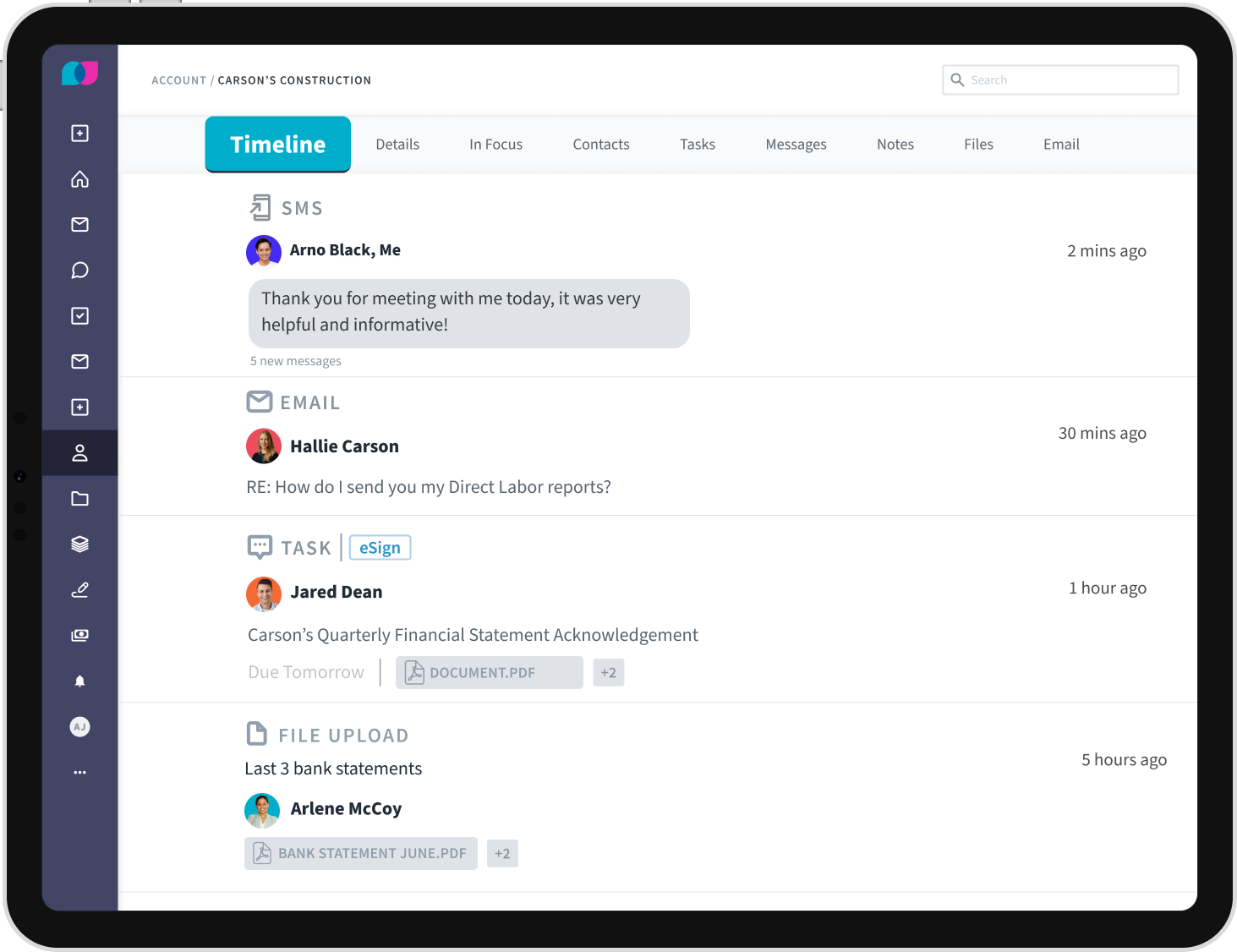
The two-way SMS texting is the headline feature. Response rates to client requests jump up to 8x compared to email. Clients can text your firm's business number, and all client interactions stay organized in one place.
The mobile app is excellent: clients actually like using it. That's rare for business software. Built-in document scanning turns phone photos into professional PDF format automatically.
But Liscio isn't a practice management platform. There's no workflow automation. No billing. Think of it as a communication tool that sits on top of your other accounting software.
Best for: Firm owners drowning in email who want better client communication without replacing their entire tech stack.
Our rating: 4.2/5
Pros and cons
Pros:
- Bank level security with 256-bit encryption, IRS 4557 compliant
- Two-way SMS gets faster responses to client requests
- Clients enjoy the mobile app
- Built-in document scanner
- Great customer support
Cons:
- Not a complete practice management solution
- Extra fees for texting, e-signatures, tax organizers
- No API for custom integrations
- No data export capability
Key features
- Communication: Secure messaging, two-way SMS, email integration
- Documents: Unlimited storage, large file sharing (up to 2GB), tagging
- Tax: Smart Organizers, personalized gathering, e-signature delivery
- AI: Message assistant, file intelligence, auto-renaming
- Financial: Support for financial statements and financial documents
Pricing
Usage-based pricing applies for some features.
What users say
"Can't thank you enough for getting this Liscio system. You have just reduced my anxiety 100%." Client feedback
"Liscio was twice the money and had less features [than TaxDome]." User comparison
Choosing the right platform depends on your firm’s size, workflows, and how you want clients to interact with your business.
Finding the right client portal for your accounting practice
So, how does client portal work best for your firm? It depends on your size, focus, and what's already in your tech stack.
For accounting firms prioritising security, compliance, and a better client experience, moving to a secure client portal software is often the most reliable long-term solution.
Clinked works alongside your existing accounting software through 7,000+ integrations. You don't have to rebuild your tech stack. You get enterprise-grade security features (ISO 27001, SOC 2, HIPAA-capable) and complete white-label customization. Clients see your brand, not someone else's.
For accounting firms that want professional presentation and need to protect client data without sacrificing the client experience, Clinked delivers both. It creates a secure space for all your client documents while providing the seamless client experience modern clients expect.
Book a free demo or start your free trial to see if it's the right client portal for your accounting practice.
For accounting firms prioritising security, client experience, and scalability, investing in a dedicated client portal software provides a more reliable long-term solution than email or shared drives
FAQs
Do accountants really need client portal software if they already use email?
Yes. Email is the most common way data breaches happen - and it creates serious compliance risks. Beyond security, email creates version control problems, lacks audit logs, and frustrates clients who expect 24/7 secure access to their financial documents. A client portal solves all of these issues while improving the client experience.
What security features should accounting client portal software have?
Look for SOC 2 Type II compliance and 256-bit encryption at minimum. If you have healthcare clients, you need HIPAA capability. European clients require GDPR compliance. ISO 27001 certification is the gold standard. Comprehensive audit logs and secure file sharing are essential to protect client data and meet IRS requirements.Many firms comparing options today are specifically looking for secure client portal software that meets compliance and client experience expectations.
How long does it take to implement client portal software?
It varies. Simple tools like Liscio or Client Hub can be running in hours. Feature-rich platforms like TaxDome or Karbon take weeks to set up properly. Clinked typically falls in the middle - most accounting firms are operational within days.
Will my clients actually use an accounting client portal or resist it?
They will if it's easy. Platforms with intuitive interface design (TaxDome, Canopy, Liscio) see higher adoption. White-labeled portals with custom branding that match your firm help reduce the "another login" objection - or look for magic link features that eliminate passwords entirely. Once clients experience the seamless client experience, most prefer portals over email for accessing client documents and financial statements.





.webp)