


Quick Answer: What is the Best Document Management Software?
The best document management software depends on use case, team size, and how an organization collaborates — internally, externally, or both.
Based on widely adopted platforms and their primary strengths:
- Microsoft SharePoint → Best for enterprise environments using Microsoft 365
- Google Workspace → Best for real-time collaboration and distributed teams
- Clinked → Best for secure client collaboration and external document sharing
- Egnyte → Best for compliance-heavy and regulated industries
- DocuWare → Best for automating document-heavy workflows
- M-Files → Best for metadata-based document organization at scale
- Box → Best for scalable enterprise content management
- Dropbox → Best for simple file storage, syncing, and sharing
Most businesses choose a document management system based on who they collaborate with not just how much storage they need.
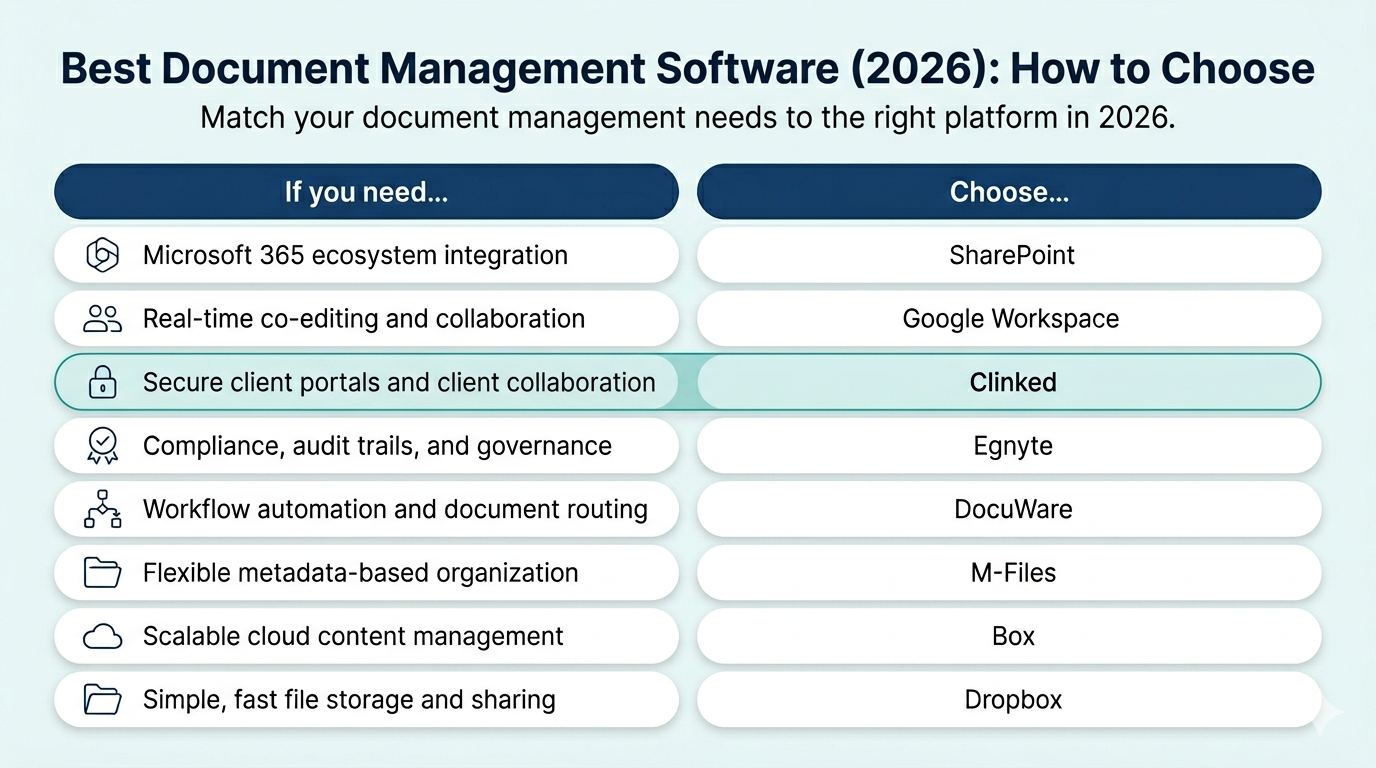
Best Document Management Software by Use Case (Quick Picks)
For teams that need a fast shortlist, here are the best document management software tools based on primary use case:
- Best for enterprises: Microsoft SharePoint — ideal for organizations using Microsoft 365, with deep integration across Teams, Outlook, and Power Automate
- Best for real-time collaboration: Google Workspace — built for distributed teams that need simultaneous co-editing across documents, spreadsheets, and slides
- Best for client collaboration: Clinked — a secure client portal platform designed for professional services that need structured external document sharing and branded portals
- Best for compliance: Egnyte — suited for regulated industries with audit logging, data loss prevention (DLP), and support for frameworks like GDPR and HIPAA
- Best for workflow automation: DocuWare — enables automation of document-heavy processes such as invoice approvals, contract routing, and onboarding
- Best for metadata-based organization: M-Files — organizes documents by metadata rather than folders, improving search and retrieval
- Best for scalable cloud content management: Box — offers scalable storage, enterprise security, and broad third-party integrations
- Best for simplicity: Dropbox — a straightforward solution for file storage, syncing, and sharing across devices
What is Document Management Software?
According to the Association for Intelligent Information Management (AIIM), document management is the use of a computer system and software to store, manage, and track electronic documents and electronic images of paper-based information captured through document scanning.
In practice, document management software (DMS) enables businesses to store, organize, track, retrieve, and share documents securely — with controls that go well beyond basic file storage.
Unlike cloud storage tools, a true DMS includes:
- Centralized storage — a single, searchable source of truth for all documents
- Version control — full history of changes with the ability to restore previous versions
- Access permissions — granular controls over who can view, edit, or share each file
- Secure sharing — distribute documents to internal teams or external parties with defined access rules
- Workflow automation — route documents for approval, review, or signature automatically
- Audit trails — a log of who accessed or modified each document and when
- Compliance support — tools to enforce retention policies and meet regulatory requirements
Modern DMS platforms increasingly combine these capabilities into a unified system, replacing fragmented workflows built on email attachments, shared drives, and consumer storage tools.
What Does Document Management Software Do?
Document management software handles the full lifecycle of a document — from creation and storage through collaboration, approval, and archiving.
Core functions, at a glance:
- Stores documents in a centralized, searchable repository
- Controls who can view, edit, download, or share each file
- Tracks every version of a document with a full change history
- Routes documents automatically for review, approval, or signature
- Logs all document activity to support compliance and auditing
- Enables secure sharing with both internal teams and external stakeholders
The practical result is that documents become easier to find, harder to misuse, and simpler to govern — whether an organization stores hundreds of files or hundreds of thousands.
What is the Difference Between Document Management Software and Cloud Storage?
Cloud storage and document management software both store files in the cloud, but they solve different problems.
Cloud storage (such as Dropbox or Google Drive) is designed for storing and syncing files. Document management software adds the controls, structure, and automation that organizations need when documents carry legal, compliance, or operational weight.
Comparison of cloud storage vs document management software, highlighting differences in control, security, and workflow capabilities.
In short: Cloud storage answers where to put files. Document management software controls who accesses them, what they can do, and what happened over time.
Many organizations begin with cloud storage and migrate to a DMS when compliance requirements, external collaboration needs, or document volume make basic storage inadequate.
What is the Best Document Management Software for Businesses?
The best document management software for a business depends on team size, how documents flow between people, and whether compliance is a requirement.
A practical framework for most business contexts:
- Small businesses and freelancers → Dropbox or Google Workspace for simplicity and low cost
- Mid-sized businesses with internal teams → Box or SharePoint for scalability and control
- Professional services firms working with clients → Clinked for secure, branded external collaboration
- Regulated industries (healthcare, finance, legal) → Egnyte for compliance and governance
- Organizations with complex internal document workflows → DocuWare or M-Files for automation and structured organization
Research from McKinsey Global Institute found that employees can spend nearly 20% of their workweek searching for information Research from IDC similarly points to significant productivity losses from time spent locating, recreating, or managing documents across disconnected systems.
The right DMS is the one that fits how documents actually move through an organization not necessarily the platform with the most features.
When Should You Upgrade from Cloud Storage to a Document Management System?
Many organizations start with cloud storage tools like Google Drive or Dropbox — and outgrow them. The following situations are common signals that a dedicated DMS is needed:
- You are sharing files via email or unsecured links — with no way to revoke access, track downloads, or confirm who has seen what
- You have no visibility into who has accessed documents — no audit trails, no access logs, and no way to demonstrate compliance if questioned
- Version confusion is causing errors — teams are working from outdated drafts, and there is no reliable way to identify the current version of a document
- Compliance requirements have emerged — your industry (healthcare, finance, legal) requires documented access controls, retention policies, or audit logs that cloud storage cannot provide
- External client collaboration is creating risk — sensitive documents are being shared via personal email or generic links, with no control over what recipients can do with them. For teams managing external stakeholders regularly, [client portal software] can provide the structure and access controls that cloud storage tools lack
- Documents are being duplicated or lost — files are scattered across email threads, local drives, and multiple cloud accounts, with no single source of truth
- Your team is growing — as headcount increases, informal file-sharing habits create security gaps and operational inefficiencies that require a structured system
The transition from cloud storage to a DMS is typically triggered not by storage volume, but by control, compliance, or collaboration needs that basic tools cannot meet.
Why Businesses Use Document Management Systems
Organizations adopt document management systems to address specific operational problems:
- Reduce time lost searching for files — knowledge workers spend a measurable portion of each workweek locating documents scattered across email, shared drives, and local systems
- Improve collaboration — enable teams to work on the same documents without creating version conflicts
- Maintain regulatory compliance — meet requirements under GDPR, HIPAA, ISO, and other frameworks through controlled access and audit logging
- Automate document workflows — remove manual steps from approvals, contract review, onboarding, and similar processes
- Enable secure external sharing — work with clients, partners, and contractors without compromising data security or losing visibility over shared files
Best Document Management Software by Use Case
1. Microsoft SharePoint — Best for Enterprise Microsoft 365 Environments
Overview: SharePoint is Microsoft's enterprise document management and intranet platform, built natively into Microsoft 365. It is one of the most widely deployed DMS solutions globally, particularly in large organizations with existing Microsoft infrastructure.
Best for: Organizations already using Microsoft 365 that need document management deeply integrated with Teams, Outlook, and Office applications.
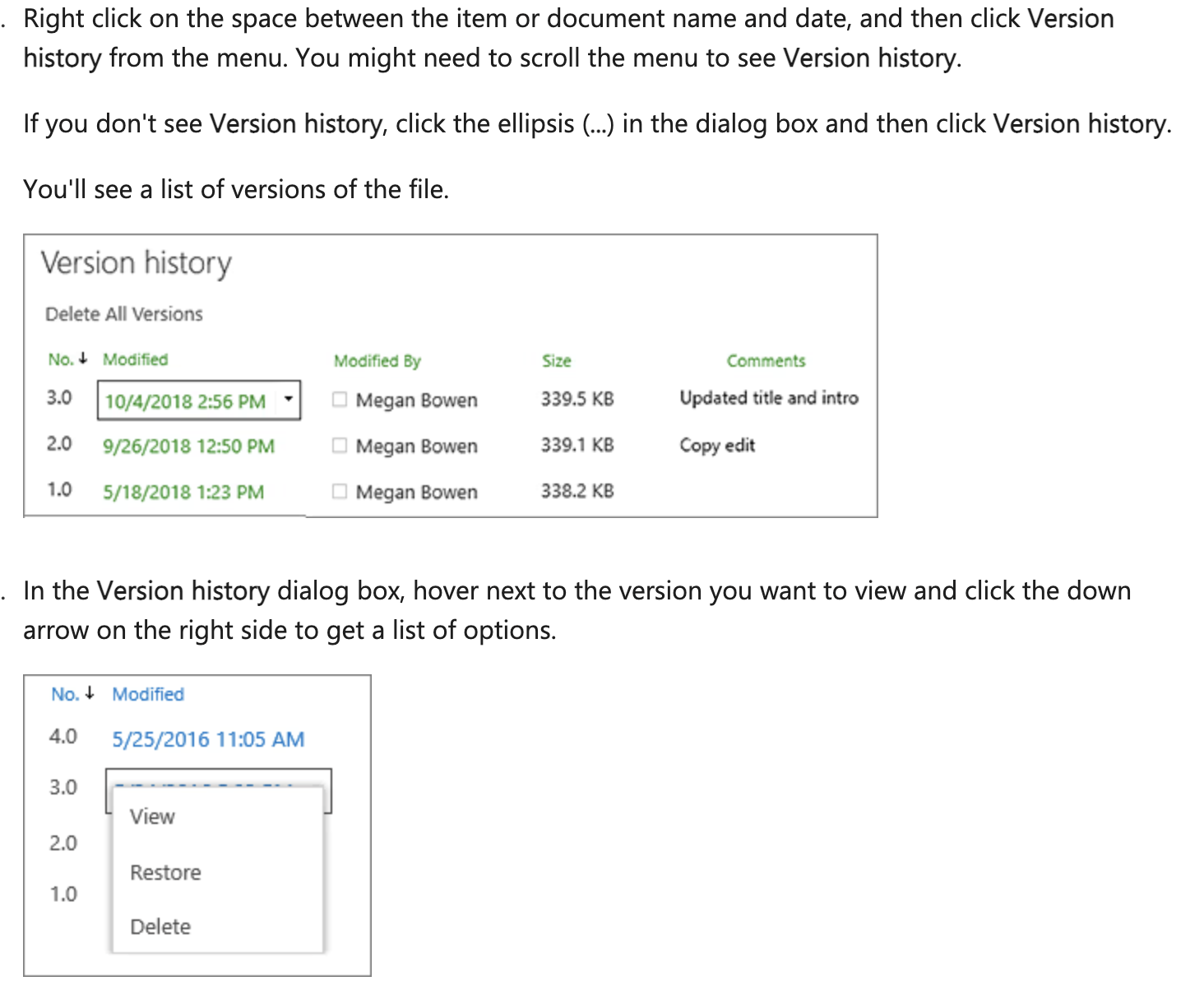
Key features:
- Document libraries with metadata tagging and custom columns (source : Microsoft)
- Native integration with Microsoft Teams, Outlook, Word, Excel, and PowerPoint
- Workflow automation via Power Automate
- Granular permission controls at the site, library, folder, and file level
- Version history and co-authoring support
Pros:
- Seamless integration with the broader Microsoft 365 ecosystem
- Highly customizable for complex enterprise requirements
- Enterprise-grade scalability and security
Cons:
- Complex initial setup and ongoing administration
- Typically requires dedicated IT support or SharePoint expertise
- Can be over-engineered for small teams or straightforward storage needs
When to choose SharePoint:
- Your organization already uses Microsoft 365
- You need tight integration between document storage and tools like Teams or Outlook
- You have IT resources available to manage configuration and governance
- You require enterprise-level permissions, compliance support, and audit capabilities
2. Google Workspace — Best for Real-Time Collaboration and Remote Teams
Overview: Google Workspace (formerly G Suite) is a cloud-based productivity suite centered on real-time collaboration. Google Drive serves as its document storage backbone, with Docs, Sheets, and Slides supporting simultaneous multi-user editing.
Best for: Distributed or remote teams that prioritize collaboration speed and ease of adoption over advanced document control.

Key features:
- Real-time co-editing across Docs, Sheets, and Slides
- Cloud-based storage via Google Drive with folder-based organization
- Commenting, suggesting, and version history on all documents
- External sharing via link or email with permission settings
- Integration with Gmail, Google Meet, and Google Calendar
Pros:
- Low barrier to adoption — familiar interface for most users
- Strong real-time collaboration, including simultaneous editing by multiple users
- Effective search across documents and Drive
Cons:
- Limited advanced document control features compared to enterprise DMS platforms
- Offline access and metadata management are less robust
- Version control is basic relative to specialized document management tools
When to choose Google Workspace:
- Your team is remote or distributed and needs frictionless, real-time collaboration
- Simplicity and adoption speed are higher priorities than advanced document governance
- Your organization already uses Gmail and other Google services
- Most document sharing is internal or with familiar collaborators
3. Clinked — Best for Secure Client Collaboration and External Document Sharing
Overview: Clinked is a client portal and document management platform designed for businesses that share documents regularly with external parties — including clients, partners, and contractors. It combines document management with client communication and project tools in a single branded environment.
Best for: Professional services firms, agencies, legal teams, and consulting practices that need structured, secure, and branded external collaboration.

Key features:
- Branded client portals with custom logos and colors
- Granular permission controls at the group, folder, and file level
- Secure document sharing with external clients and stakeholders
- Integrated task and project management tools
- Activity tracking and audit trails on document access
- Mobile-accessible client portal
Pros:
- Built for external collaboration, not just internal document storage
- White-label branding supports a professional, client-facing experience
- Combines document management, messaging, and task tracking in a single platform
Cons:
- More specialized than general-purpose DMS tools — less suited to purely internal workflows
- May exceed the requirements of very small teams with minimal client interaction
- Fewer native integrations with enterprise tools compared to SharePoint or Box
When to choose Clinked:
- You share documents regularly with external clients, partners, or contractors
- You need a branded, professional portal for client-facing interactions
- You require strict control over who can view, download, or edit shared documents
- Your work involves managing projects with external stakeholders alongside internal teams
- You operate in professional services: legal, accountancy, consulting, financial advisory, or agency work
4. Egnyte — Best for Security, Compliance, and Regulated Industries
Overview: Egnyte is an enterprise content platform built around security, governance, and regulatory compliance. It is used in industries where strict data controls are a legal or operational requirement, including healthcare, financial services, legal, and life sciences.
Best for: Organizations in regulated industries that require compliance controls, audit trails, and data governance alongside document management.
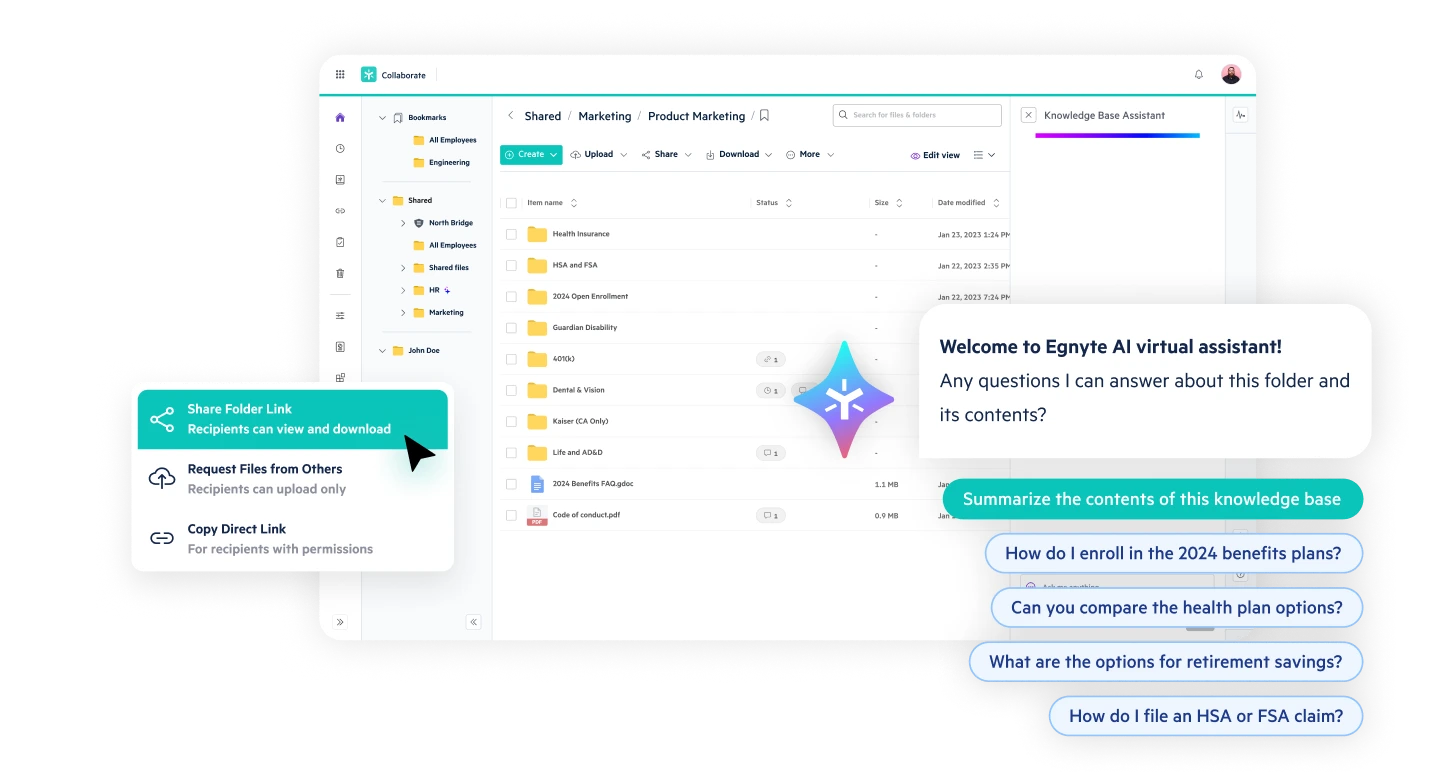
Key features:
- Granular permissions at the folder and file level
- Comprehensive audit logs and access monitoring
- Data loss prevention (DLP) and sensitive content detection
- Compliance support for HIPAA, GDPR, FTC Safeguards, and other frameworks
- Hybrid deployment options (cloud and on-premises)
Pros:
- Designed for compliance-heavy environments
- Strong data governance and risk management capabilities
- Flexible deployment options for organizations with data residency requirements
Cons:
- Higher cost relative to general-purpose document storage tools
- Setup and configuration require more time than simpler platforms
- Interface can feel less intuitive for non-technical users
When to choose Egnyte:
- Your organization operates in a regulated industry (healthcare, finance, legal, life sciences)
- You need documented audit trails for compliance reporting
- Data governance and sensitive content monitoring are organizational requirements
- You require flexible deployment — cloud, on-premises, or hybrid
5. DocuWare — Best for Document Workflow Automation
Overview: DocuWare is a cloud-based document management and workflow automation platform designed to digitize and automate paper-intensive or process-heavy document workflows. It is commonly used in accounts payable, HR, and operations departments.
Best for: Organizations that need to automate document-driven processes such as invoice approval, employee onboarding, contract routing, and purchase order management.
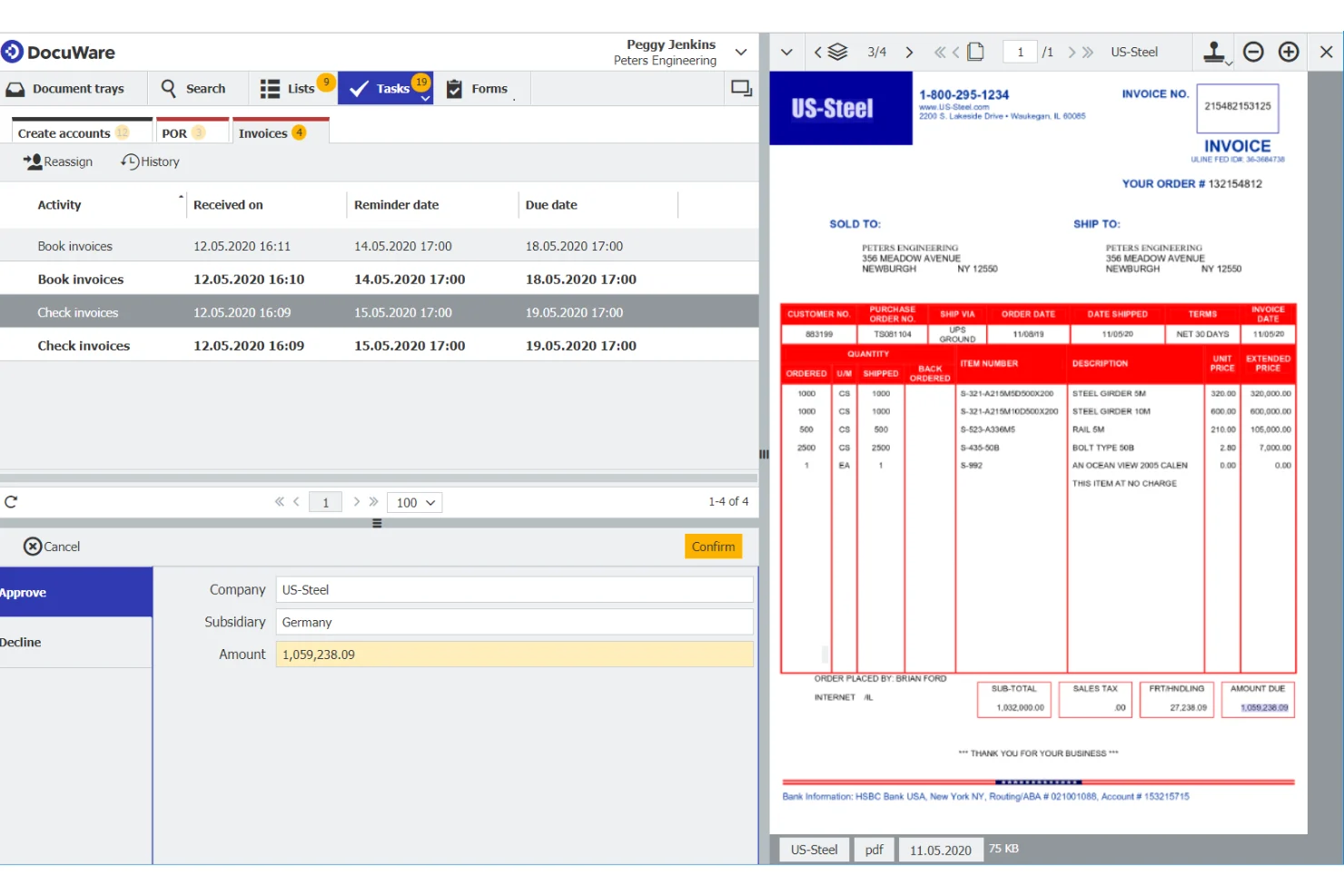
Key features:
- Visual workflow builder for automating document routing and approvals
- Intelligent document capture and data extraction
- Digital signatures and form processing
- Secure cloud-based document archive
- Integration with ERP, CRM, and accounting systems
Pros:
- Strong automation capabilities that reduce manual document handling
- Well-suited to complex, multi-step approval workflows
- Integration options with common business applications
Cons:
- More complex to configure than general-purpose storage tools
- Best value is realized with high document volumes — may be more than small teams need
- Pricing reflects its enterprise positioning
When to choose DocuWare:
- Your team handles high volumes of documents that require structured review, approval, or routing
- You want to automate repetitive document workflows such as invoice processing or contract management
- You are digitizing paper-based processes in departments like finance, HR, or operations
- You need integration between document management and ERP or accounting systems
6. M-Files — Best for Metadata-Based Document Organization
Overview: M-Files organizes documents based on metadata rather than traditional folder structures. Documents are categorized by what they are project, type, status, client rather than where they were saved, enabling more consistent and reliable retrieval.
Best for: Organizations managing large volumes of structured documents where context-based retrieval and consistent classification are priorities.

Key features:
- Metadata-driven document organization (categorized by type, project, client, status, and more)
- Automatic version control with check-in/check-out
- Workflow automation for document review and approval
- AI-assisted document classification and tagging
- Integration with Microsoft 365, Salesforce, and other business tools
Pros:
- Reduces time spent locating documents through metadata-based retrieval
- Strong version control and document lifecycle management
- Flexible structure that adapts to different business processes and document types
Cons:
- Requires a shift from folder-based to metadata-based document thinking
- Initial configuration and classification setup takes time and planning
- Learning curve for users accustomed to traditional folder structures
When to choose M-Files:
- Your organization struggles to locate documents due to inconsistent folder naming or structures
- You manage large volumes of documents that benefit from consistent categorization (contracts, engineering drawings, project files)
- You prefer metadata-driven search and retrieval over manual folder navigation
- AI-assisted document classification is a priority
7. Box — Best for Scalable Enterprise Cloud Content Management
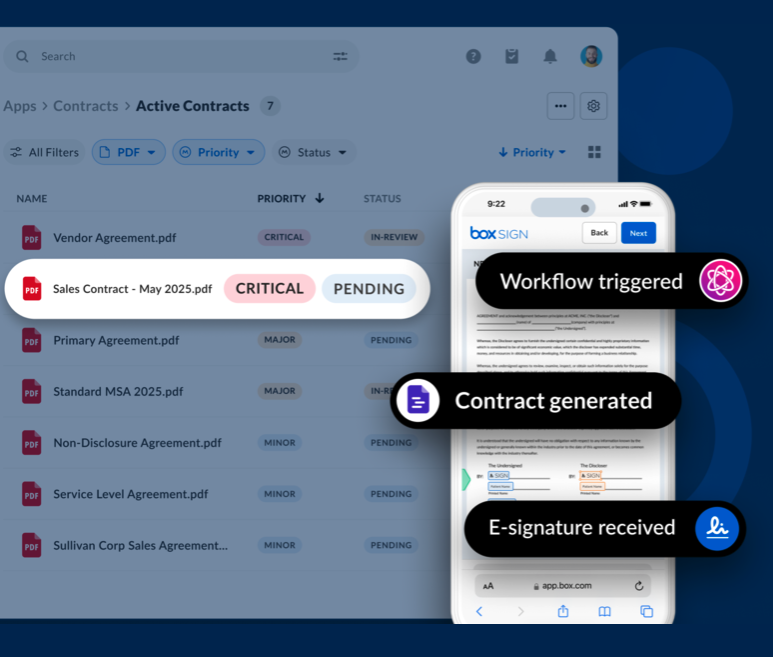
Overview: Box is an enterprise-grade cloud content management platform that combines document storage, collaboration, and workflow automation. It is used by mid-to-large organizations that need scalable, secure cloud storage alongside broad third-party integrations.
Best for: Mid-to-large businesses that need scalable cloud storage, collaboration features, and extensive integrations with existing business tools.
Key features:
- Scalable cloud storage with enterprise-grade security
- Real-time collaboration and co-editing
- Workflow automation via Box Relay
- Integrations with Salesforce, Slack, Microsoft 365, Google Workspace, and many other applications
- Advanced security controls including encryption, access logging, and DLP
Pros:
- Highly scalable — suitable for mid-sized teams through large enterprises
- Broad integration ecosystem across common business tools
- Strong security and compliance certifications
Cons:
- Can become expensive at scale relative to simpler alternatives
- Advanced features such as Box Relay require higher-tier plans
- Interface is functional but less refined than some competitors
When to choose Box:
- You need scalable cloud storage with enterprise security from day one
- Your team relies on a wide range of third-party tools that need to connect with your DMS
- You want collaboration capabilities alongside robust document governance
- Your organization is mid-to-large and anticipates growth
8. Dropbox — Best for Simple File Storage, Syncing, and Sharing
Overview: Dropbox is a widely used cloud storage and file-sharing tool that prioritizes simplicity. It makes it straightforward to store, sync, and share files across devices with minimal configuration. source: Dropbox.
Best for: Small teams, freelancers, or individuals who need reliable cloud file storage and sharing without the complexity of a full enterprise DMS.
Key features:
- Seamless file syncing across desktop, mobile, and web
- Shared folders and link-based file sharing
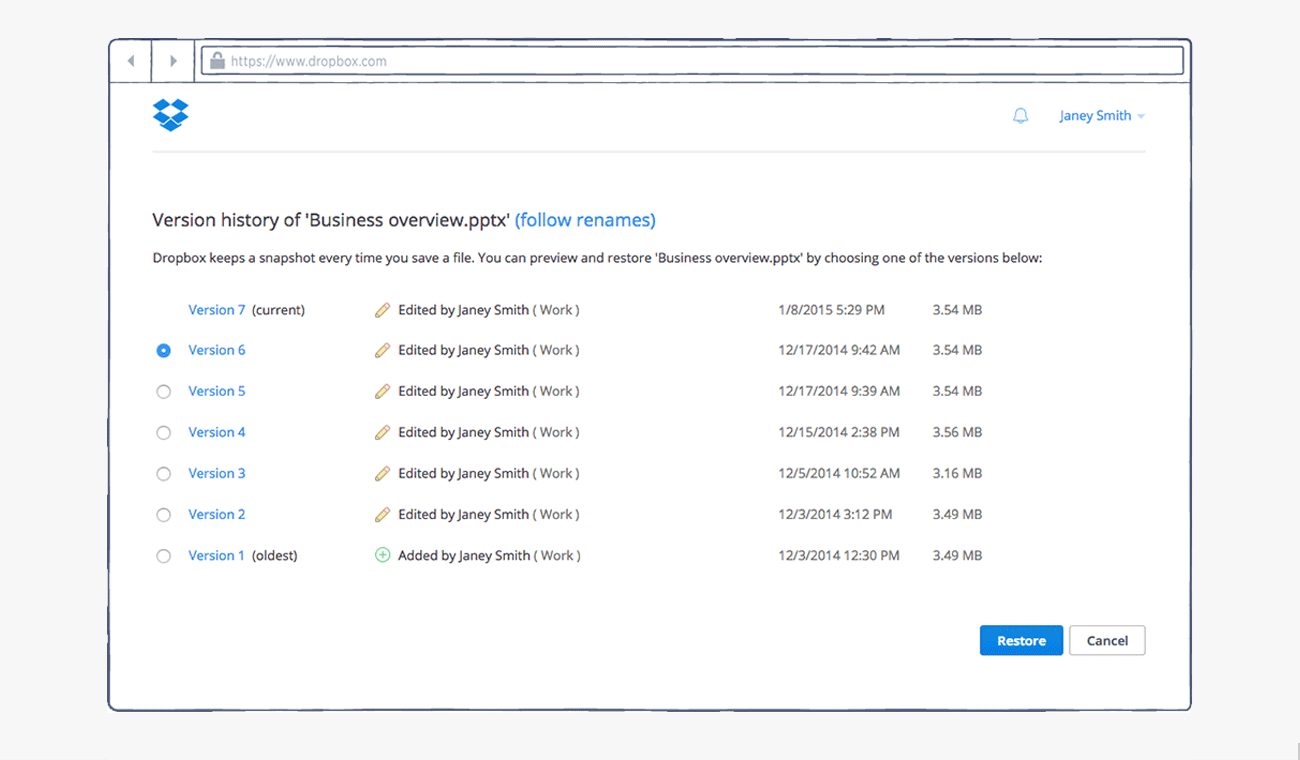
- Version history and file recovery
- Dropbox Paper for lightweight collaborative document creation
- Integrations with Slack, Zoom, Google Workspace, and other common tools
Pros:
- Fast to set up and easy to use across all experience levels
- Reliable cross-device syncing with wide platform support
- Familiar interface with broad consumer and business adoption
Cons:
- Limited document governance and compliance features
- Not designed for complex workflows or structured document management
- Permission controls are less granular than enterprise DMS platforms
When to choose Dropbox:
- You need simple, reliable cloud storage and file syncing
- Document management needs are straightforward — store, share, access
- You are a freelancer, small team, or early-stage business without complex governance requirements
- You want a low-friction tool that works across all devices with minimal setup
Comparison of top document management systems by use case, key strength, and typical user.
What is the Best Document Management Software for Small Businesses?
For small businesses, the best document management software balances ease of use, cost, and the features actually needed — without enterprise-level complexity.
The most suitable options depend on how the business operates:
- Google Workspace — best for small teams that collaborate frequently on shared documents, with a simple interface and low barrier to adoption
- Dropbox — best for businesses that need reliable file storage and cross-device syncing with minimal setup
- Clinked — well-suited to small professional services businesses (agencies, consultants, accountants) that share documents with clients and need a structured, access-controlled portal experience
- Box — a practical option for small businesses that anticipate growth and want a scalable platform with strong security from the start
Small businesses working with external clients often find that general cloud storage tools lack the access controls and audit trails that client-facing document sharing requires. In those cases, a dedicated client collaboration platform provides a more appropriate level of control without the overhead of a full enterprise DMS.
What is the Best Document Management Software for Client Collaboration?
The best document management software for client collaboration combines secure document sharing, structured access controls, and a professional interface designed for external stakeholders.
General-purpose storage tools such as Google Drive or Dropbox are commonly used for client sharing but typically lack the granular controls, audit trails, and branding options that professional services businesses require.
Platforms built for external client collaboration include:
- Clinked — a dedicated client portal platform with white-label branding, granular permissions, task management, and audit trails; designed for professional services businesses that work regularly with external clients
- Box — an enterprise-grade option with strong external sharing controls and compliance certifications, suited to larger organizations
- Egnyte — appropriate for regulated industries where client document sharing must meet strict governance requirements
For professional services businesses where client-facing document sharing is a core workflow, a platform built for external collaboration offers more appropriate controls than a repurposed internal storage tool.
Common Mistakes When Choosing Document Management Software
Selecting a DMS based on feature lists or brand recognition often leads to poor fit. These are the most frequent mistakes organizations make during evaluation:
- Choosing a storage tool when a workflow tool is needed — buying Dropbox or Google Drive to solve a problem that actually requires approval routing, audit trails, or structured access controls
- Ignoring external collaboration requirements — evaluating tools based on internal team needs only, then discovering the platform has no client portal, limited external sharing controls, or no branded interface for client-facing use. In some cases, businesses also evaluate [virtual data room solutions] for secure document sharing in high-stakes contexts such as M&A, fundraising, or legal due diligence
- Overbuying enterprise platforms for small teams — implementing SharePoint or Egnyte in organizations that lack the IT resources to configure and maintain them, resulting in low adoption and wasted investment
- Underestimating the importance of permissions — selecting a tool that only supports folder-level sharing, then discovering it cannot restrict access at the file, group, or user level when needed
- Failing to assess integrations before committing — choosing a DMS that does not connect with existing CRM, accounting, e-signature, or project management tools, creating data silos and manual workarounds
- Not involving end users in the evaluation — selecting a platform based on administrator preferences or feature checklists, without testing usability with the people who will use it daily
- Treating all tools as equivalent — assuming that any DMS will handle client-facing document sharing, when many platforms are designed exclusively for internal teams and lack the portals, branding, and external permission controls that external collaboration requires
How Document Management Systems Are Categorized
Document management tools generally fall into three broad categories. Understanding which category fits your needs helps narrow the shortlist.
Storage-first platforms
Examples: Dropbox, Google Drive
These tools prioritize ease of use and accessibility over advanced document control. They suit small teams, early-stage businesses, and use cases where simplicity outweighs governance requirements.
Strengths: Fast setup, low friction, broad device support
Limitations: Basic permissions, limited workflow automation, minimal compliance features
Enterprise content management systems
Examples: SharePoint, Box, Egnyte
Built for larger organizations that need scalability, security, compliance, and integration with enterprise tools. They offer the most control but require more configuration and IT investment.
Strengths: Scalability, security, compliance, extensive integrations Limitations: More complex to deploy and maintain, higher cost
Specialized platforms
Examples: Clinked, DocuWare, M-Files
Built around a specific use case — external client collaboration, document workflow automation, or metadata-based organization. They offer depth in their area of focus that general-purpose tools typically do not match.
Strengths: Purpose-built features, strong fit for specific workflows Limitations: May need complementary tools for needs outside their core focus
Many organizations use more than one category — for example, SharePoint for internal document management and Clinked for external client collaboration.
How to Choose the Best Document Management Software
A structured evaluation process helps avoid selecting a tool based on features alone.
Step 1: Define your primary use case
Start with the most important question: who are you managing documents with?
- Primarily internal teams → SharePoint, Google Workspace, Box
- Clients, partners, or external stakeholders → Clinked
- Regulated industry with compliance requirements → Egnyte
- Document-heavy internal processes → DocuWare, M-Files
Step 2: Evaluate security and compliance requirements
- Does your industry require specific compliance frameworks (HIPAA, GDPR, ISO 27001)?
- Do you need audit trails and access logging?
- Are there data residency requirements that affect where documents can be stored?
If yes to any of the above → prioritize Egnyte or enterprise-tier options with relevant compliance certifications.
Step 3: Assess workflow complexity
- Are document processes linear and simple (store, share, access)? → Dropbox, Google Workspace
- Do documents require multi-step review, approval, or routing? → DocuWare, SharePoint with Power Automate
- Do you need automated classification or intelligent search? → M-Files
Step 4: Consider external collaboration requirements
- Do you share documents regularly with clients, partners, or contractors?
- Do you need branded portals for client-facing interactions?
- Do you require strict controls over what external users can do with shared documents?
If yes → evaluate Clinked or Box for external sharing and portal capabilities.
Step 5: Review integration requirements
Identify the tools already in use: CRM, accounting, email, project management, e-signature. Ensure any DMS under evaluation integrates with these systems. Poor integrations create workarounds that undermine adoption.
Step 6: Factor in total cost of ownership
Subscription costs are only part of the picture. Also consider:
- Implementation and configuration time
- IT support requirements
- Training and change management
- Document migration costs
Step 7: Test with real workflows
Most platforms offer trials or demos. Test with actual documents and real workflows rather than staged demonstrations. Include end users in the evaluation — adoption depends on their buy-in.
Key Features to Look for in Document Management Software
Regardless of which platform is under evaluation, the following capabilities are worth assessing on every shortlist:
- Version control — Can previous document versions be viewed, compared, and restored?
- Access permissions — Can access be controlled at the folder, file, and user-group level?
- Search — Can documents be found quickly by name, content, metadata, or tag?
- Audit trails — Does the system log who accessed or modified each document and when?
- External sharing — Can documents be shared securely with people outside the organization?
- Workflow automation — Can documents be automatically routed for review or approval?
- Mobile access — Can users access and work with documents from mobile devices?
- Integrations — Does the platform connect with CRM, email, e-signature, and project tools?
- Compliance certifications — Does it meet the regulatory requirements relevant to your industry?
Final Takeaway
There is no single best document management software. The right platform depends on how an organization works and who it collaborates with.
- Choose enterprise systems like SharePoint or Egnyte when scalability, compliance, and deep integrations are the priority
- Choose collaboration-first tools like Google Workspace when distributed teams and co-editing speed matter most
- Choose specialized platforms like Clinked when working with external clients requires secure, structured, and professionally branded document sharing
- Choose automation-focused tools like DocuWare when document workflows are complex and high-volume
- Choose simple storage tools like Dropbox when ease of use and cross-device syncing are the primary requirements
The most common selection mistake is choosing the most feature-rich platform rather than the best-fit platform. A tool that matches the actual workflow — and that teams will adopt consistently — will always deliver more value than a more powerful tool that creates friction.
Next Steps
Before selecting a document management platform:
- Map current document workflows — identify where bottlenecks or access control gaps exist
- Determine who documents are shared with most — internal teams, clients, or both
- List any compliance or security requirements that must be met
- Request demos or trials from two to three shortlisted platforms
- Include end users in the evaluation — adoption depends on their buy-in
For organizations whose workflow involves sharing documents with external clients or stakeholders, a platform designed specifically for that purpose can meaningfully improve control, professionalism, and collaboration efficiency compared to a general-purpose storage tool.
Frequently Asked Questions
What is document management software?
Document management software (DMS) is a digital system that enables organizations to store, organize, track, share, and control access to documents securely. According to AIIM, document management encompasses the use of systems and software to store, manage, and track electronic documents. Unlike basic file storage, a DMS includes version control, access permissions, audit trails, and often workflow automation — making it appropriate for regulated industries and any organization where document security and traceability matter.
What is the best document management software for small businesses?
For small businesses, Google Workspace and Dropbox are the most accessible options given their low cost and ease of use. Small professional services businesses — such as agencies, accountants, and consultants — often benefit from a client collaboration platform like Clinked, which provides secure client portals, branded document sharing, and access controls that general-purpose storage tools do not offer.
What is the difference between document management software and cloud storage?
Cloud storage (such as Dropbox or Google Drive) is designed primarily for storing and syncing files. Document management software adds granular access controls, full version history, audit logging, workflow automation, and compliance support. The key distinction is control: cloud storage shows you where a file is; document management software governs who can access it, what they can do with it, and what has happened to it over time.
What is the best document management software for client collaboration?
For professional services businesses, platforms built specifically for external collaboration — such as Clinked — offer more appropriate controls than repurposed internal storage tools. Clinked provides branded client portals, granular permissions, audit trails, and integrated task management in a single platform. For larger enterprises requiring external sharing with compliance controls, Box and Egnyte are established alternatives. General cloud storage tools lack the access controls, audit trails, and professional branding that dedicated client collaboration platforms provide.
What features should I look for in a document management system?
The most important features to evaluate are: version control, granular access permissions, audit trails, secure external sharing, workflow automation, search capabilities (including metadata search), mobile access, third-party integrations, and compliance certifications relevant to your industry.
Is SharePoint a document management system?
Yes. Microsoft SharePoint is one of the most widely deployed document management systems, particularly within Microsoft 365 environments. It provides document libraries, metadata tagging, version control, granular permissions, and workflow automation via Power Automate . It is best suited to organizations with IT resources to manage configuration, and is generally considered more than necessary for small teams or simple document storage needs.


