

Best Client Portal for Agencies (2026): Tools Compared + How to Choose
2026 has brought major upgrades to client portal toolsbut do you actually need them, or is it just shiny object syndrome?
If you're searching for the best client portal for agencies, you're likely trying to simplify approvals, centralize communication, and stop chasing clients across emails.
In this guide, we cut through the noise, compare 8 of the best client portal tools for agencies, and help you choose the one that actually fits your workflow—not just the one with the most features.
Running an agency means keeping a lot of plates spinning at once. And at some point — usually around the time your client roster hits double digits — the cracks start to show.
Approvals go missing in email threads. Clients ask for files that were definitely sent last Tuesday. Feedback arrives through three different channels on the same project. One client messages the account manager directly, another goes straight to the designer, and a third sends a voice note via WhatsApp at 9pm on a Friday.
Sound familiar?
The problem isn't that your team isn't working hard. It's that the infrastructure holding everything together isn't really infrastructure at all — it's a patchwork of tools that were never designed to work with each other. Email, Slack, Google Drive, project boards, shared spreadsheets. Each one is reasonable on its own. Together, a source of constant friction.
And clients feel it too. Even when the work is excellent, a client who can't find their latest assets, doesn't know where the project stands, or has to contact three people to get a straight answer is not going to feel confident in the agency behind it.
That's exactly the problem a client portal for agencies is built to solve not by adding another tool, but by replacing the mess with something that actually holds together. One place for communication, files, tasks, and approvals organised by client, accessible to the right people, and structured enough to actually reduce the back-and-forth.
For agencies that want to go a step further, a white label client portal wraps all of that in your own brand, so the workspace feels like yours rather than a generic third-party tool.
Most agencies don't need more tools. They need fewer moving parts and one place where everything just makes sense.
Explore white label client portal
What Is a Client Portal for Agencies?
A client portal for agencies is a secure, centralised workspace where agencies and their clients can communicate, share files, manage tasks, track progress, and handle approvals all in one place, rather than scattered across a dozen disconnected tools.
Think of it as a dedicated home for every client relationship. Instead of managing one account through email, another through Slack, and a third through a mix of WeTransfer links and WhatsApp threads, an agency client portal gives each account its own structured space with consistent processes.
Depending on the platform, a client portal typically includes:
- Dedicated workspaces per client or project
- File storage and document management
- Messaging and discussion threads
- Task tracking and milestone views
- Approval and sign-off workflows
- Role-based access controls
- Customisation and branding options
What separates a proper agency client portal from a project management tool with a guest link is focus. A client management portal is designed around the client experience, not just internal planning. It's built so that clients can log in, find what they need, take action, and feel informed without needing a walkthrough every time.
That matters especially in multi-client environments. A creative agency managing ten active accounts. A marketing consultancy running campaigns across six brands. A PR firm handling ongoing retained work for a rotating roster of clients.
Each of these businesses benefits from a repeatable, scalable structure and that's what a well-chosen agency portal provides.You don't need to switch everything overnight. Most teams start with one client workspace and expand from there.
Why Do Agencies Need a Client Portal?
Organisation Across Multiple Accounts
Here's how agency communication typically evolves: one client emails feedback, another Slacks it, a third leaves comments in a shared Google Doc, and a fourth invites you into their project management tool — on their terms, in their format.
If you're juggling multiple clients, this will sound familiar. It's not anyone's fault. It's just what happens when there's no shared infrastructure.
An agency portal changes that. Every client gets the same consistent structure: files, conversations, tasks, and approvals tied to the right project and the right account. Your team doesn't have to remember how each client prefers to communicate. The portal provides a process that works for everyone — without feeling impersonal.
A Smoother, More Transparent Client Experience
Clients don't always need to know how the work is done. But they do need to know where things stand.
A good portal gives them that visibility without requiring your team to send a weekly status email. Progress is visible. Files are findable. Next steps are obvious.
That transparency reduces anxiety on the client side and cuts the volume of "just checking in" messages on your side — a genuine improvement for both parties.
Internal Efficiency That Compounds Over Time
The hidden cost of fragmented workflows is significant. Searching for the right version of a document. Chasing an approval that got buried in email. Manually updating a client on something they could have seen for themselves.
These aren't dramatic failures they're small, daily drains on your team's time. And if you're juggling multiple clients, you'll feel them accumulate fast.
Most agencies don't realise how much time they're losing to small inefficiencies until those inefficiencies disappear.
A client portal for marketing agencies or any other specialism can claw back real hours by keeping everything findable, organised, and moving forward without constant manual intervention. Faster sign-offs. Fewer duplicate conversations. Less document ping-pong.
Brand Presence That Matches the Quality of Your Work
The experience your clients have between deliverables is part of what they're paying for. If they're logging into a workspace branded around someone else's software, it subtly signals that your delivery process is borrowed rather than built.
A white label client portal changes that. Clients arrive in an environment that looks and feels like yours — your domain, your colours, your identity. That kind of attention to detail matters, particularly for agencies competing at the higher end of their market.
Why Do Most Client Portals Break Down at Scale ?
As agencies grow, the problem isn’t just where work lives, it’s how work moves.
Feedback gets buried in email threads. Approvals stall because no one knows who’s responsible. Teams spend more time chasing responses than actually delivering work.
Many tools try to solve this with more workflows, more automation, more layers. But for most agencies, that just adds another system to manage.
The real issue isn’t a lack of workflows.
It’s a lack of visibility.
When files, conversations, and approvals live in one place clearly structured and easy to access work moves forward without constant follow-up.
Key Features of a Client Portal for Agencies
Not every platform is built with agencies in mind. Some are general project management tools with a client-sharing option attached. Others are document repositories with a messaging layer on top.
When you're evaluating options, it's worth understanding which features actually matter for how your agency operates.
Client Communication
Good client communication in a portal isn’t just messaging, it's structured messaging. Conversations attached to the relevant project, file, or task, so nothing gets lost and no one has to scroll through an inbox to find context.
In practice, that means fewer scattered updates and more clarity around what’s happening and what needs attention.
With Clinked, communication is built around how teams actually work:
- Group chat keeps conversations tied to specific clients or projects so updates don’t disappear into inbox threads
- Reachouts let you send targeted updates, requests, or announcements without chasing people individually
- Email notifications keep clients in the loop automatically without relying on manual follow-ups
No more switching between email, Slack, and shared docs just to piece together a single conversation.Everything lives in one place — visible, traceable, and easy to act on for both your team and your clients.communication more accessible and more traceable — for both your team and your clients.
File Sharing and Document Management
Agencies move a lot of assets: strategy documents, creative files, contracts, reports, presentations, and final deliverables.But the real issue isn’t volume — its control.Files get shared across email, Slack, Drive, and random links. Feedback lives in different places. Approvals slow down because no one is quite sure which version is the right one. This is where most client workflows break and where the right system makes the biggest difference.Strong file sharing and document management capabilities aren’t optional they’re what keep everything moving without friction.Practically, this means drag-and-drop uploads, version control so clients always access the right file, folder structures that mirror your workflow, and granular user permissions so sensitive documents only go to the right people.
Clinked approaches document management differently not as storage, but as part of how client work actually gets done.
- Files live in dedicated client portal workspaces per client
- Every version is tracked automatically
- Feedback stays attached to the right file
- Approvals happen in context, not buried in inbox threads
No more document ping-pong. No more “final_v3_FINAL”.
Just one place where everything is clear for your team and your clients.
If document chaos is slowing things down, it’s worth seeing how this works in practice.
→ Explore document management for agencies
This is where most agencies lose hours every week and don’t realise it. Practically, this means drag-and-drop uploads, version control so clients always access the right file, folder structures that mirror your project workflow, and permission-based access so sensitive documents only go to the right people.
If you've ever sent a client the wrong version of something, you'll understand why version control matters more than most feature lists suggest.
Task Management
For agencies handling ongoing work, a portal that only does file sharing will start to feel limited quickly. Task management keeps projects moving and gives both teams and clients a shared view of what's happening, what's due, and who owns what.
The features that matter most: task assignment, due dates, milestone tracking, and support for recurring workflows. These are especially useful for agencies running monthly retainers or phased delivery programmes where the same process repeats across cycles.
Collaboration Tools
A portal should support real collaboration not just one-way file delivery. Depending on your workflow, that might mean structured approval flows, shared calendars for milestone visibility, co-editing on documents, or simply real-time updates that keep everyone aligned without requiring a meeting to discuss it.
The practical measure: does the portal reduce the number of emails you send to move something forward? If yes, the collaboration layer is doing its job.
Security and Data Protection
Agencies regularly handle material that clients would very much prefer to stay confidential: commercial strategies, financial documents, legal contracts, proprietary data. A secure client portal isn't a premium feature it's a baseline expectation.
Role-based permissions matter here. Clients should only see what belongs to their account. Different team members may need different levels of access. And as your client list grows, the ability to manage all of that cleanly and auditably becomes genuinely important.
Customisation and White Labelling
This is where platforms diverge most sharply and where agencies often underestimate how much it matters. Portal customisation ranges from "add your logo" all the way to a fully branded environment: custom domain, branded login page, white-labelled email notifications, tailored navigation.
For agencies where the client experience is part of the product, the depth of white-label capability can be the deciding factor. A portal that looks and feels like an extension of your agency is a very different thing from one that displays another company's logo in the corner.
Integrations and Mobile Access
Most agencies already use tools for accounting, CRM, storage, or project management. Meaningful client portal integrations with those systems keep data consistent and reduce duplication across your stack.
And because clients and team members increasingly work across devices, a mobile client portal experience whether through a responsive interface or a dedicated app ensures the portal is genuinely accessible wherever work actually happens.
Best Client Portal Tools for Agencies
There's no platform that suits every agency equally. The right choice depends on whether you're prioritising branding, project depth, simplicity, or breadth of capability. Here's a balanced look at the most notable options.
1. Clinked
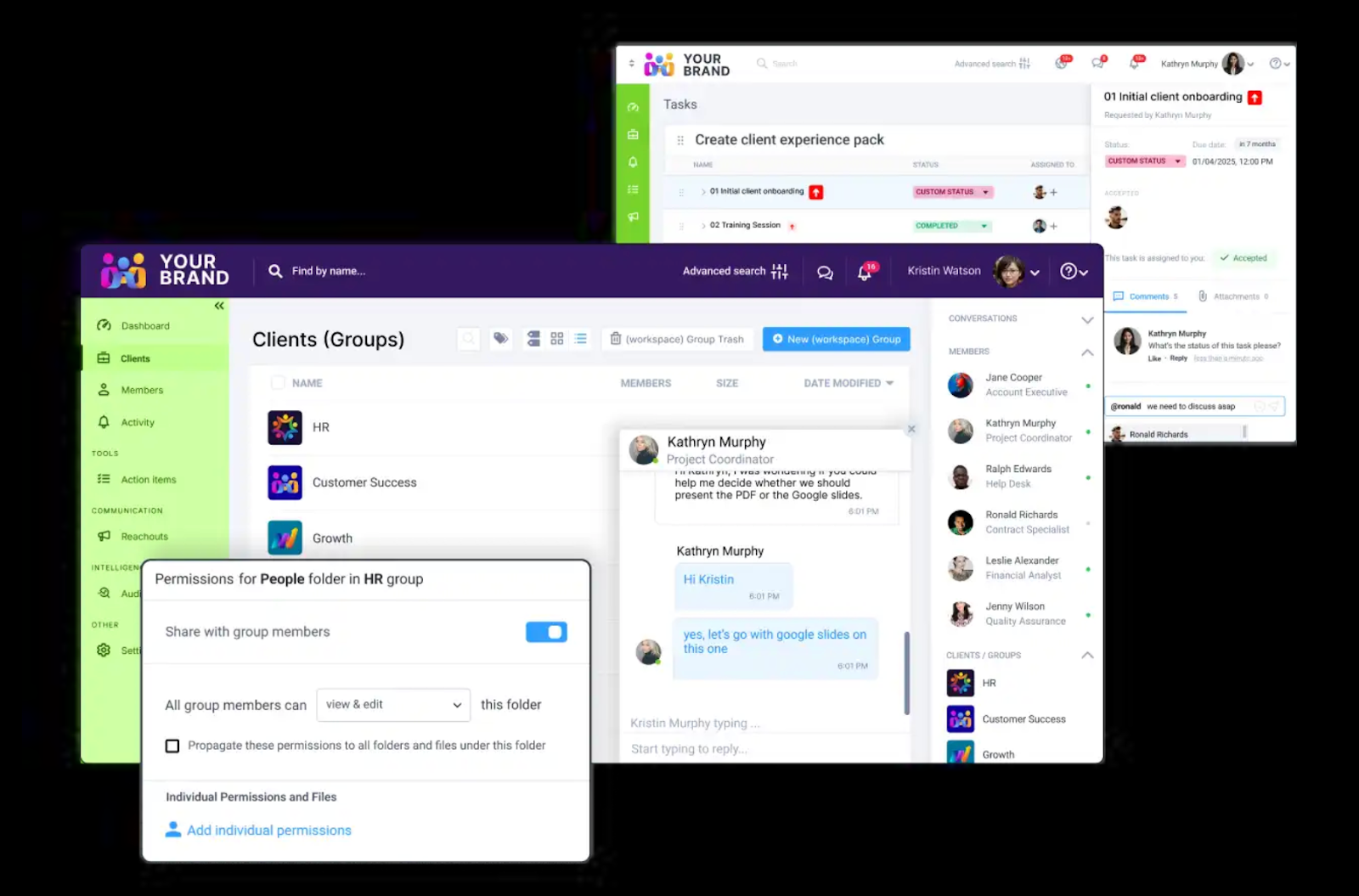
Before anything else, there’s one factor most agencies can’t afford to get wrong: Clinked's interface is organised around the client workspace but behind that simplicity is a platform designed to keep the right people in, and the wrong people out, with granular user permissions and access controls.
Navigation is clean, grouped by client or project group, and keeps the most relevant actions files, tasks, messages immediately accessible without requiring any configuration to get there. The white-label layer means clients see your branding throughout, not Clinked's.
Overview: Clinked is built for agencies that want everything in one place without the chaos. It's a secure client collaboration platform designed around the experience of working with clients, not just alongside them. Where many tools treat the client-facing layer as an afterthought, Clinked treats it as the whole point.
Most tools try to adapt to client work. Clinked starts there.
Key features:
- Full white-label portal with custom domain support
- Secure file sharing and document management
- Task and project tracking
- Dedicated workspaces per client or group
- Branded mobile app
- Granular user permissions and access controls
- Discussion threads and activity feeds
Best for: Agencies that want a white label client portal that genuinely looks and feels like theirs and doesn't require them to sacrifice collaboration quality to get it.
What sets it apart: Most tools in this space were built for internal teams first and adapted for clients later. Clinked was built the other way around. That means the client experience is considered at every level from how files are organised to how notifications are sent to how the login page looks on your domain, in your colours, with your name on it.
If you've tried forcing internal tools into client workflows, this will feel like a reset.The result is a portal your clients will actually want to use and one that quietly reinforces your agency's credibility every time they do.If you've ever tried to force a project management tool into a client-facing role, you'll feel the difference immediately. Clinked doesn't need adapting; it already fits.
Pros: Strong white-label depth; purpose-built for client collaboration; secure and well-structured; branded mobile app included; simpler to navigate than general project management platforms.
Cons: Maybe more than very small agencies need if requirements are minimal; teams with a deeply embedded project management stack should assess overlap before switching.
For most agencies, the decision comes down to this: do you want to keep adapting tools that were never built for clients, or switch to something that was?
2.Moxo
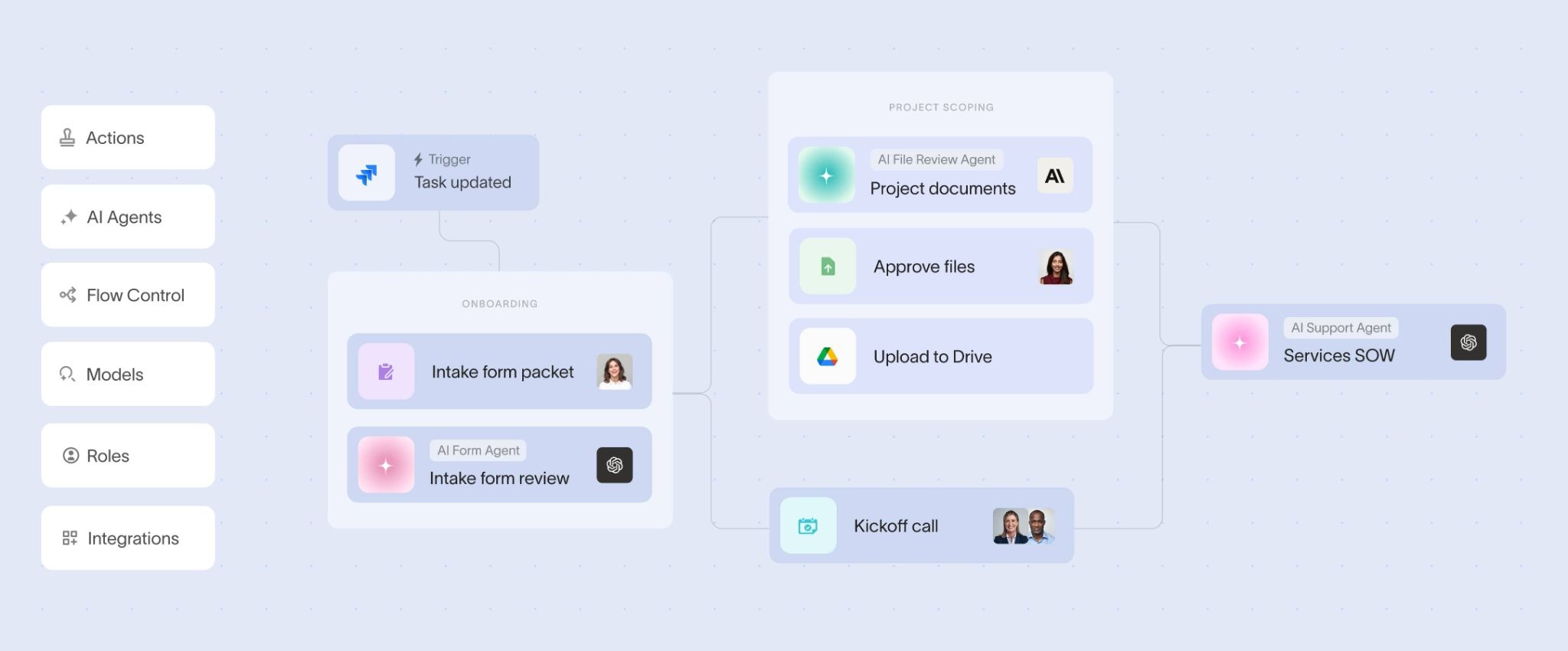
Moxo’s interface is built around structured workflows and multi-step processes. Dashboards reflect this showing tasks, approvals, and process stages moving across different stakeholders. For agencies managing complex, multi-layered operations, that structure can be valuable. But for teams that just need a clear place to share files, gather feedback, and move approvals forward, it can feel like more system than necessary.
Overview: Moxo is a workflow and process orchestration platform designed for agencies handling complex, multi-step client work across teams and stakeholders. It focuses heavily on structuring how work moves from onboarding to approvals using predefined workflows and automation.
Key features: Workflow builder, automated approvals, client portals, task routing, integrations, and white-label capabilities.
Best for: Teams managing complex, multi-stage processes that require strict coordination across multiple stakeholders.
Pros: Strong workflow automation; clear ownership across tasks; useful for managing complex approval chains; supports structured execution at scale.
Cons: Requires upfront process setup; can feel heavy for day-to-day client collaboration; less intuitive for clients who just need a simple place to access files, give feedback, and approve work.
Where it differs: Moxo is built around workflows first, meaning agencies often need to define how work should move before they can start using it effectively. That works well for complex operations, but for many agencies, the challenge isn’t designing workflows, it's reducing the day-to-day back-and-forth.
3. SuiteDash
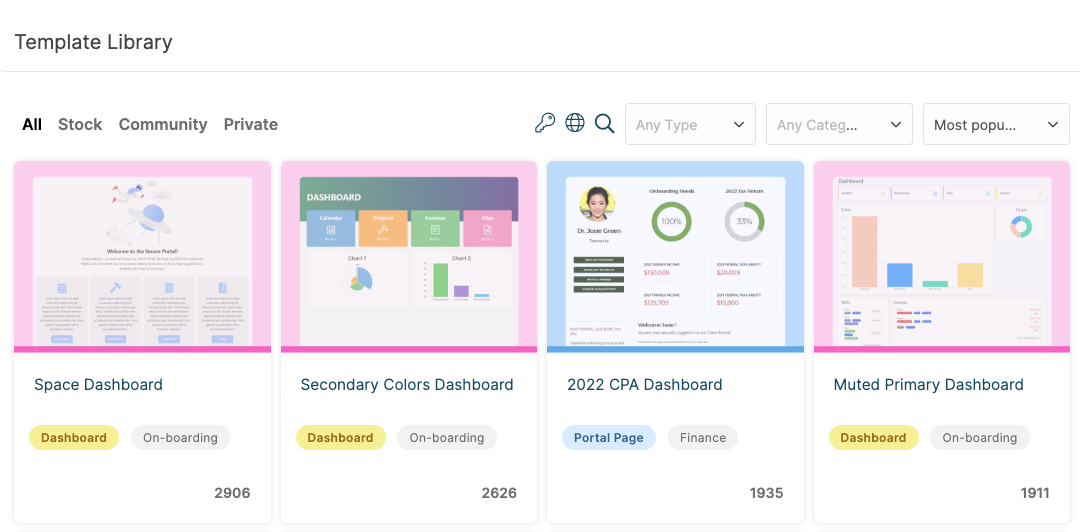
SuiteDash presents a feature-dense environment. The dashboard reflects its breadth CRM pipeline, project tracking, invoicing, and portal access sit side by side. For agencies that genuinely need all of those functions in one place, that consolidation is useful. For those primarily seeking a clean client-facing workspace, it can feel like navigating more than necessary.
Overview: SuiteDash is a broad all-in-one business platform that combines a client portal with CRM, project management, invoicing, and proposal tools under one roof.
Key features: Client portal, CRM, project and task management, file sharing, invoicing and proposals, white-label options.
Best for: Agencies looking for a single system that covers business operations well beyond client collaboration alone.
Pros: Wide feature coverage; includes billing and pipeline functions; white-label options available.
Cons: Can feel heavy for agencies that primarily need a clean, focused portal experience; the breadth of features means more time in setup before you get value from it.
4. Monday.com
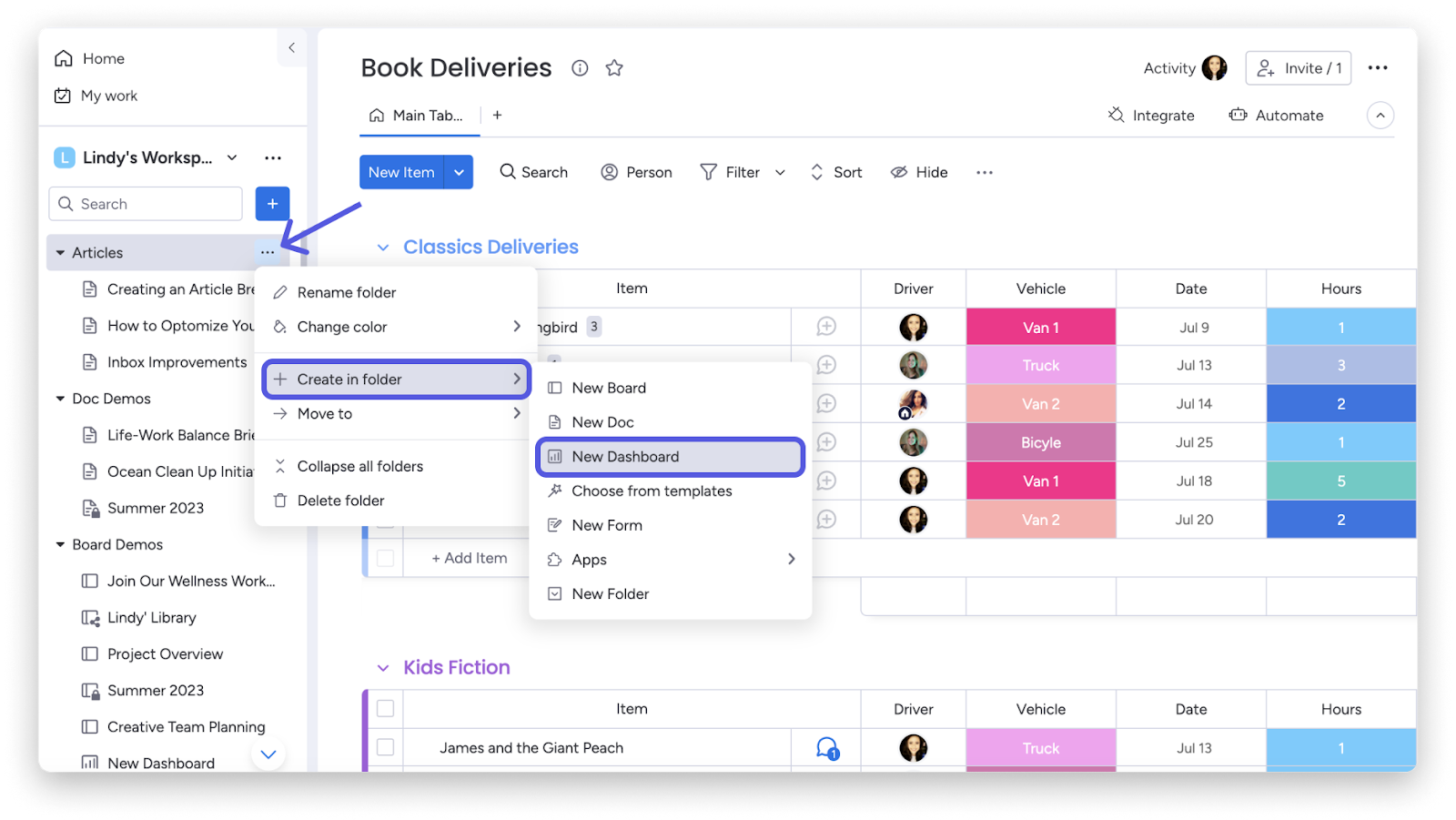
Monday.com's interface centres on boards, timelines, and dashboards built primarily for internal project visibility. The client-sharing experience typically involves granting external users access to specific boards. Functional for project tracking; a different approach from a dedicated client environment.
Overview: Monday.com is a flexible work management platform. Many agencies use it to create client-visible dashboards and track project delivery. It's powerful, but its centre of gravity is internal operations not the client relationship.
Key features: Project and task management, visual dashboards, automation, file sharing, extensive integrations.
Best for: Agencies focused primarily on internal workflow visibility and project execution.
Pros: Highly flexible; excellent automation; strong integration library; visual project tracking is genuinely useful.
Cons: Not purpose-built as a client portal; white-label capability is limited; the client-facing experience often feels like it was added rather than designed.
5. ClickUp
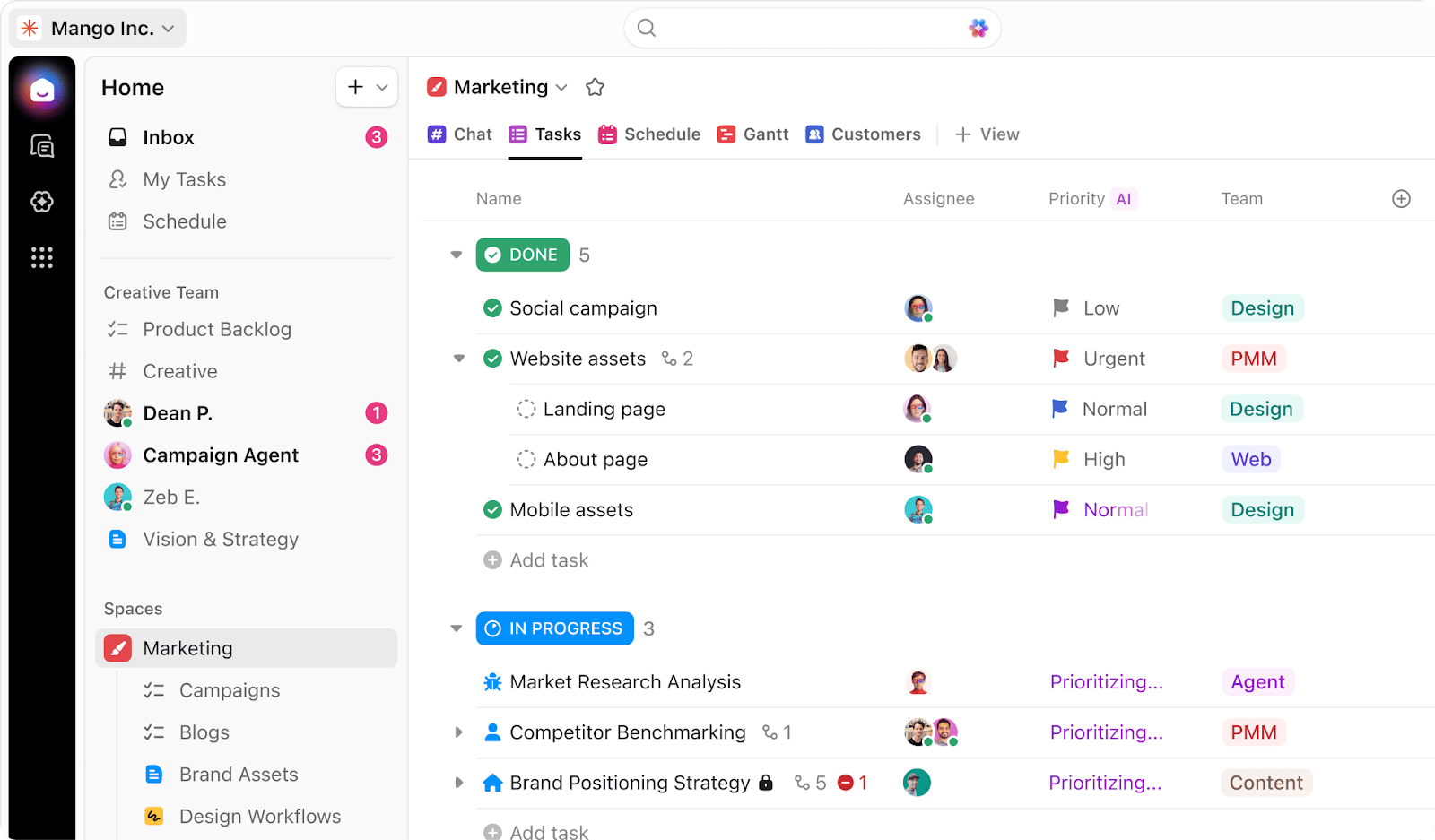
ClickUp offers a wide range of view types — lists, boards, Gantt charts, docs, whiteboards and is configurable at every level. That flexibility rewards teams willing to invest in setup. For clients who aren't familiar with the platform, the range of options can take some getting used to.
Overview: ClickUp is a highly customisable productivity platform with a vast range of project management features. You've probably seen it recommended in every "best tools for agencies" list going and it earns that for internal work. Client-facing, it's a different story.
Key features: Task and project management, docs and wikis, dashboards, time tracking, client-sharing options, integrations.
Best for: Agencies that need deep workflow control internally and can accept a less polished client-facing experience.
Pros: Extremely flexible; broad feature set; free tier available; handles complex internal operations well.
Cons: Can be overwhelming for both teams and clients; white-label options are limited; the client experience often reflects the tool's internal complexity rather than shielding clients from it.
6. Notion
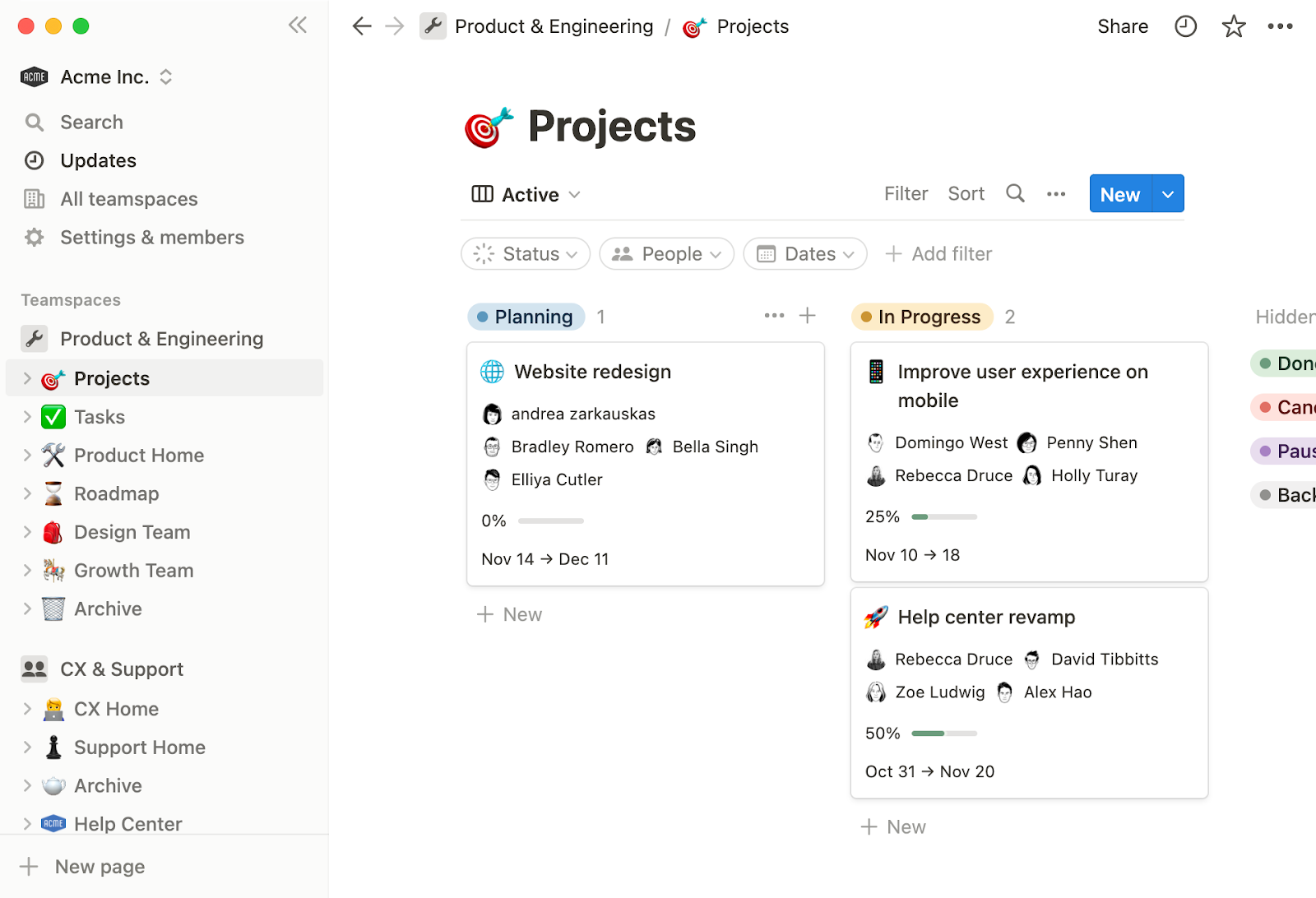
Notion's interface is document-first. Pages, linked databases, and nested content make it well suited to knowledge management and collaborative writing. Configuring it as a structured client portal with clear permissions, approval flows, and file management requires more manual setup than a purpose-built solution.
Overview: Notion is a flexible workspace tool that smaller agencies sometimes repurpose as a lightweight client hub shared project pages, knowledge bases, and content calendars. It works well up to a point. That point tends to arrive quickly.
Key features: Shared pages and databases, wikis and documentation, collaboration tools, templates.
Best for: Small agencies or consultancies that need a simple, low-cost shared space and don't yet need formal portal infrastructure.
Pros: Clean interface; easy to adapt to different use cases; good for documentation-heavy workflows; free tier available.
Cons: Limited access controls for multi-client management; not designed for secure, structured client delivery; white-label capability is minimal; it scales as a workspace tool, not as an agency portal.
6. Basecamp
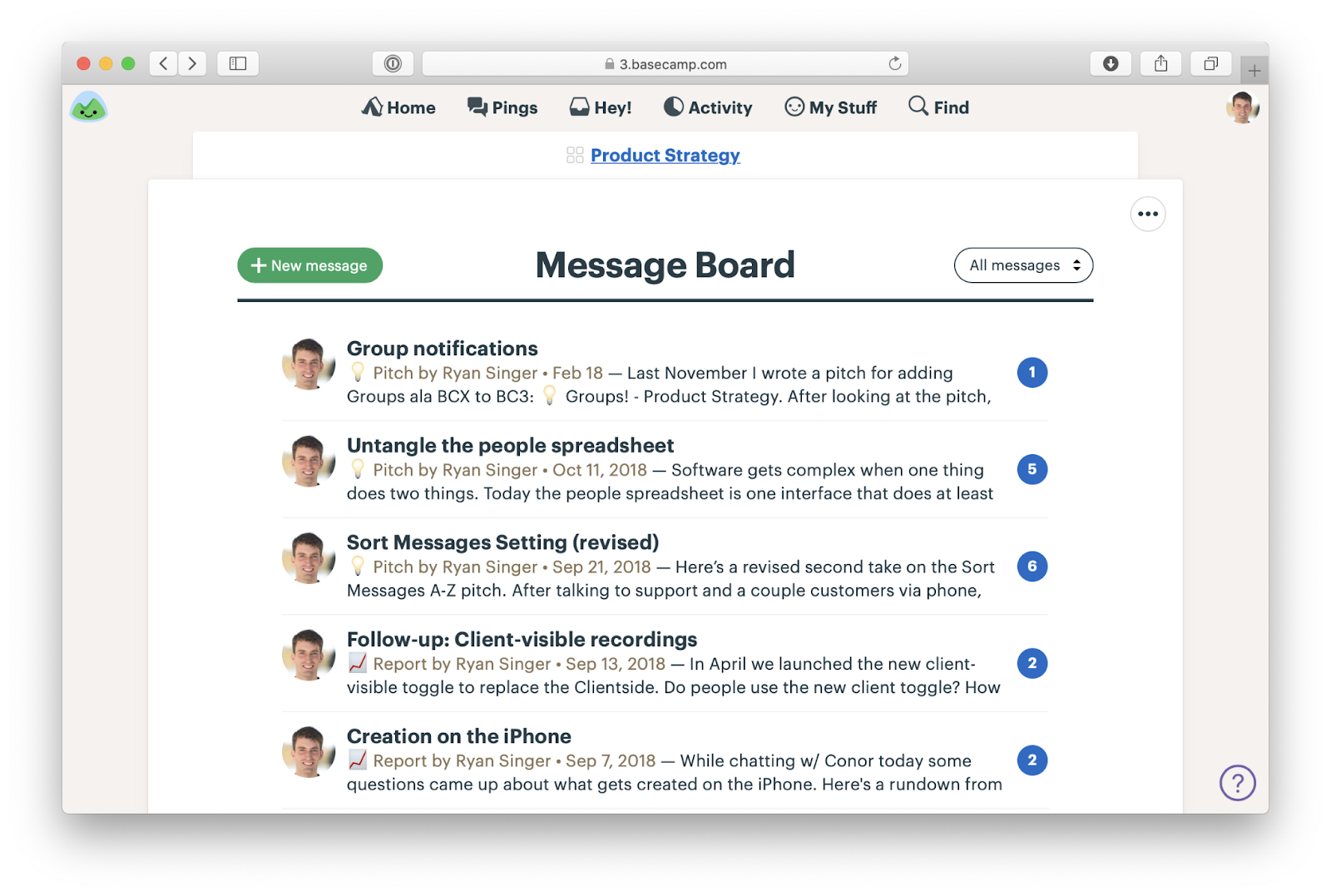
Basecamp keeps things deliberately simple: message boards, to-do lists, file storage, and schedules in a clean project view. Clients find it easy to navigate on first login. The trade-off is customisation branding options are limited, and the experience remains recognisably Basecamp regardless of who's using it.
Overview: Basecamp is a long-standing project collaboration tool built around simple communication, to-dos, and file sharing. Its main appeal is ease of use rather than depth of capability.
Key features: Message boards, to-do lists, file storage, group chat, project scheduling.
Best for: Agencies that value simplicity and clear communication over customisation or advanced workflow management.
Pros: Quick to learn; strong communication structure; flat pricing is refreshingly simple.
Cons: Limited customisation; white-label capability is minimal; not well suited to agencies that need branded client environments or want to project a polished, built-out delivery experience.
7. Zoho Projects / Zoho WorkDrive
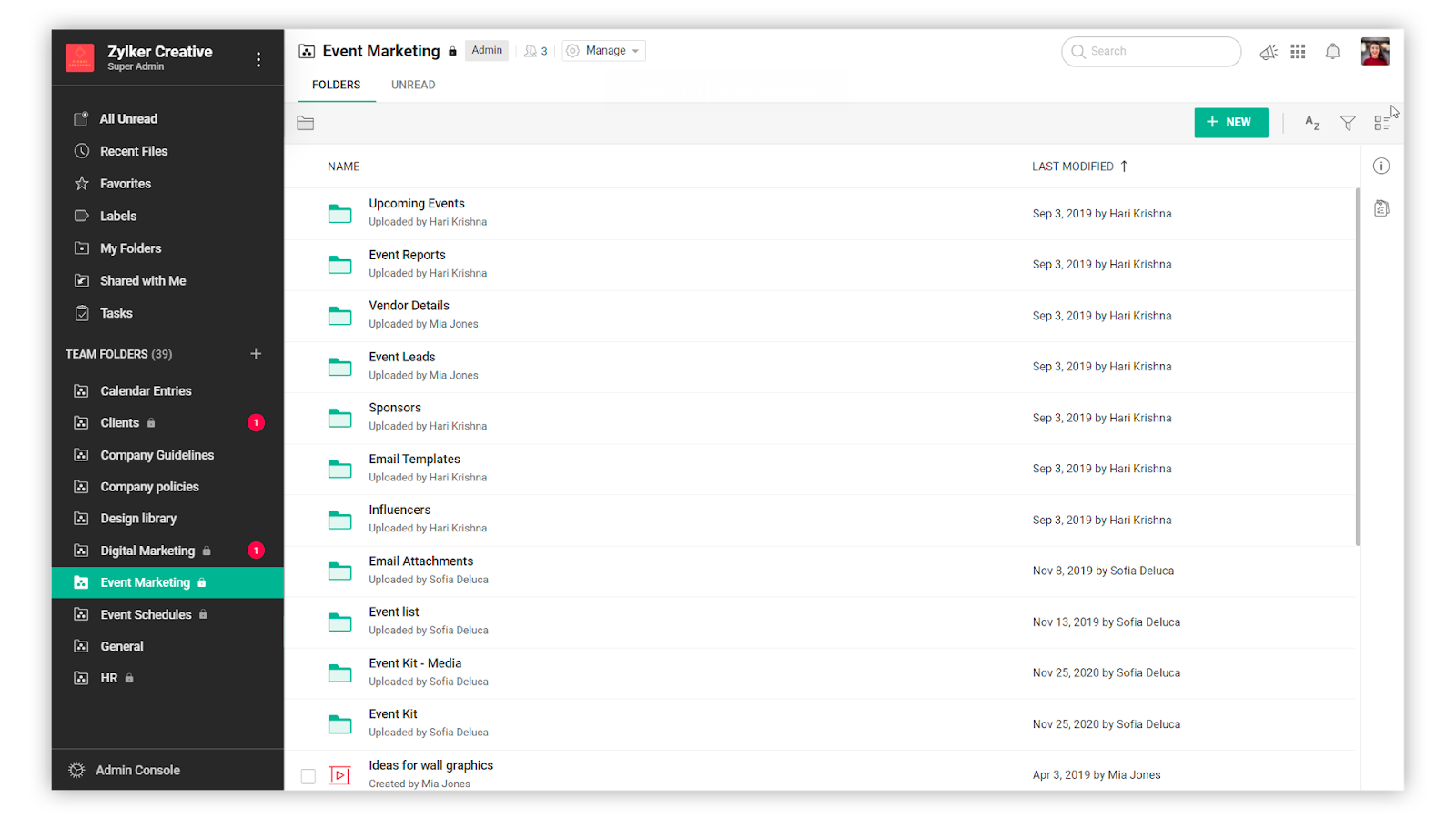
Overview: Zoho offers a wide ecosystem of connected business tools. Agencies already using Zoho CRM or other products in the suite may piece together a client collaboration setup using Zoho Projects alongside WorkDrive for file management.
Key features: Project tracking, file sharing, team collaboration, automation, deep integration within the Zoho ecosystem.
Best for: Agencies already committed to the Zoho ecosystem who want to extend it into client collaboration.
Pros: Good value; broad functionality; works well if you want project and business systems connected.
Cons: Building a cohesive portal experience often requires combining multiple Zoho products; white-label depth isn't the platform's focus; the client-facing experience can feel stitched together rather than designed.
What These Client Portals Actually Look Like
Most comparison guides talk about features. Fewer show what you're actually going to use day to day.
Interface matters more than it's given credit for not just for your team, but for your clients. A tool that feels cluttered or unfamiliar creates friction every time someone logs in. A tool that feels clear and purposeful does the opposite. Here's a sense of what each platform looks like in practice.
Features and pricing change. Always verify directly with each provider before making a decision.
How to Choose the Right Client Portal for Your Agency
The platform with the longest feature list isn't automatically the right one. The right choice is the one that fits how your agency actually works and how your clients prefer to engage. Here's how to think through it.
Start With the Problem You're Actually Solving
Before you look at a single pricing page, get specific about what's broken.
Is client communication scattered across too many channels? Are files getting lost or versioned incorrectly? Are approvals stalling delivery? Do clients feel uninformed even when your team is working flat out?
A simple way to think about it:
- If your biggest issue is internal workflow → look at project management tools
- If your biggest issue is client experience → look at a client portal
- If branding matters → look at a white label client portal
For most agencies, it's the last two that actually move the needle.Most agencies don't realise how much time they're losing to small inefficiencies until those inefficiencies disappear.
Think About the Client Experience, Not Just Your Team's
It's easy to evaluate a portal from the inside. It's harder and more important to evaluate it from a client's perspective.
Can they log in easily without needing a tutorial? Can they find what they need without pinging your account manager? Can they complete an approval without getting confused by interface complexity?
A portal that works brilliantly for your internal team but frustrates clients isn't doing its most important job. If your priority is client retention and satisfaction, how the portal feels to use from the outside matters as much as what it can technically do.
Don't Underestimate Branding
Many platforms offer some level of customisation but "add your logo" and "full white-label capability" are very different things.
If your agency invests in brand and positions itself as premium, ask the harder questions: Can you use a custom domain? Are email notifications branded as yours? Would a client be able to tell what software you're using?
If the answer to that last question is yes, it's worth considering whether that's the impression you want to give.
Review Permissions Before You Need To
For small client rosters, basic access controls may be sufficient. But as your agency grows, managing who can see what across multiple accounts becomes genuinely complex.
Choose a platform that handles permission structures cleanly, workspace-level separation, user roles, file-level access before you have a permissions problem, not after.
Plan for Scale, Not Just Today
A portal that works smoothly for five clients should work just as smoothly for fifty. Consider how easy it is to replicate workspaces for new clients, how quickly onboarding can happen, and whether the system supports consistent delivery processes across your full roster.
You don't need to switch everything overnight. Most teams start with one client and expand from there. But a marketing agency client portal that can't grow with the business will create problems at exactly the wrong moment.
Be Realistic About Integrations
If your agency relies on specific tools for accounting, CRM, or project management, integrations matter. But be honest about what you actually need.
A portal that covers communication, file management, tasks, and approvals well may reduce your reliance on other tools rather than needing to connect with all of them. Sometimes fewer integrations is the point.
Why White Label Client Portals Matter for Agencies
The case for white labelling isn't really about aesthetics. It connects to how clients perceive value, how agencies build trust, and how firms grow without losing consistency in their delivery.
Brand Reinforcement Where It Counts
Agencies invest in their brand identity positioning, visual design, tone as a core part of how they compete. A branded portal extends that identity into the working relationship itself.
Every time a client logs in, downloads a file, or receives a project notification, the experience reinforces that they're working with your agency specifically and not just a service that happens to use a particular software platform. That's not a small thing. Brand perception compounds quietly over the life of a client relationship.
Client Confidence in Your Systems
Clients notice when agencies have mature infrastructure. A secure, organised, branded workspace signals that your delivery process is considered and built not improvised.
That perception matters most during high-stakes projects and in the early stages of a new relationship, when clients are still working out whether they've made a good choice. A polished portal experience can do a lot to answer that question before it's even asked.
Consistent Delivery as You Scale
As agencies grow, inconsistency becomes one of the biggest threats to client satisfaction. A white-labelled portal standardises the experience every client has regardless of which account manager they work with, which service line they've engaged, or how long they've been a client.
That consistency makes scaling manageable without compromising on quality.
A Genuine Point of Difference
Many agencies still manage client relationships through a patchwork of tools that, from the outside, looks improvised. A cohesive, branded, purpose-built portal is a differentiator particularly in markets where agencies are competing closely on capability and price. It signals that you've built a delivery process, not just assembled one.
Less chasing. Fewer emails. Faster approvals. And a workspace your clients actually recognise as yours.That's what a good white label client portal should fix quietly, in the background, every single day.
Conclusion
A client portal for agencies solves real problems: fragmented communication, disorganised file sharing, stalled approvals, and client experiences that don't reflect the quality of the work behind them. The right platform brings structure to how agencies deliver, how clients engage, and how both sides stay aligned through the life of a project.
When you're evaluating tools, avoid narrowing the decision to feature checklists. Security, scalability, ease of use for clients, and the depth of branding capability all determine whether a portal becomes a genuine asset or just another layer in an already cluttered stack.
For agencies where client experience and professional presentation are central to the business, Clinked is a strong and natural fit. It's built specifically for client-facing work combining tools for secure collaboration, structured workspaces, clear project management, and genuine white-label capability in one platform that clients actually enjoy using.If your current setup feels like it's held together by email threads and workarounds, you're not alone but you don't have to keep working that way.A better client experience doesn't come from working harder. It comes from working in a system that actually supports how your agency runs.
If that's what you're looking for, a white label client portal is a strong place to start.