Secure client onboarding software financial firms trust
Replace email attachments, fragile spreadsheets, and paper forms with a branded, compliant client portal. One that handles document collection, KYC workflows, and audit trails from day one.


My tax team needs to see anytime a client uploads to that folder. Sometimes clients upload in the morning, afternoon, at night. I can't have them check one client at a time three times a day.
The portal has really exceeded my expectations. Our clients feel like they're logging into our own product, not a third-party tool we bolted on.
They need to sign 14 different documents throughout the year. I need tasks with due dates so I can track exactly where each client is in the process.
What is client onboarding software for financial services?
Client onboarding software is
a digital platform that helps financial firms collect documents, verify identities, and manage new client intake through a structured, secure workflow, replacing the email chains, shared drives, and paper forms that slow
most firms down.
Unlike generic onboarding tools built for HR or SaaS companies, client onboarding software
for financial services is purpose-built around
the industry's specific requirements: KYC compliance, audit trails, data residency,
and multi-document collection at scale.
Core purpose
- Document collection at scale: Invite clients to a branded portal, assign required documents, and track submissions across every client simultaneously.
- Financial services onboarding: Addresses the regulatory demands unique to finance: KYC verification, AML compliance, identity checks, and signed agreements.
- Digital vs. paper:
Replaces email attachments, PDF forms, and manual follow-up with structured workflows, automated reminders, and a complete activity log.
Why generic tools fall short?
Financial firms managing 80–400 clients can't afford a one-size-fits-all solution. They need templated group structures that clone for each new client, folder-level permissions that guarantee investor isolation and audit trails that satisfy regulators, not just a file-sharing link.
The ideal client onboarding flow
Client invited to branded portal
Firm sets up a custom URL, logo, welcome note, and folder structure all replicated from a master template.
Client completes secure intake form
Structured intake replaces the "email me a PDF" workflow. Submissions map directly to the client's portal group.
Documents collected with task deadlines
Advisor assigns document requests and tasks with due dates. Client uploads directly and firms are notified instantly across all clients.
Review, co-sign, and deliver
Firm reviews submissions, co-signs via e-signature integrations, and delivers final documents back into the client's secure portal.
Audit trail captured automatically
Every action, upload, approval, and signature is logged with timestamps. Ready for regulatory review at any time.

Reduce manual processes and administrative delays.
Email chains, spreadsheet trackers, and manual PDF requests create bottlenecks that multiply with every new client. Automation moves clients through onboarding stages, assigns tasks to team members, and sends reminders without a single chase email from your team.

Improve client experience and reduce drop-offs.
A confusing, fragmented onboarding process is a credibility problem for financial firms. A streamlined digital portal creates a professional first impression, keeps clients engaged through every step, and removes the friction that causes onboarding to stall before completion.

Meet KYC and regulatory compliance requirements.
Know Your Customer (KYC) regulations require firms to verify client identities, assess risk levels, and maintain records of that process. Client onboarding solutions help firms satisfy anti-money laundering (AML) requirements by structuring the verification workflow ensuring no step is skipped and every document is captured.
"There's specific confidential information for each investor that we want to make sure only that investor can see. Board documents, certain people should see those, others shouldn't."
— Operations Lead, US Wealth Management Firm

Create complete audit trails for every client interaction.
Onboarding software automatically logs every document submission, approval action, and team activity with timestamps. This built-in transparency makes it straightforward to demonstrate compliance during regulatory reviews without reconstructing a paper trail after the fact.

Scale without adding headcount.
A firm managing 200+ clients can't recreate folder structures manually for each one. Templated portal structures that clone at onboarding let you scale client relationships without scaling your admin burden.
Security requirements for financial services client onboarding.
Security isn't a feature checklist for financial firms, it's a regulatory and reputational baseline. Here's what to require from any onboarding platform.

Bank-grade encryption and data protection
AES-256 encryption for data at rest, TLS 1.2+ for data in transit. Client documents are protected to the same standard used by financial institutions — at every point in the workflow.

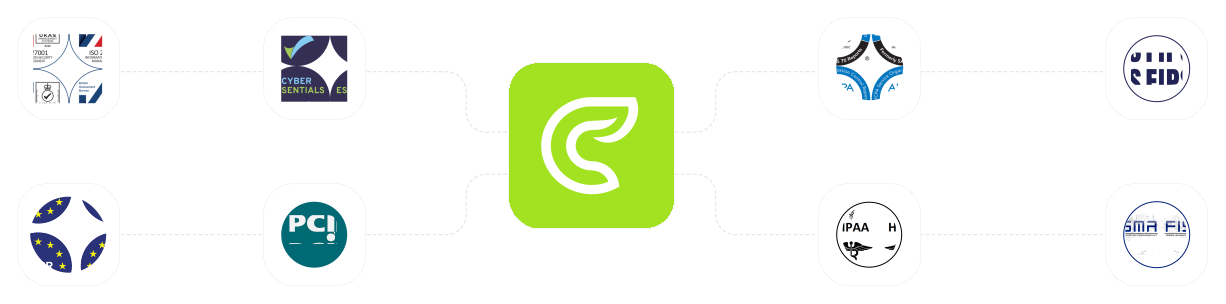
ISO 27001 and SOC 2 compliance
These certifications signal that a vendor's security practices have been independently audited. ISO 27001 covers information security management; SOC 2 validates operational controls around data availability and confidentiality.

Flexible cloud hosting and data residency options
Regulatory requirements vary by jurisdiction. Look for platforms that offer public cloud, private cloud, and regional data center options so your client data stays where regulations require it.

Role-based access controls and permissions
Granular permissions ensure only authorized team members access specific client files. Folder-level controls, 2FA enforcement, and IP restrictions keep sensitive investor data isolated even within your own team.
| Feature | What it does | Why it matters for financial services |
| Document management | Collect, store, and organize client files with version control | Secure handling of sensitive financial documents with a clear audit trail |
| Branded portals | White-label client-facing interface with custom URL, logo, and colors | Professional experience that reinforces firm credibility from day one |
| Communication tools | Real-time messaging, comments, and upload notifications | Faster client responses without switching between email and the portal |
| Integrations | Connect with CRM, accounting, and e-signature tools via API or native connectors | Unified client data across systems. No duplicate entry, no sync errors |
| Mobile access | Responsive portal accessible from any device without an app download. | Clients can upload documents and complete tasks from anywhere, on any device. |
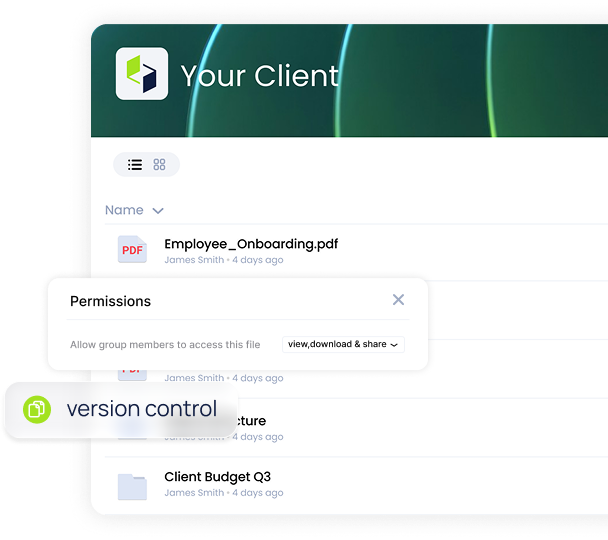
The core reason financial firms adopt Clinked: replace ad-hoc email attachments with a structured, branded upload area. Every client gets an identical folder structure. Your team sees every upload across every client in one view.
- Assign document requests with deadlines and required file types
- Clients upload directly to their secure portal folder
- Real-time notifications across your entire client book
- Version control and complete upload history for each file
- Folder-level permissions prevent cross-client data contamination
Your clients should feel like they're logging into your firm's product, not a third-party tool you bolted on. Clinked's white-label portal lets financial firms customize every visible element with their own brand identity.
- Custom domain (e.g. portal.yourfirm.com)
- Firm logo, brand colors, and welcome message
- Branded login page and client homepage
- Navigation instructions tailored to your onboarding process
- Professional experience that reinforces trust from first login

Built-in messaging, comments, @mentions and notifications keep clients and teams aligned without context switching to email. Every communication is logged inside the client's portal and is part of the same audit trail as their documents.
- In-portal messaging and threaded comments per document
- Instant task completion and approval notifications for your team
- Client announcements and status updates from within the portal
- All communications captured in the client's activity log
- No switching between email, Slack, and the portal to find what was said

Avoid duplicate data entry across your tech stack. Clinked connects via API and native integrations with the tools financial teams already use so client data flows cleanly between your portal, CRM, and accounting software.
- DocuSign and Adobe Sign integrations for e-signature workflows within the porta
- API access for custom CRM and practice management connections
- Zapier integration for connecting to 7,000+ tools without code
- SSO support for enterprise authentication workflows

Clients can upload documents and complete tasks from any smartphone or tablet. For remote teams, portal admin experience is accessible from any device.

How client onboarding software supports
KYC compliance
Know Your Customer (KYC) regulations require financial firms to verify client identities, assess risk, and maintain verifiable records of that process. The right onboarding platform structures this workflow so nothing falls through the cracks.
Intake form
Client details collected via structured form.
Compliance checklist
Automated checks confirm all steps complete.
Risk assessment
Workflow routes based on client risk level.
Audit trail
Full activity log saved for regulatory review.
Digital identity verification and document collection
Structured ID upload requests guide clients through submitting passports, utility bills, and other verification documents directly into their secure portal folder.
Ongoing monitoring and client document refresh
KYC isn't a one-time event. Scheduled task templates trigger periodic document refresh requests — so client records stay current without your team having to manually reach out each time.
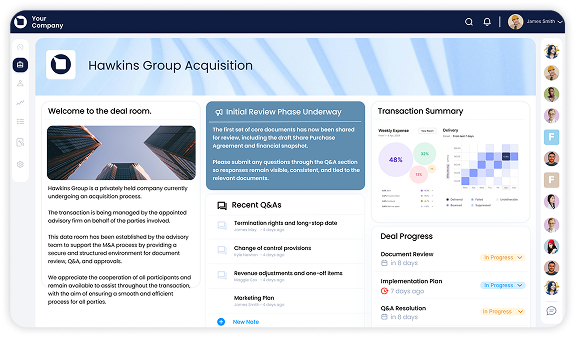
domain, and welcome message. Build your
master folder structure once, then clone it
for every new client instantly.
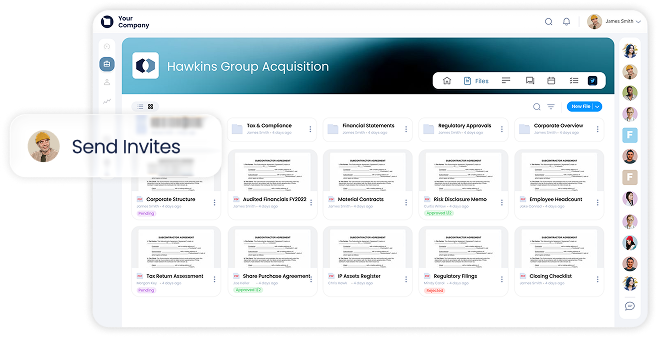
on your portal, set up 2FA, and see exactly what
they need to do with deadlines, document
requests, and intake forms waiting.
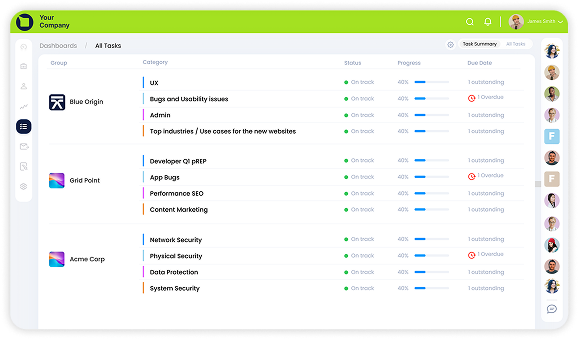
completions, and outstanding actions across all
clients in one view. Get notified the moment a
client uploads a document.
Ready to simplify your financial client onboarding?
See how Clinked gives financial firms a secure, branded portal that handles document collection, KYC workflows, and compliance audit trails out of the box.
No commitment. 30-minute walkthrough.

How to evaluate client onboarding software for financial services
Not all onboarding platforms are built for the regulatory and workflow demands of financial firms. Use this framework before you commit to a vendor.
01.
Assess your security and compliance needs first
Identify your firm's specific regulatory requirements before evaluating any
platform. Which certifications do you need —
ISO 27001, SOC 2, both? Do you have data residency requirements that restrict where client data can be stored? Do regulators in your jurisdiction require specific audit trail formats? Start here, and eliminate vendors that don't meet the baseline before evaluating any other features.
02.
Define your onboarding workflow requirements
Map your current process before you configure anything new. What document types do you collect? How many approval stages does a typical client onboarding involve? Which team members need to take actions at which stages? The more clearly you define this, the faster implementation goes and the more likely automation will eliminate your actual bottlenecks.
03.
Evaluate integration capabilities
Check compatibility with your existing CRM, accounting software, e-signature tools, and communication platforms before shortlisting any vendor. A portal that can't exchange data cleanly with your practice management system will create duplicate entry work, often worse than the manual process it replaces. Ask vendors specifically about their DocuSign, Zapier, and REST API support.
04.
Test the
client portal experience personally
Walk through the onboarding flow as if you were one of your own clients. Is the login experience professional? Can they complete document uploads without a tutorial? Does the interface reflect your firm's brand or does it look like a generic SaaS tool with your logo pasted on? Your clients' first impression of your firm's portal directly affects how quickly they complete onboarding.
05.
Review vendor certifications and support model
Check that security certifications are current and independently audited — not self-declared. Ask about implementation support: does the vendor offer guided setup, or do you receive documentation and a login? For firms with 100+ clients, the difference between a supported launch and a self-serve configuration is often the difference between a 3-week rollout and a 3-month one.
How To Implement A Digital Onboarding Platform
A practical roadmap for financial firms moving from email-based onboarding to a structured client portal.

Map your current client onboarding workflow
Email chains, spreadsheet trackers, and manual PDF requests create bottlenecks that multiply with every new client. Automation moves clients through onboarding stages, assigns tasks to team members, and sends reminders without a single chase email from your team.

Configure your branded client portal
Apply your firm's logo, colors, fonts, and custom domain. Set up your welcome message and navigation instructions. Build your master folder template: the single group structure you'll clone for every new client.

Build automated checklists and document requests
Create document request templates for each client type you serve: individuals, corporates, trusts, partnerships. Configure approval workflows and set up your e-signature integration for signature tasks. Test the automation end-to-end before inviting real clients.

Train your team and launch with a pilot cohort
Walk your team through the portal admin interface before go-live. Launch with 5–10 clients first. Collect feedback on where clients get stuck and what notifications your team finds most useful. Refine before rolling out to your full client book.

Monitor progress and continuously optimize
Use reporting to track document completion rates, average time-to-onboard, and which tasks generate the most client support requests. These metrics tell you where automation can go further and where your client communication needs adjustment.
Streamline financial services onboarding with a secure, branded platform
Clinked provides financial services firms with a white-label client portal built around the workflows they actually run without the generic tool feel that erodes client trust.